> ## Documentation Index
> Fetch the complete documentation index at: https://docs.bizbone.com/llms.txt
> Use this file to discover all available pages before exploring further.

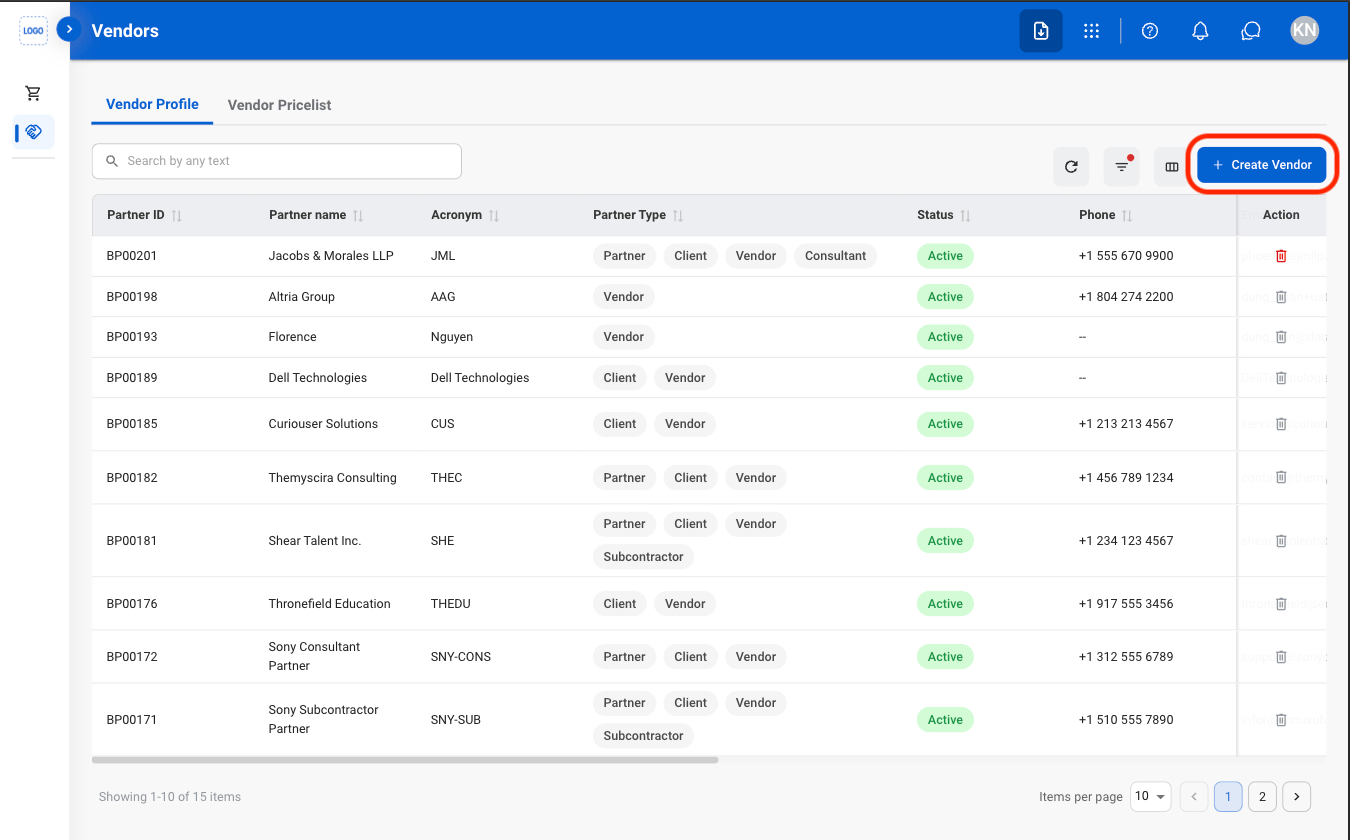
# Vendors

> Manage vendor records used throughout the purchasing process. Supports vendor information, product pricing, and supplier details to facilitate purchasing and procurement activities.

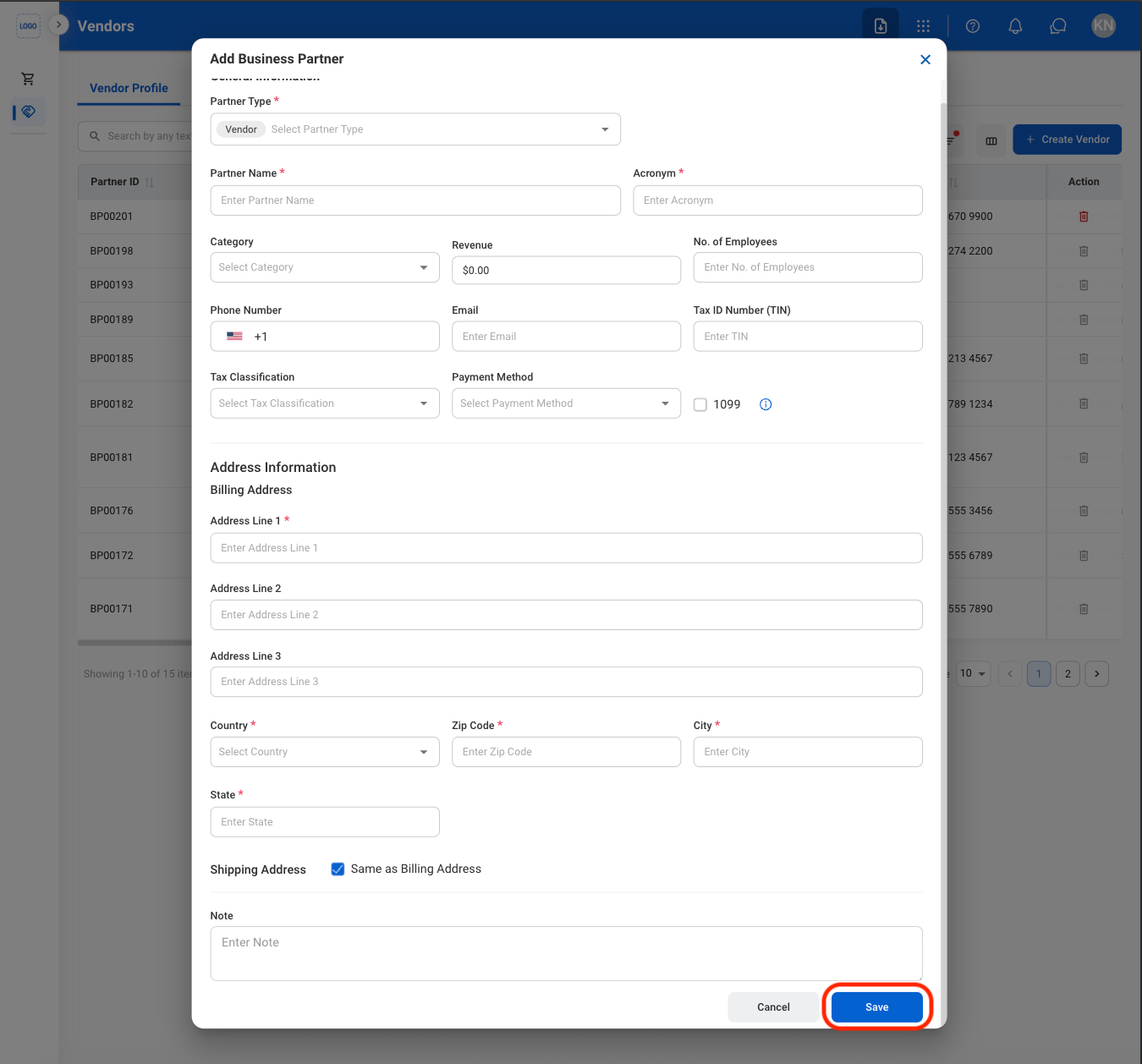
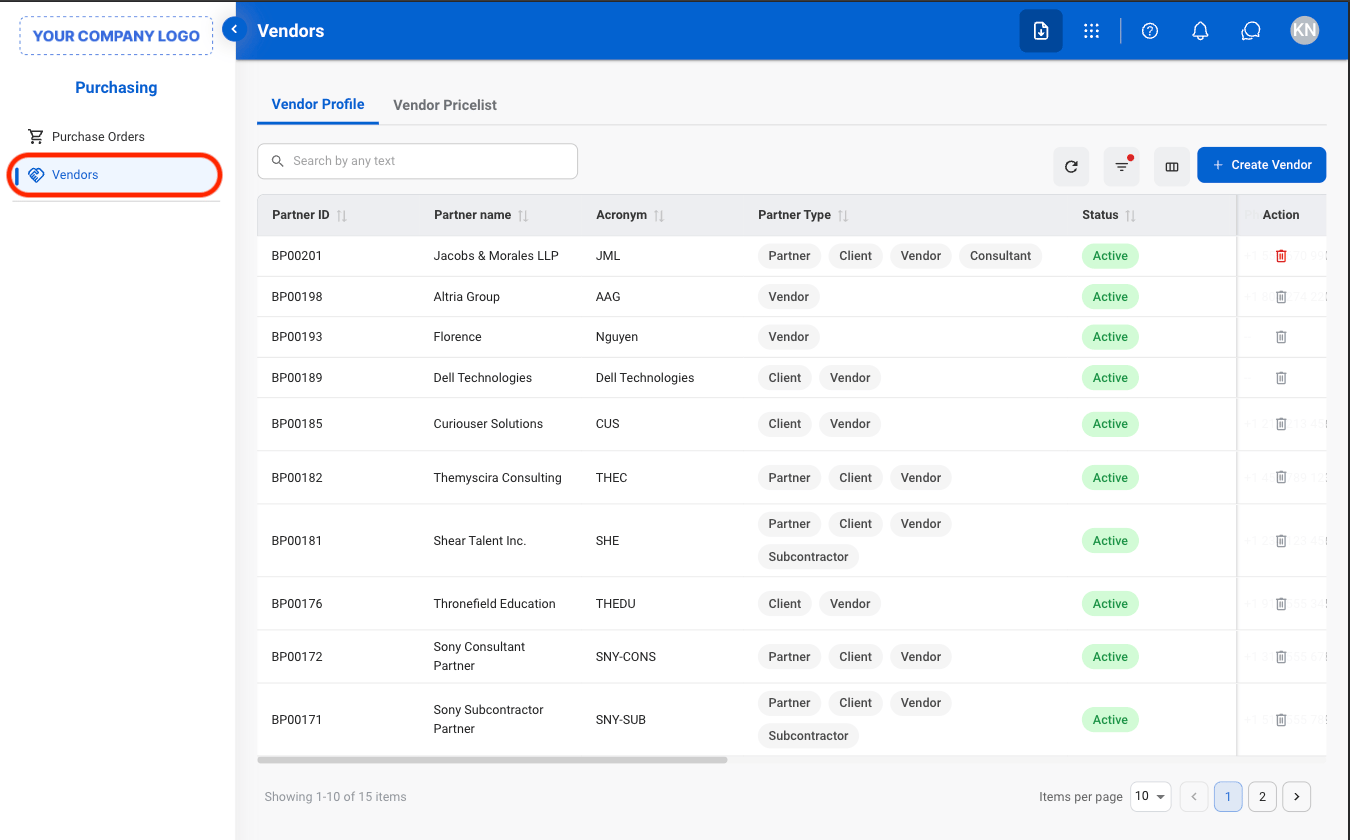
## Add a Vendor
<Steps>
  <Step title="Navigate to Vendors">
    <Frame>
      <img src="https://mintcdn.com/bizbone/pbQvDnPVNhYcuslV/images/P-V-Nav.png?fit=max&auto=format&n=pbQvDnPVNhYcuslV&q=85&s=02e70ae8932c8213fe683f33a42824f9" alt="P V Nav" width="1350" height="840" data-path="images/P-V-Nav.png" />
    </Frame>
  </Step>

  <Step title="Select Create Vendor">
    <Frame>
      <img src="https://mintcdn.com/bizbone/pbQvDnPVNhYcuslV/images/P-V-Add.png?fit=max&auto=format&n=pbQvDnPVNhYcuslV&q=85&s=7c9ccc31b73a15570af7296cec8b56b9" alt="P V Add" width="1350" height="840" data-path="images/P-V-Add.png" />
    </Frame>
  </Step>

  <Step title="Fill in the required information">
    <Frame>
      <img src="https://mintcdn.com/bizbone/pbQvDnPVNhYcuslV/images/P-V-Add-C.png?fit=max&auto=format&n=pbQvDnPVNhYcuslV&q=85&s=6703a3c92fd7c3b07a3fe80674c40af2" alt="P V Add C" width="1350" height="1258" data-path="images/P-V-Add-C.png" />
    </Frame>

    Select **Save** to complete or **Cancel** to exit without saving changes. 
  </Step>
</Steps>

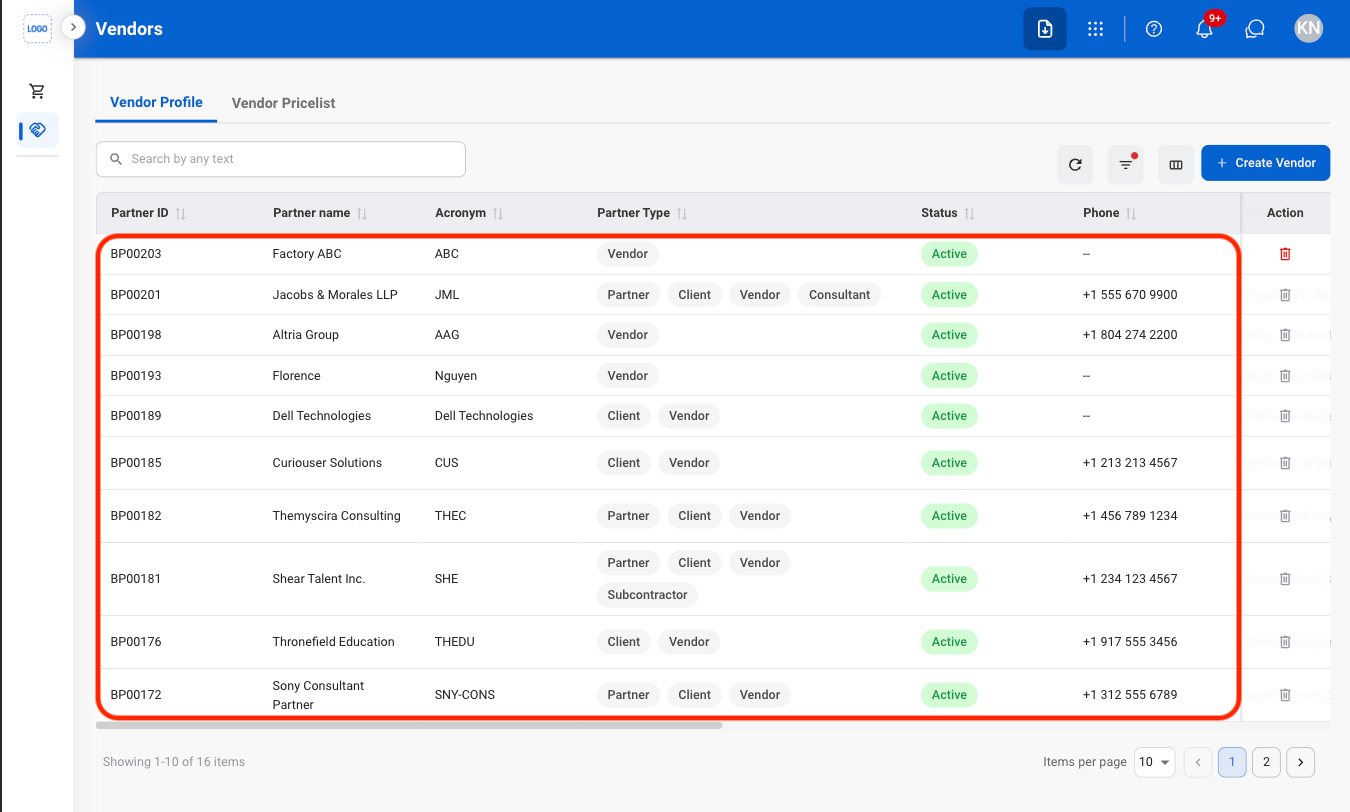
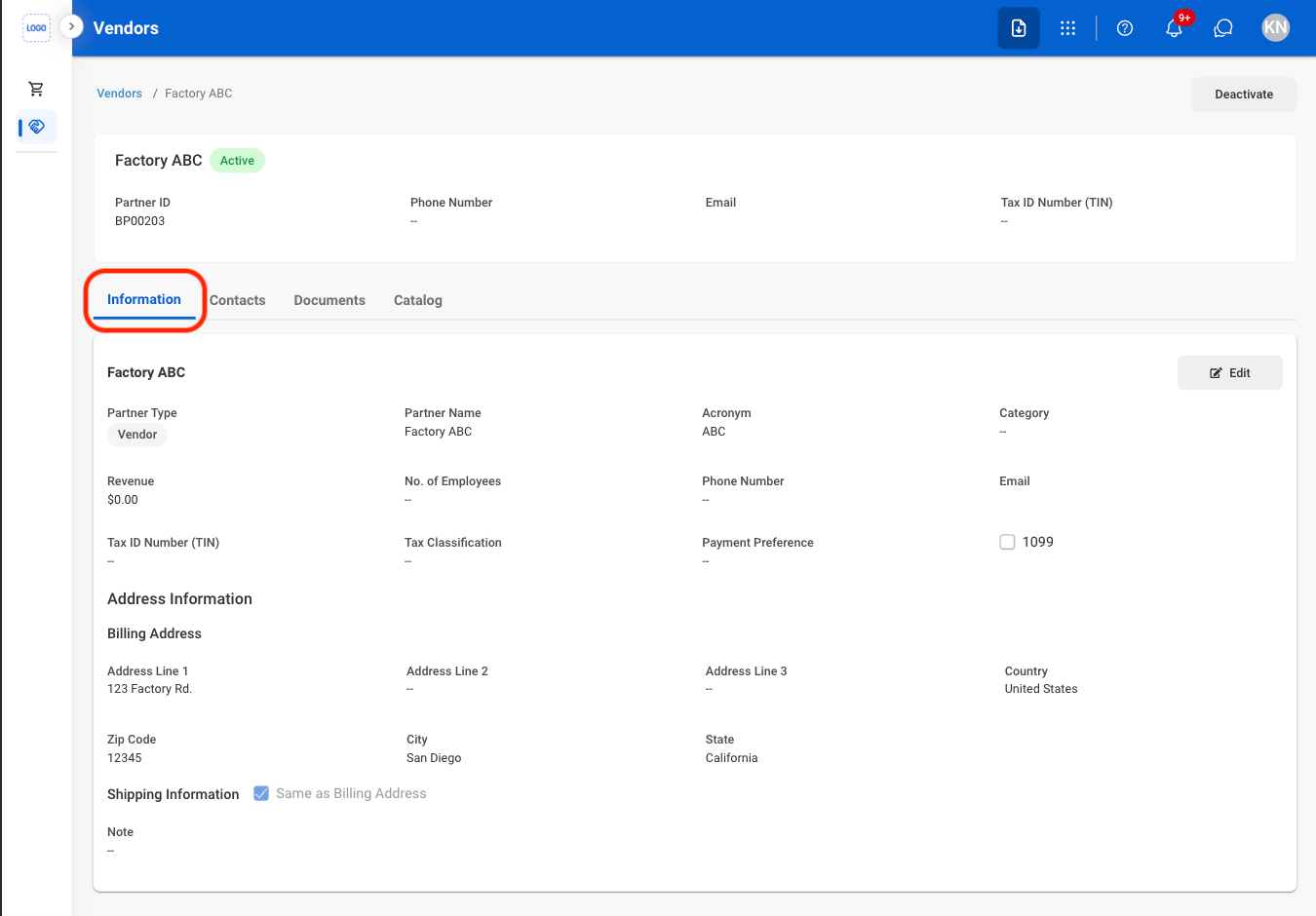
## Edit a Vendor

<Steps>
  <Step title="Select a vendor">
    <Frame>
      <img src="https://mintcdn.com/bizbone/O54KWBvXAjoTGYsh/images/P-V-Select.png?fit=max&auto=format&n=O54KWBvXAjoTGYsh&q=85&s=dde512fd1747ce5d2ace0f19f7e3ca36" alt="P V Select" width="1350" height="812" data-path="images/P-V-Select.png" />
    </Frame>
  </Step>

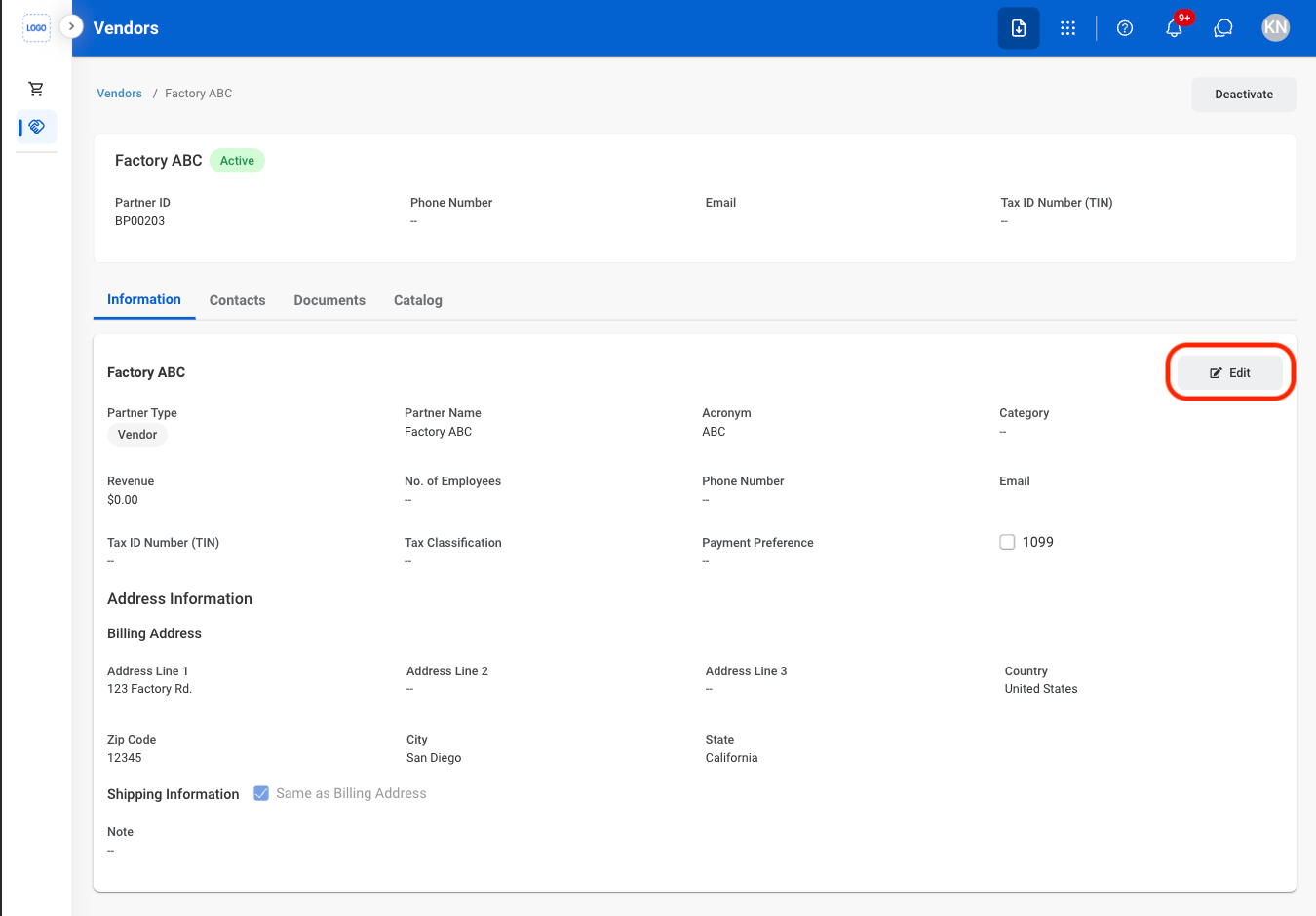
  <Step title="Navigate to Information ">
    <Frame>
      <img src="https://mintcdn.com/bizbone/O54KWBvXAjoTGYsh/images/P-V-Info.png?fit=max&auto=format&n=O54KWBvXAjoTGYsh&q=85&s=ea52c38d796026f9c83d18e73f5b033e" alt="P V Info" width="1350" height="940" data-path="images/P-V-Info.png" />
    </Frame>
  </Step>

  <Step title="Select Edit">
    <Frame>
      <img src="https://mintcdn.com/bizbone/O54KWBvXAjoTGYsh/images/P-V-EInfo.png?fit=max&auto=format&n=O54KWBvXAjoTGYsh&q=85&s=2ddd978079851c08373518f57ef5aa71" alt="P V E Info" width="1350" height="940" data-path="images/P-V-EInfo.png" />
    </Frame>
  </Step>

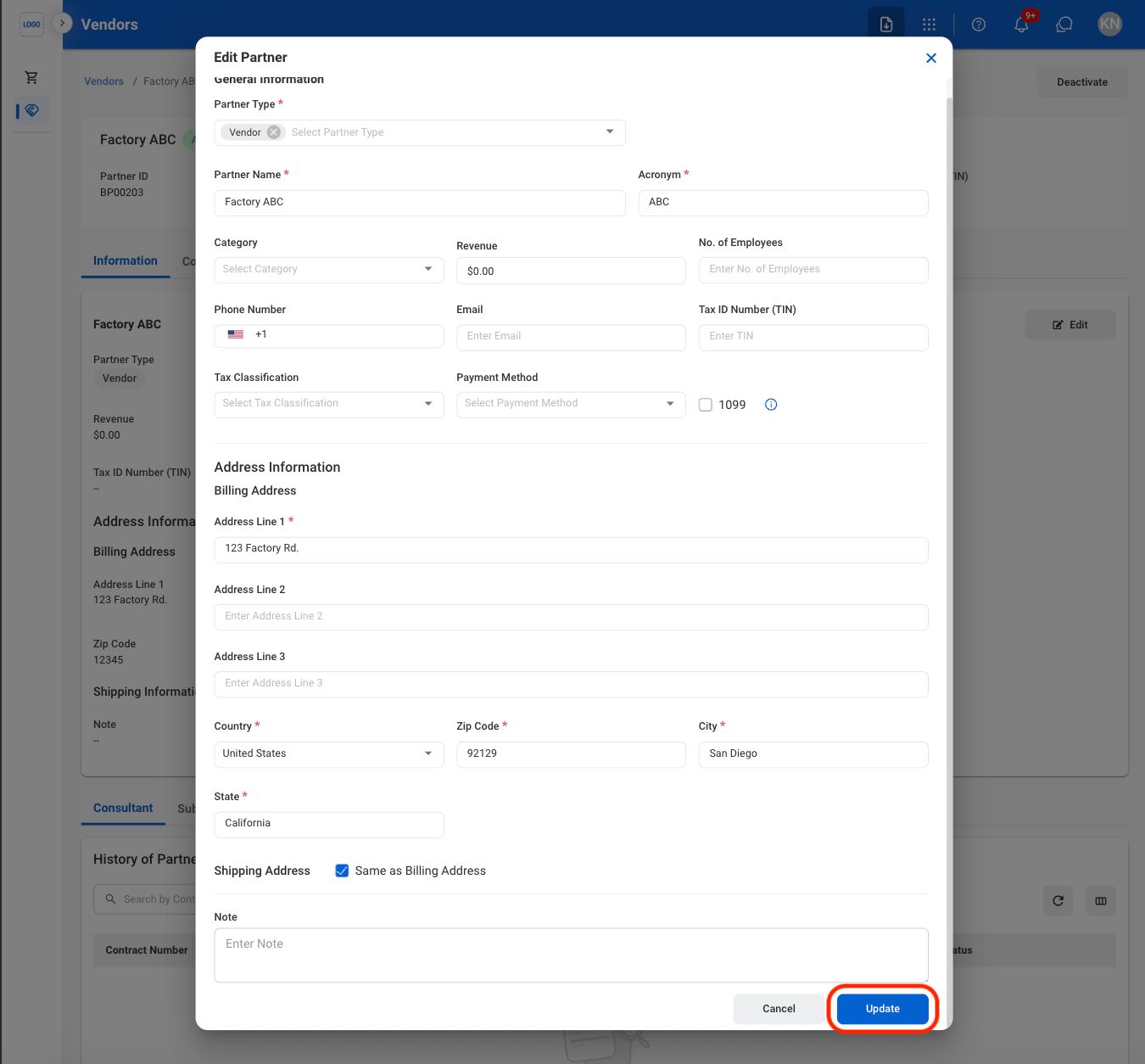
  <Step title="Fill in the required information ">
    <Frame>
      <img src="https://mintcdn.com/bizbone/O54KWBvXAjoTGYsh/images/P-V-CEInfo.png?fit=max&auto=format&n=O54KWBvXAjoTGYsh&q=85&s=5f4c6e2b979b2049fca18f2ae2b1a35f" alt="P V CE Info" width="1350" height="1254" data-path="images/P-V-CEInfo.png" />
    </Frame>

    Select **Update** to complete or **Cancel** to exit without saving changes.
  </Step>
</Steps>

## Vendor Contacts

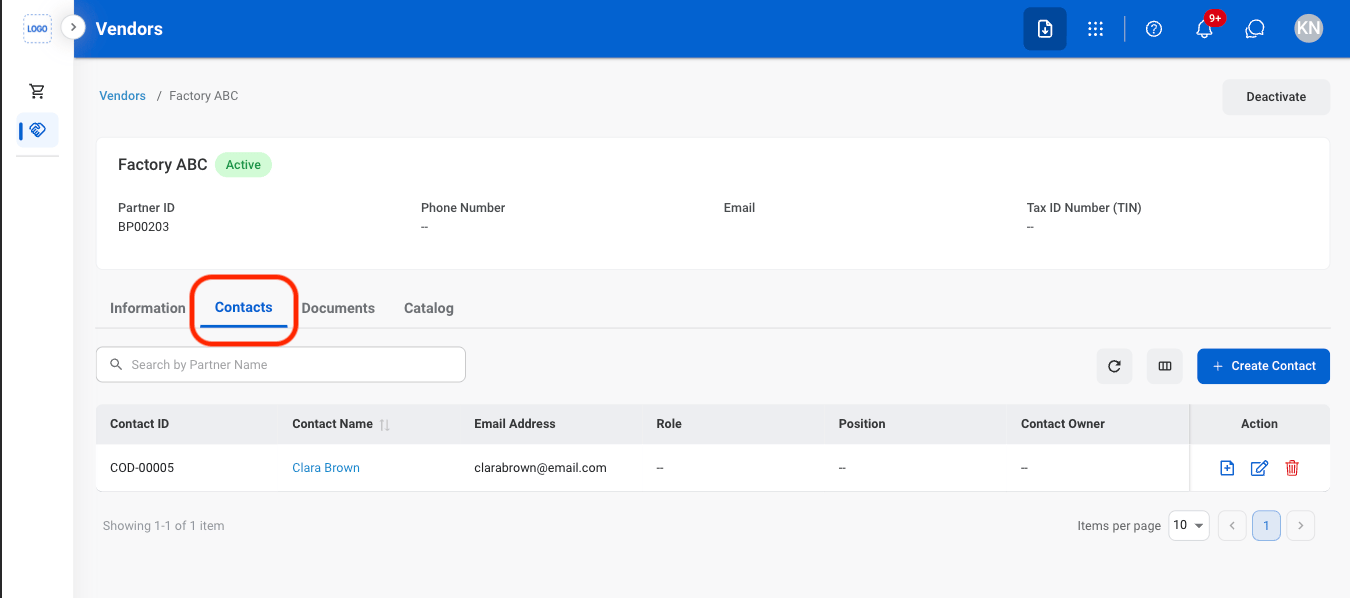
### Add a Vendor Contact
<Steps>
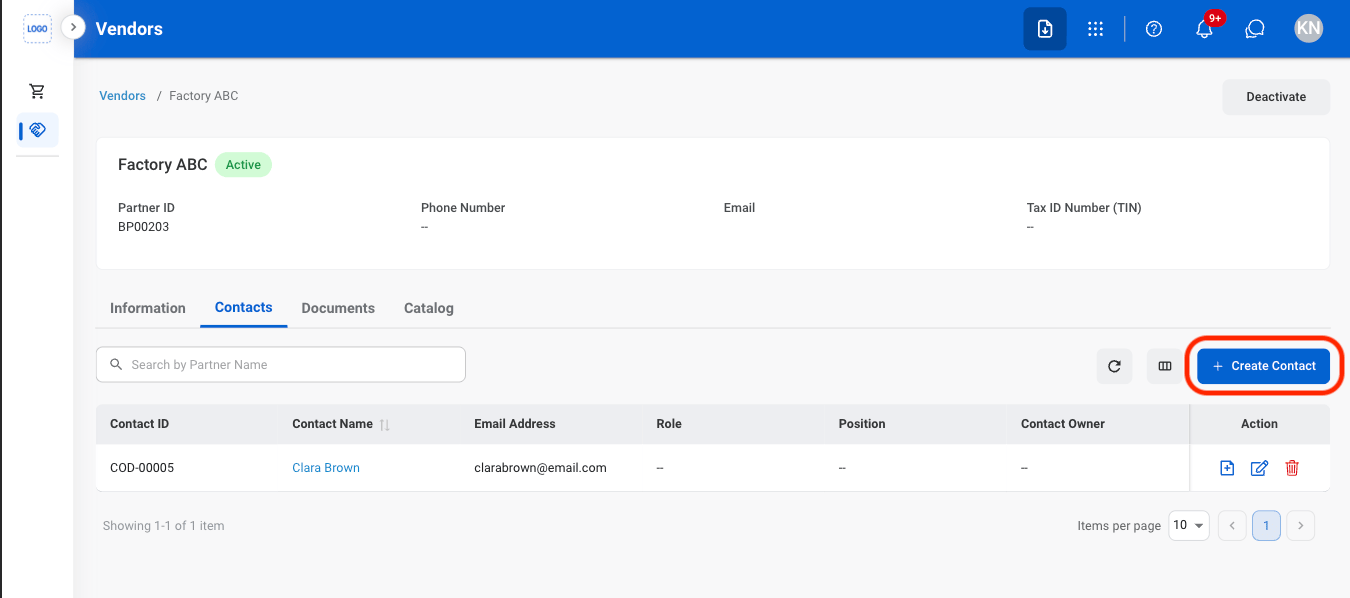
  <Step title="Navigate to Contacts">
    <Frame>
      <img src="https://mintcdn.com/bizbone/O54KWBvXAjoTGYsh/images/P-V-Contacts.png?fit=max&auto=format&n=O54KWBvXAjoTGYsh&q=85&s=20a0b323503fcd68940f0079e845a187" alt="P V Contacts" width="1350" height="598" data-path="images/P-V-Contacts.png" />
    </Frame>
  </Step>

  <Step title="Select Create Contact">
    <Frame>
      <img src="https://mintcdn.com/bizbone/O54KWBvXAjoTGYsh/images/P-V-AContact.png?fit=max&auto=format&n=O54KWBvXAjoTGYsh&q=85&s=4dc36f4e5e4fcbaaa2d9a59e30f3d3a5" alt="P V A Contact" width="1350" height="598" data-path="images/P-V-AContact.png" />
    </Frame>
  </Step>

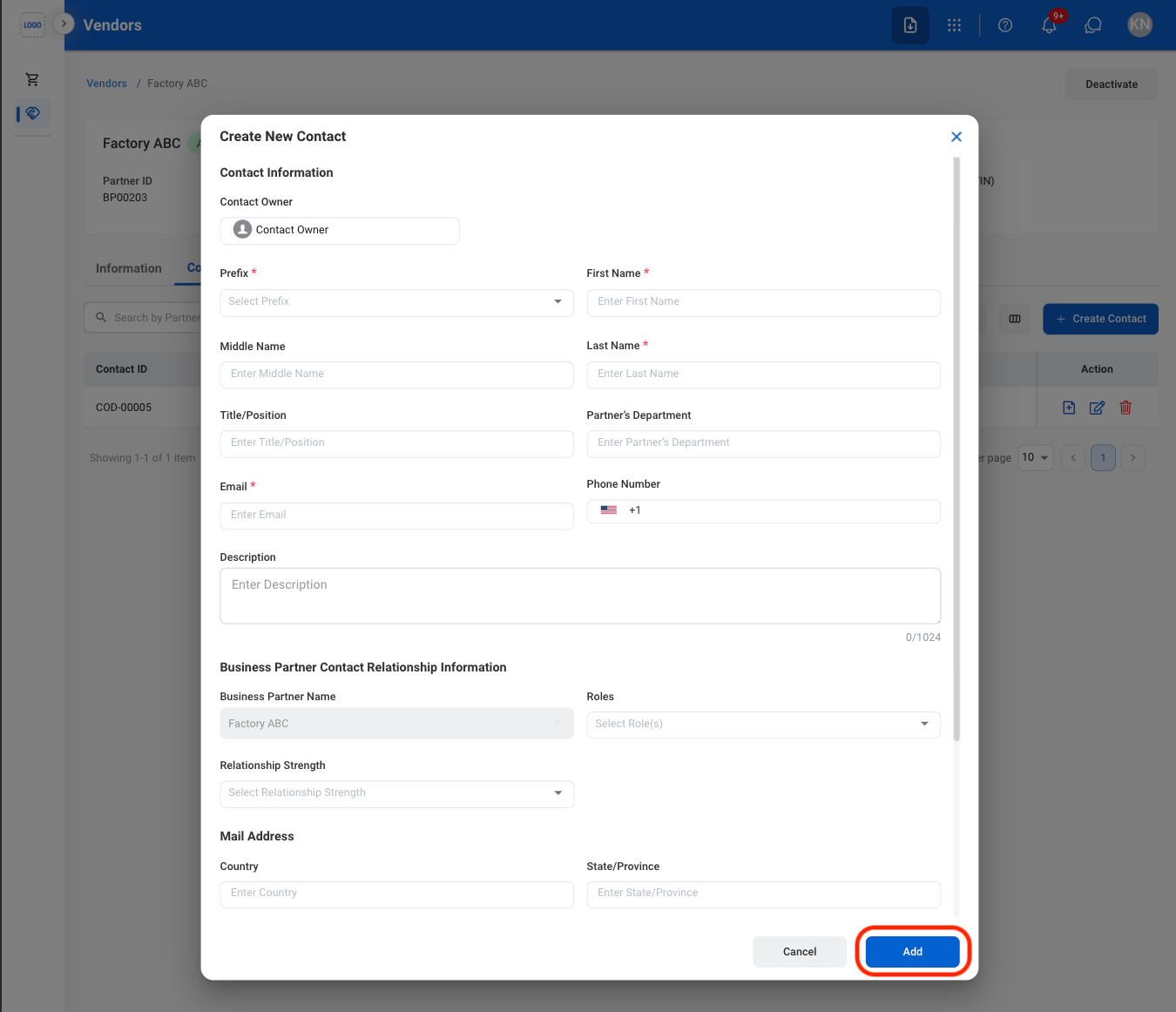
  <Step title="Fill in the required information">
    <Frame>
      <img src="https://mintcdn.com/bizbone/O54KWBvXAjoTGYsh/images/P-V-CAContact.png?fit=max&auto=format&n=O54KWBvXAjoTGYsh&q=85&s=cf803c6b4fa9c4b35531a4bb6b29a1fb" alt="P V CA Contact" width="1350" height="1162" data-path="images/P-V-CAContact.png" />
    </Frame>

    Select **Add** to complete or **Cancel** to exit without saving changes.
  </Step>
</Steps>

### Create a Contact Request

<Steps>
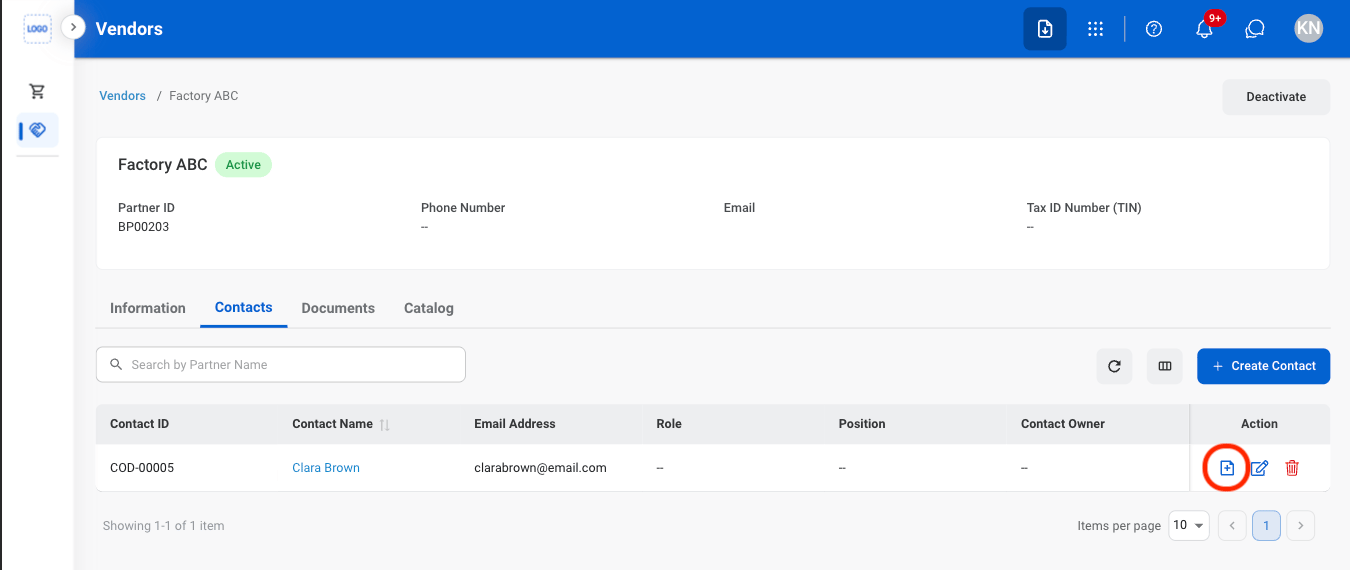
  <Step title="Select the request icon">
    <Frame>
      <img src="https://mintcdn.com/bizbone/A1_vOM_PrjNb5hJ9/images/P-V-Req-Contact.png?fit=max&auto=format&n=A1_vOM_PrjNb5hJ9&q=85&s=0127fefeb2b1919242d877fd5fee88e2" alt="P V Req Contact" width="1350" height="570" data-path="images/P-V-Req-Contact.png" />
    </Frame>
  </Step>

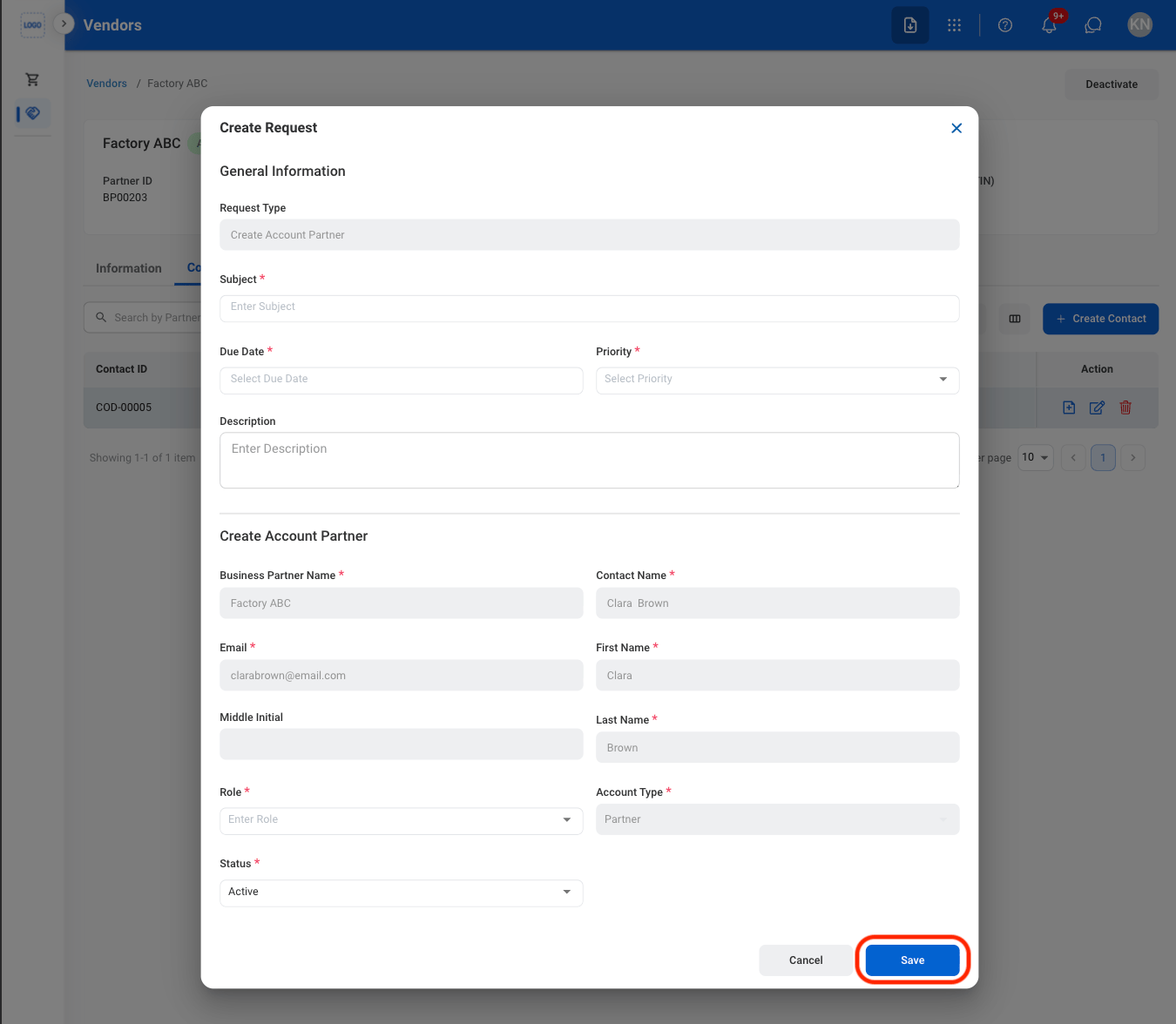
  <Step title="Fill in the required information ">
    <Frame>
      <img src="https://mintcdn.com/bizbone/A1_vOM_PrjNb5hJ9/images/P-V-CReq-Contact.png?fit=max&auto=format&n=A1_vOM_PrjNb5hJ9&q=85&s=b9fff24df419f06dfacc69482430edd7" alt="P V C Req Contact" width="1350" height="1176" data-path="images/P-V-CReq-Contact.png" />
    </Frame>

    Select **Save** to complete or **Cancel** to exit without saving changes. 
  </Step>
</Steps>

### Modify a Contact

<Steps>
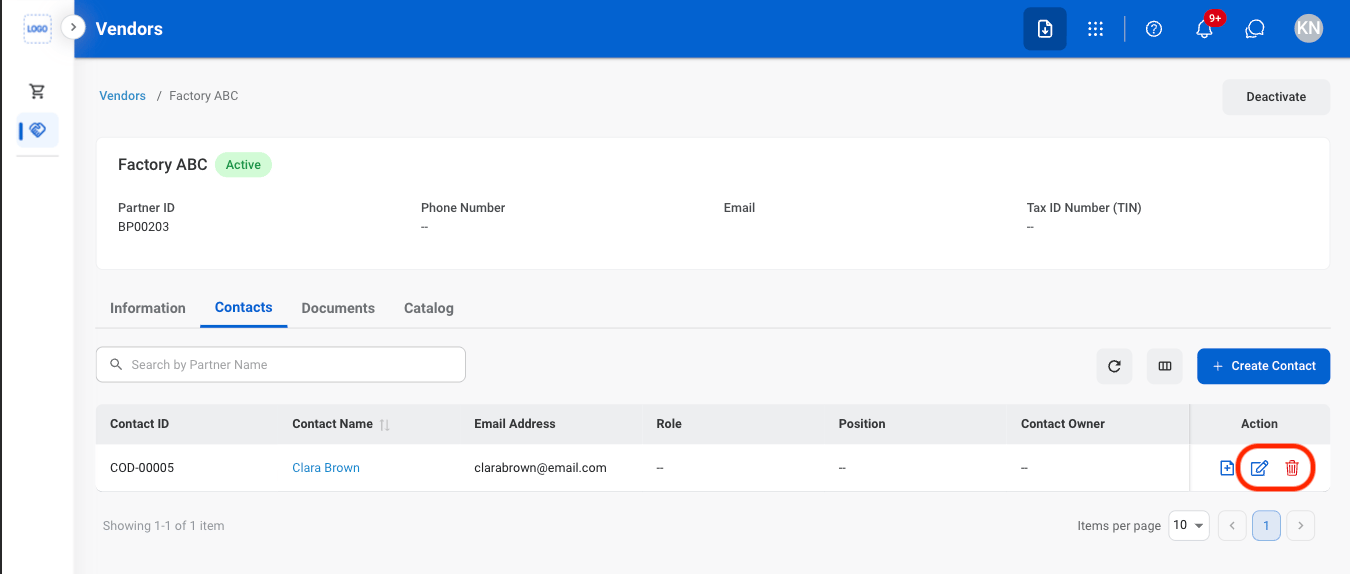
  <Step title="Select an action ">
    <Frame>
      <img src="https://mintcdn.com/bizbone/A1_vOM_PrjNb5hJ9/images/P-V-Mod-Contact.png?fit=max&auto=format&n=A1_vOM_PrjNb5hJ9&q=85&s=ded5200c6378cd25564c1994faae6c3a" alt="P V Mod Contact" width="1350" height="574" data-path="images/P-V-Mod-Contact.png" />
    </Frame>

    * **Edit**: Select the **edit icon** to update an existing entry
    * **Delete**: Select the **trash icon** to delete an existing entry.
  </Step>

  <Step title="Confirm the action">
    * **Edit:** Fill in the required information. Select **Update** to complete or **Cancel** to exit without saving changes. 
    * **Delete:** Select **Delete** to complete or **Cancel** to exit without saving changes. 
  </Step>
</Steps>

## Vendor Documents

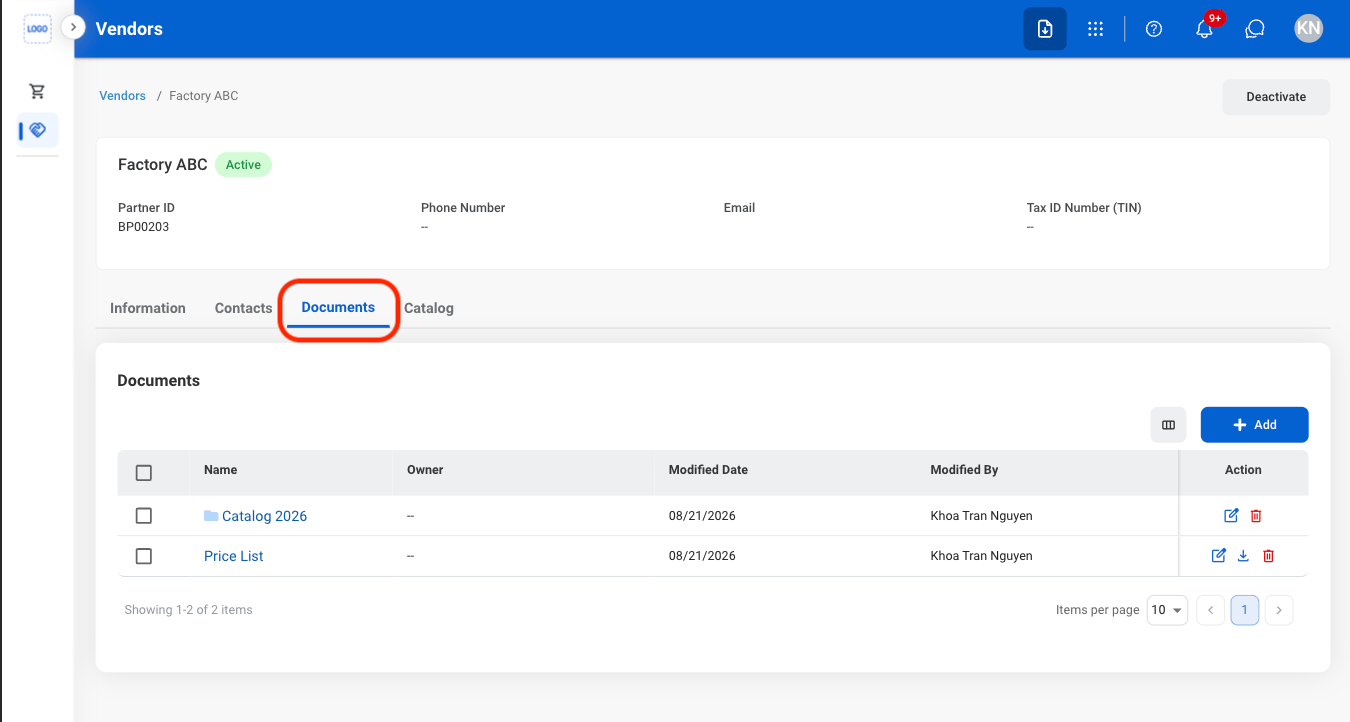
### Add a Document
<Steps>
  <Step title="Navigate to Documents">
    <Frame>
      <img src="https://mintcdn.com/bizbone/A1_vOM_PrjNb5hJ9/images/P-V-Nav-Doc.png?fit=max&auto=format&n=A1_vOM_PrjNb5hJ9&q=85&s=0b93f2d3fe1f4a97663888ffd7c8e2b3" alt="P V Nav Doc" width="1350" height="722" data-path="images/P-V-Nav-Doc.png" />
    </Frame>
  </Step>

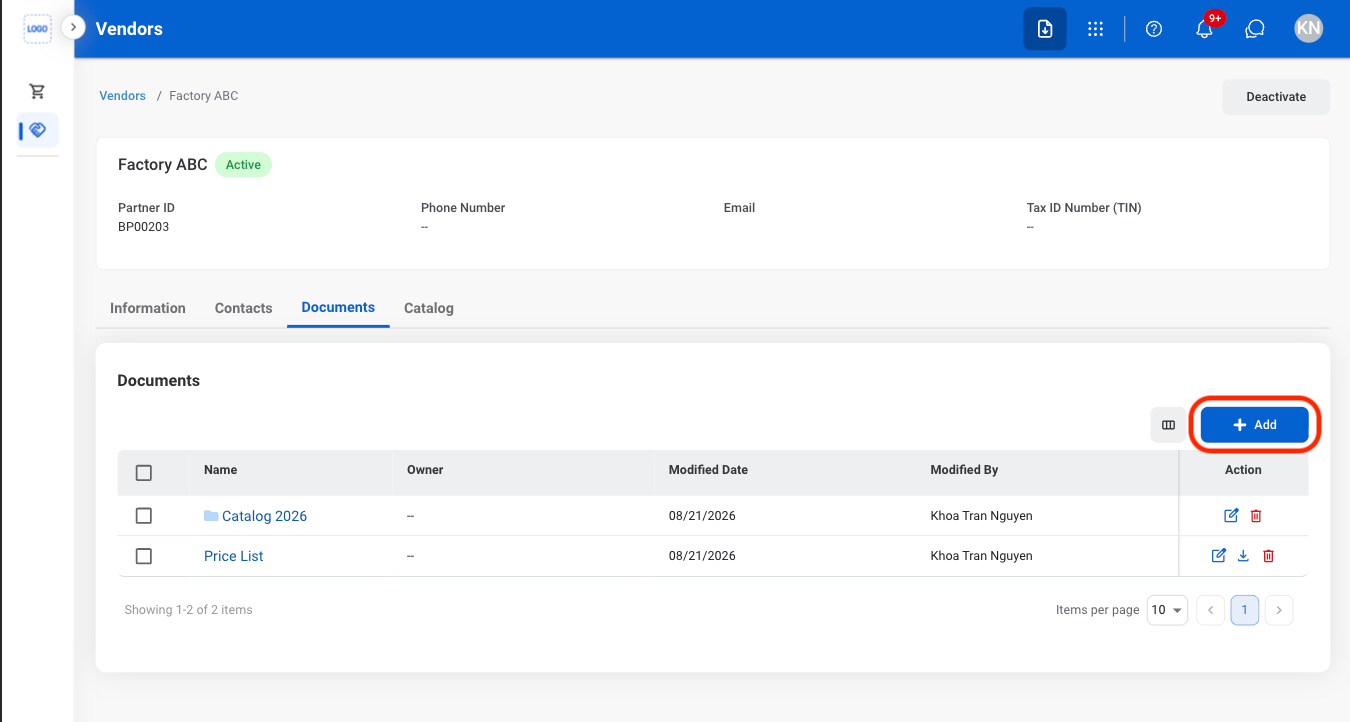
  <Step title="Select Add">
    <Frame>
      <img src="https://mintcdn.com/bizbone/A1_vOM_PrjNb5hJ9/images/P-V-Add-Doc.png?fit=max&auto=format&n=A1_vOM_PrjNb5hJ9&q=85&s=49c44119117a27698fa6f33590869839" alt="P V Add Doc" width="1350" height="722" data-path="images/P-V-Add-Doc.png" />
    </Frame>
  </Step>

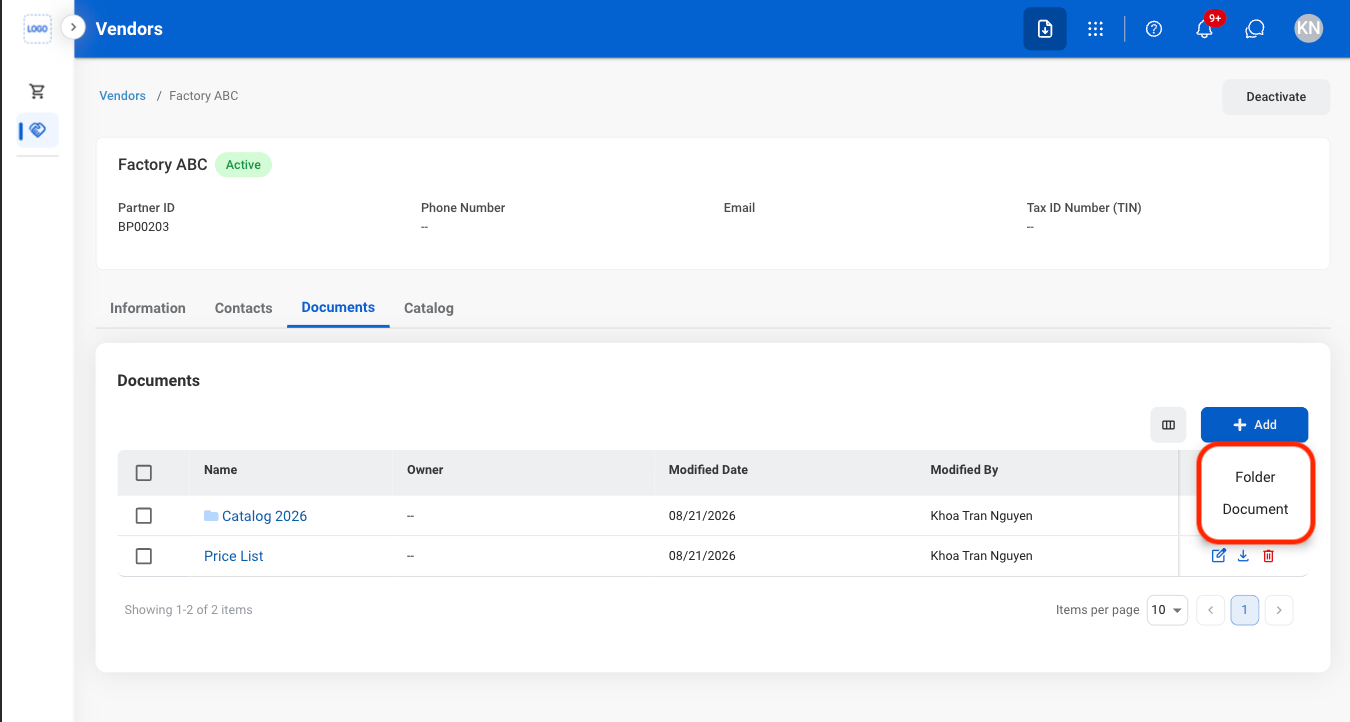
  <Step title="Select a document type">
    <Frame>
      <img src="https://mintcdn.com/bizbone/A1_vOM_PrjNb5hJ9/images/P-V-CAdd-Doc.png?fit=max&auto=format&n=A1_vOM_PrjNb5hJ9&q=85&s=d797cc85567810151e28ae9000d9653b" alt="P V C Add Doc" width="1350" height="722" data-path="images/P-V-CAdd-Doc.png" />
    </Frame>
  </Step>

  <Step title="Fill in the required information ">
    Select **Save** to complete or **Cancel** to exit without saving changes.
  </Step>
</Steps>

### Modify a Document

<Steps>
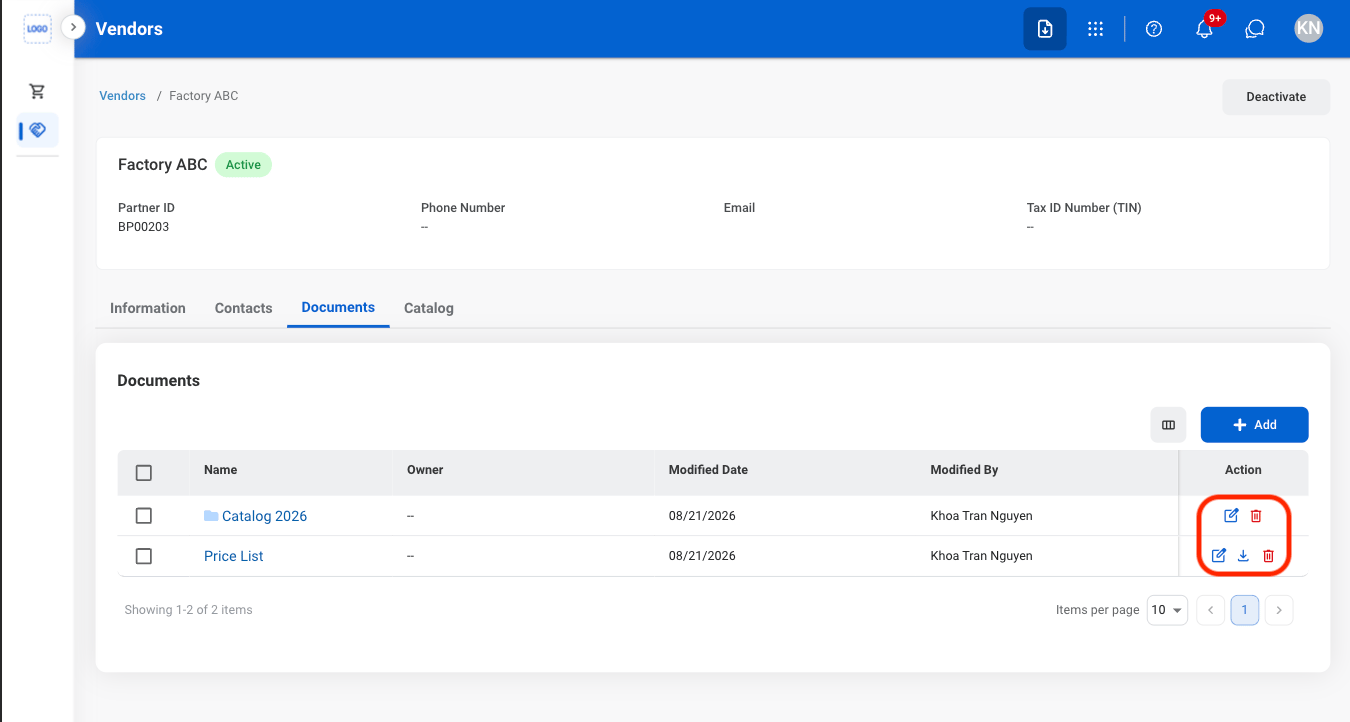
  <Step title="Select an action">
    <Frame>
      <img src="https://mintcdn.com/bizbone/A1_vOM_PrjNb5hJ9/images/P-V-Mod-Doc.png?fit=max&auto=format&n=A1_vOM_PrjNb5hJ9&q=85&s=fe136b464d2355bfba949c829b23f1f5" alt="P V Mod Doc" width="1350" height="722" data-path="images/P-V-Mod-Doc.png" />
    </Frame>

    * **Edit**: Select the **edit icon** to update an existing entry
    * **Delete**: Select the **trash icon** to delete an existing entry.
    * **Download**: Download will start automatically after selection. 
  </Step>

  <Step title="Confirm the action ">
    * **Edit:** Fill in the required information. Select **Update** to complete or **Cancel** to exit without saving changes. 
    * **Delete:** Select **Delete** to complete or **Cancel** to exit without saving changes. 
  </Step>
</Steps>

## Vendor Catalog

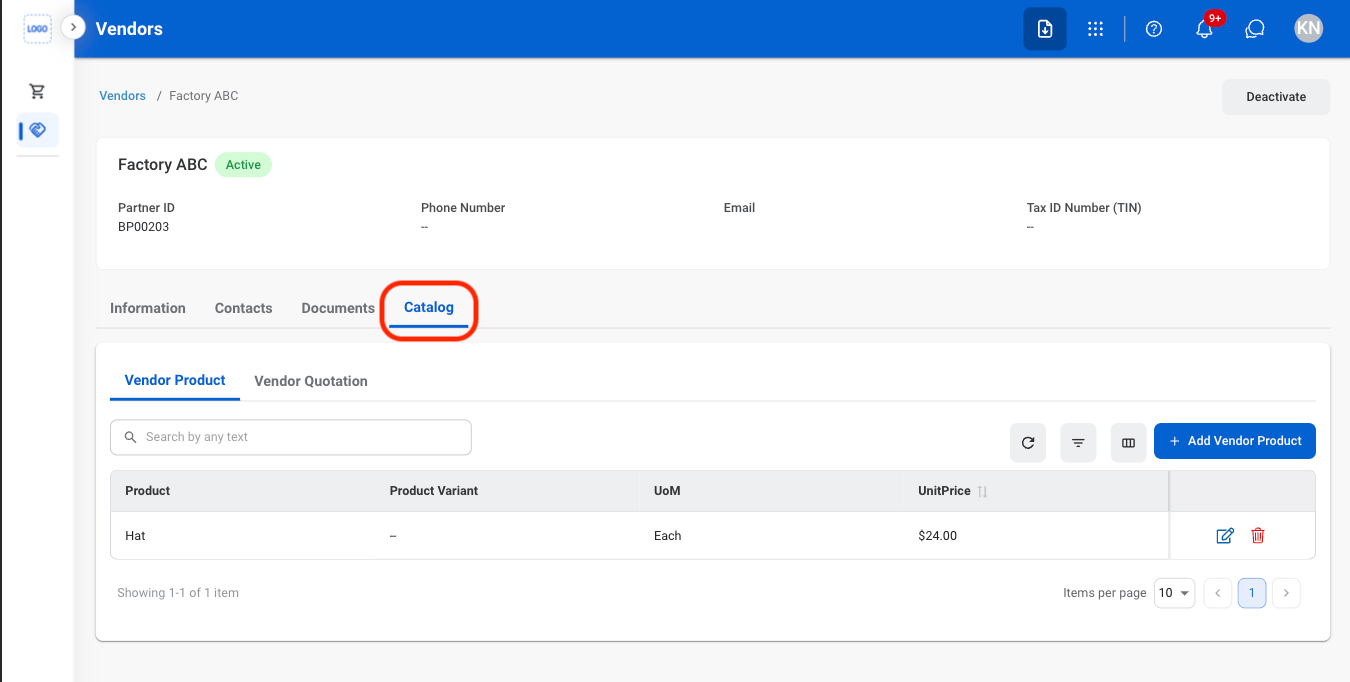
### Add a Vendor Product
<Steps>
  <Step title="Navigate to Catalog">
    <Frame>
      <img src="https://mintcdn.com/bizbone/A1_vOM_PrjNb5hJ9/images/P-V-C-Nav.png?fit=max&auto=format&n=A1_vOM_PrjNb5hJ9&q=85&s=f41c78d480c0ddf1563c162a92447246" alt="P V C Nav" width="1350" height="682" data-path="images/P-V-C-Nav.png" />
    </Frame>
  </Step>

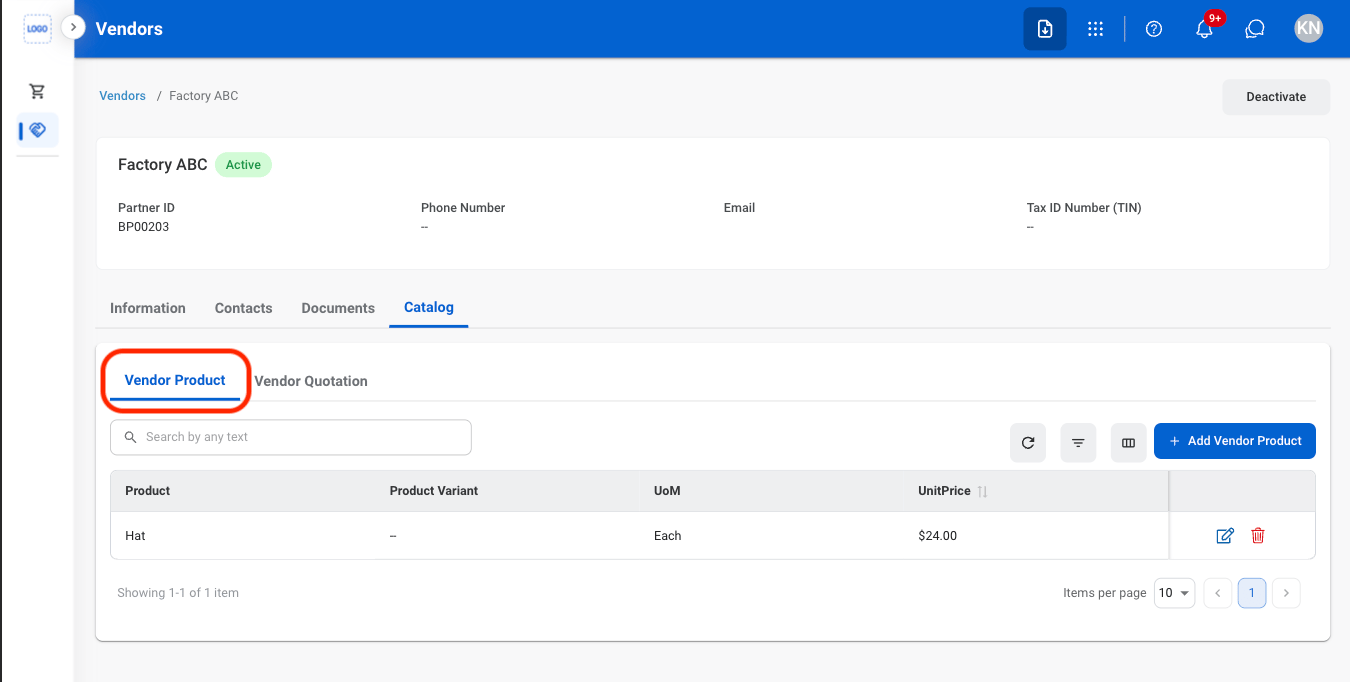
  <Step title="Navigate to Vendor Product ">
    <Frame>
      <img src="https://mintcdn.com/bizbone/A1_vOM_PrjNb5hJ9/images/P-V-C-VP-Nav.png?fit=max&auto=format&n=A1_vOM_PrjNb5hJ9&q=85&s=3fe54b1609be7ce33bee3fd0ec3c4ff4" alt="P V C VP Nav" width="1350" height="682" data-path="images/P-V-C-VP-Nav.png" />
    </Frame>
  </Step>

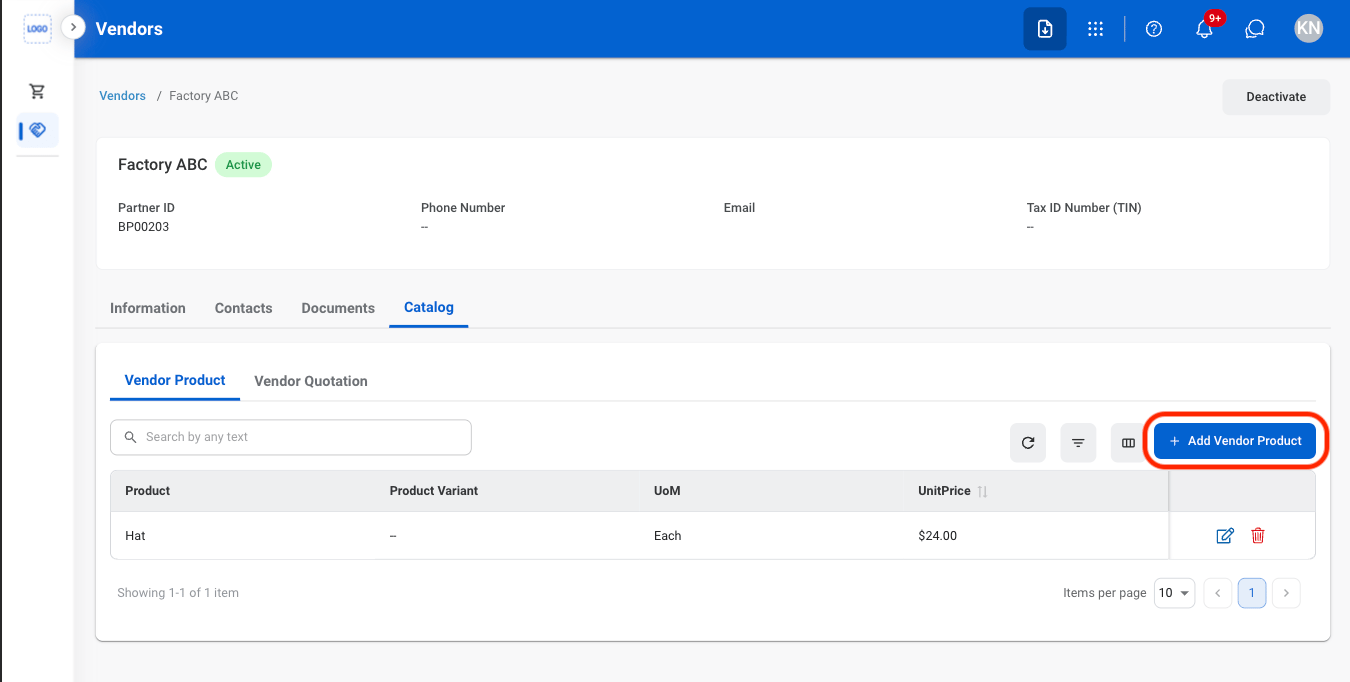
  <Step title="Select Add Vendor Product">
    <Frame>
      <img src="https://mintcdn.com/bizbone/A1_vOM_PrjNb5hJ9/images/P-V-C-VP-Add.png?fit=max&auto=format&n=A1_vOM_PrjNb5hJ9&q=85&s=0a4e764200099ec038af40067ee074c7" alt="P V C VP Add" width="1350" height="682" data-path="images/P-V-C-VP-Add.png" />
    </Frame>
  </Step>

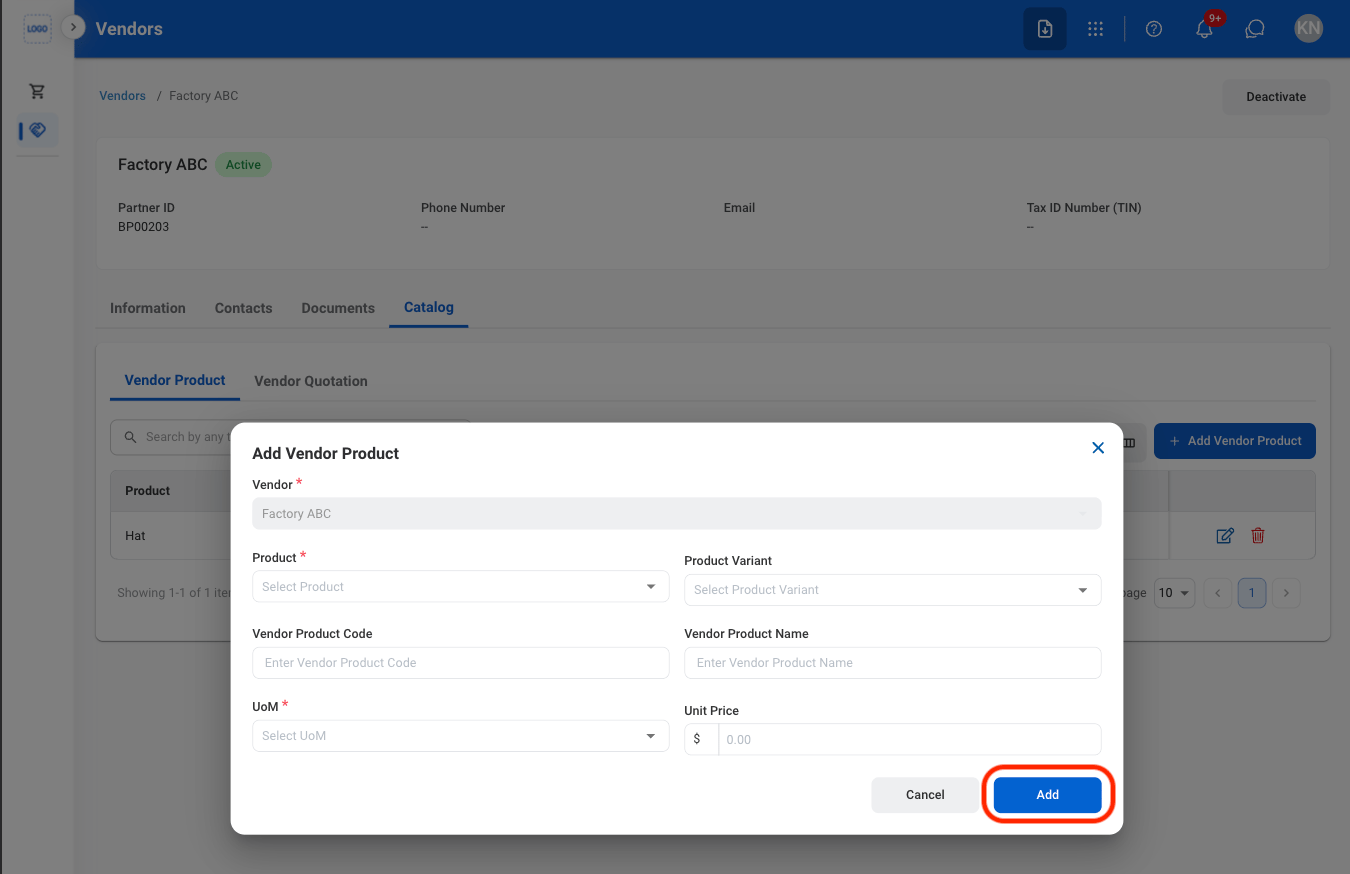
  <Step title="Fill in the required information ">
    <Frame>
      <img src="https://mintcdn.com/bizbone/A1_vOM_PrjNb5hJ9/images/P-V-C-VP-CAdd.png?fit=max&auto=format&n=A1_vOM_PrjNb5hJ9&q=85&s=91d2c9dcb183d3b488e96da241ca2dbc" alt="P V C VP C Add" width="1350" height="874" data-path="images/P-V-C-VP-CAdd.png" />
    </Frame>

    Select **Add** to complete or **Cancel** to exit without saving changes. 
  </Step>
</Steps>

### Modify a Vendor Product

<Steps>
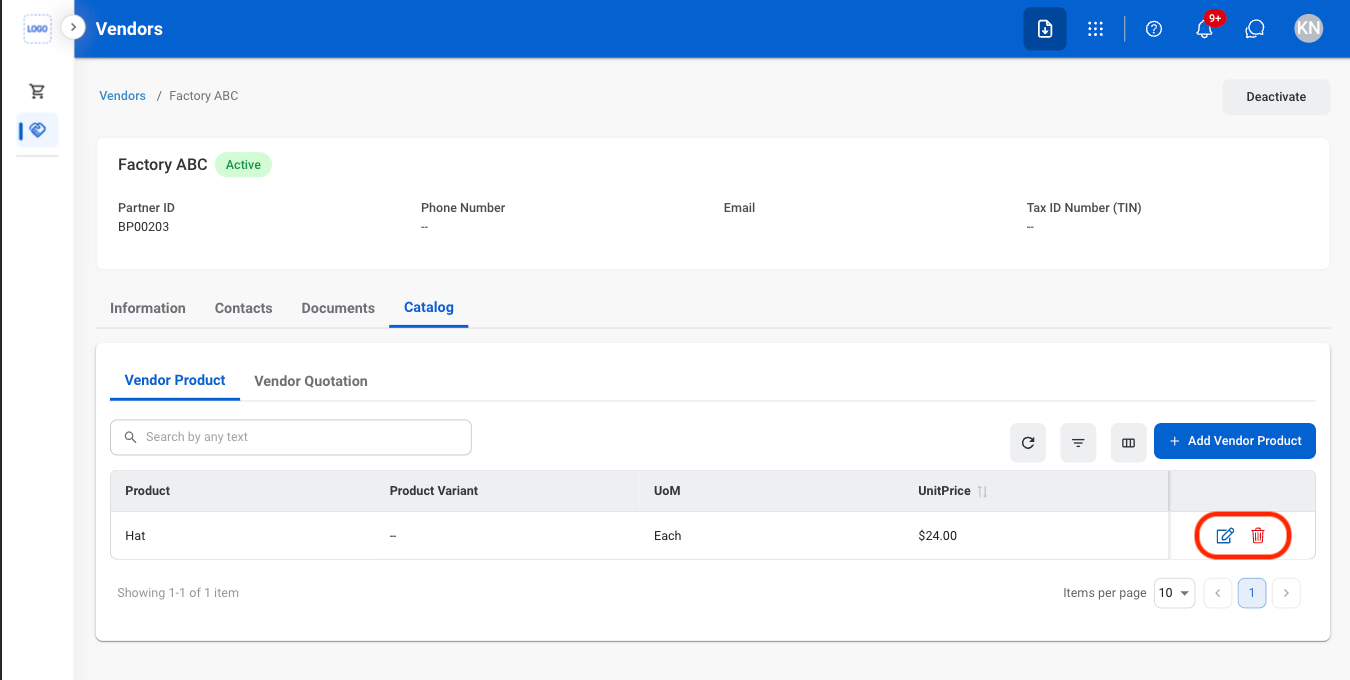
  <Step title="Select an action ">
    <Frame>
      <img src="https://mintcdn.com/bizbone/A1_vOM_PrjNb5hJ9/images/P-V-C-VP-Mod.png?fit=max&auto=format&n=A1_vOM_PrjNb5hJ9&q=85&s=ff432ddc2fac1705b7fb6b472e22c4e5" alt="P V C VP Mod" width="1350" height="680" data-path="images/P-V-C-VP-Mod.png" />
    </Frame>

    * **Edit**: Select the **edit icon** to update an existing entry
    * **Delete**: Select the **trash icon** to delete an existing entry.
  </Step>

  <Step title="Confirm the action ">
    * **Edit:** Fill in the required information. Select **Update** to complete or **Cancel** to exit without saving changes. 
    * **Delete:** Select **Delete** to complete or **Cancel** to exit without saving changes. 
  </Step>
</Steps>

### Add a Vendor Quotation

<Steps>
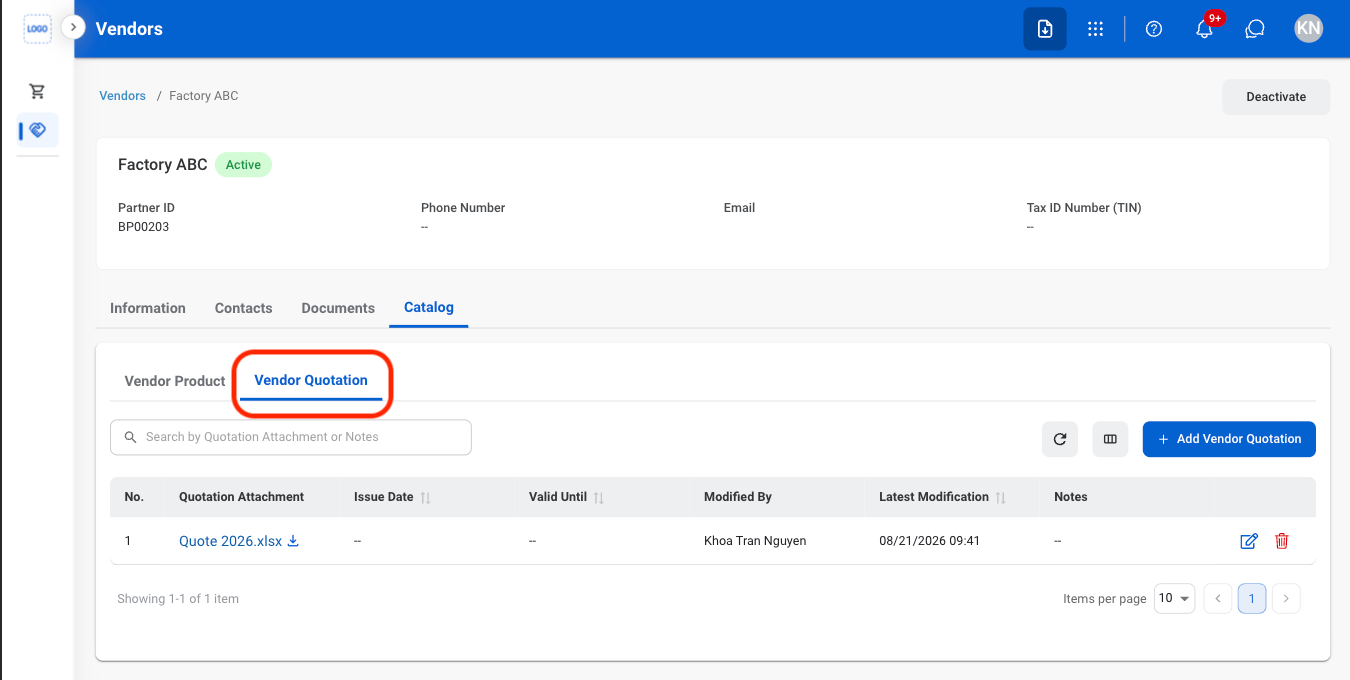
  <Step title="Navigate to Vendor Quotation ">
    <Frame>
      <img src="https://mintcdn.com/bizbone/A1_vOM_PrjNb5hJ9/images/P-V-C-VQ-Nav.png?fit=max&auto=format&n=A1_vOM_PrjNb5hJ9&q=85&s=4458da612dc6a2b9bd0d1ab442430b03" alt="P V C VQ Nav" width="1350" height="680" data-path="images/P-V-C-VQ-Nav.png" />
    </Frame>
  </Step>

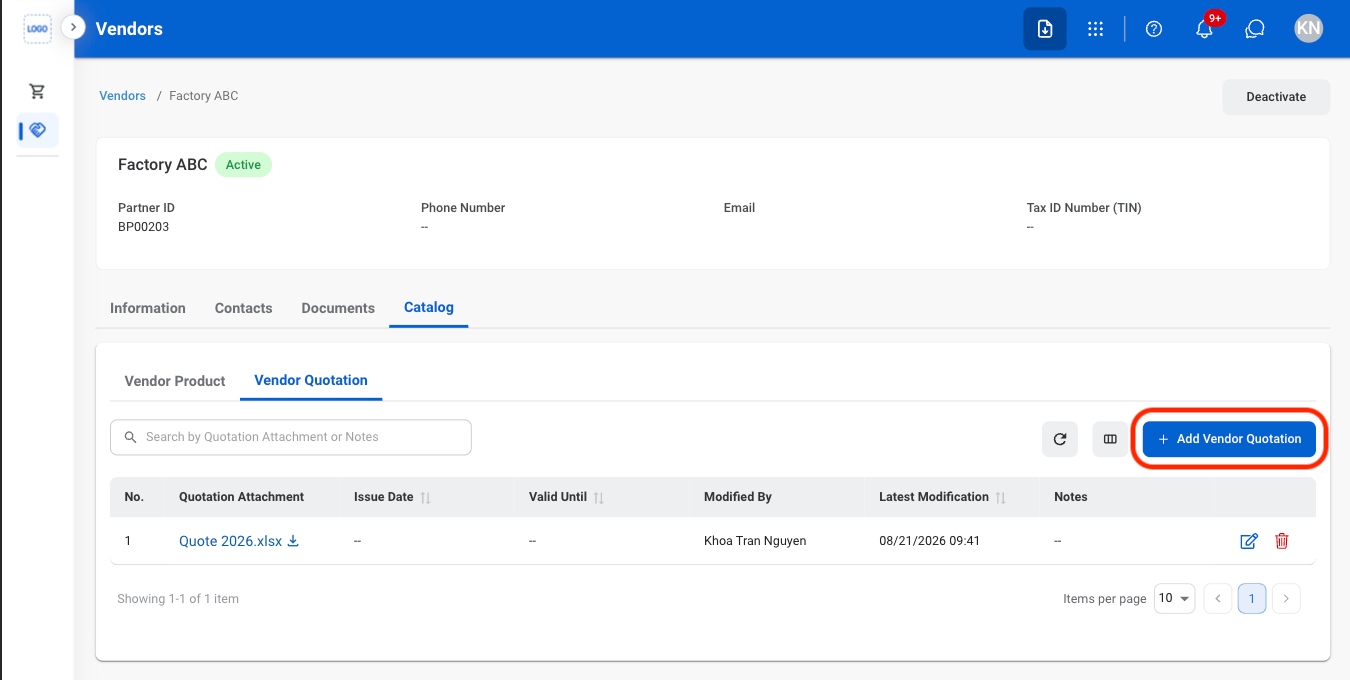
  <Step title="Select Add Vendor Quotation ">
    <Frame>
      <img src="https://mintcdn.com/bizbone/A1_vOM_PrjNb5hJ9/images/P-V-C-VQ-Add.png?fit=max&auto=format&n=A1_vOM_PrjNb5hJ9&q=85&s=9c40cc0ac00b676cca681865a4a212c5" alt="P V C VQ Add" width="1350" height="680" data-path="images/P-V-C-VQ-Add.png" />
    </Frame>
  </Step>

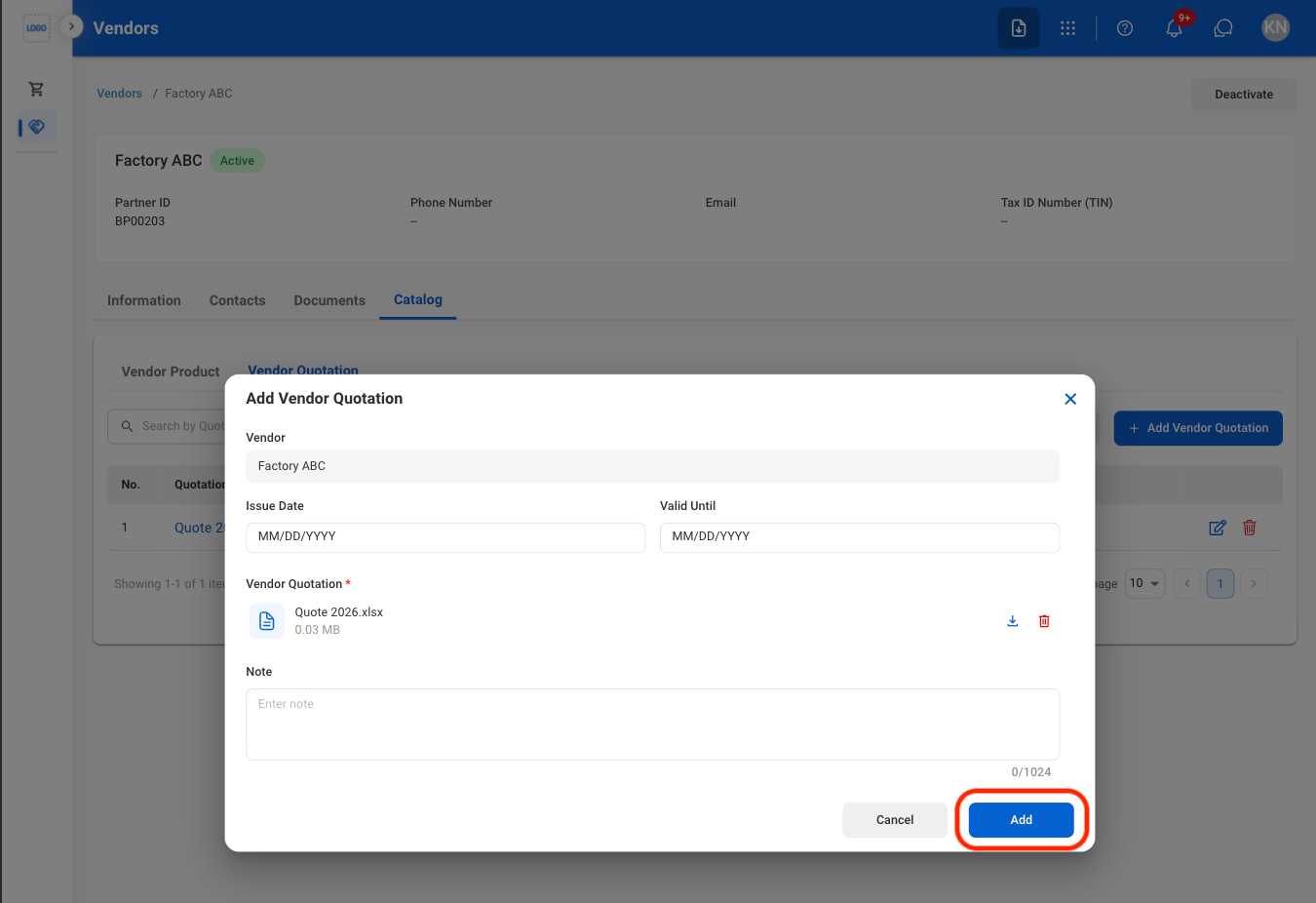
  <Step title="Fill in the required information ">
    <Frame>
      <img src="https://mintcdn.com/bizbone/A1_vOM_PrjNb5hJ9/images/P-V-C-VQ-CAdd.png?fit=max&auto=format&n=A1_vOM_PrjNb5hJ9&q=85&s=593cdd9892e9a80f7efcacd1a4173ed5" alt="P V C VQ C Add" width="1350" height="926" data-path="images/P-V-C-VQ-CAdd.png" />
    </Frame>

    Select **Save** to complete or **Cancel** to exit without saving changes. 
  </Step>
</Steps>

### Modify a Vendor Quotation

<Steps>
  <Step title="Select an action ">
    <Frame>
      <img src="https://mintcdn.com/bizbone/A1_vOM_PrjNb5hJ9/images/P-V-C-VQ-Mod.png?fit=max&auto=format&n=A1_vOM_PrjNb5hJ9&q=85&s=3731fbd428c2add23ac7b022deefe968" alt="P V C VQ Mod" width="1350" height="712" data-path="images/P-V-C-VQ-Mod.png" />
    </Frame>

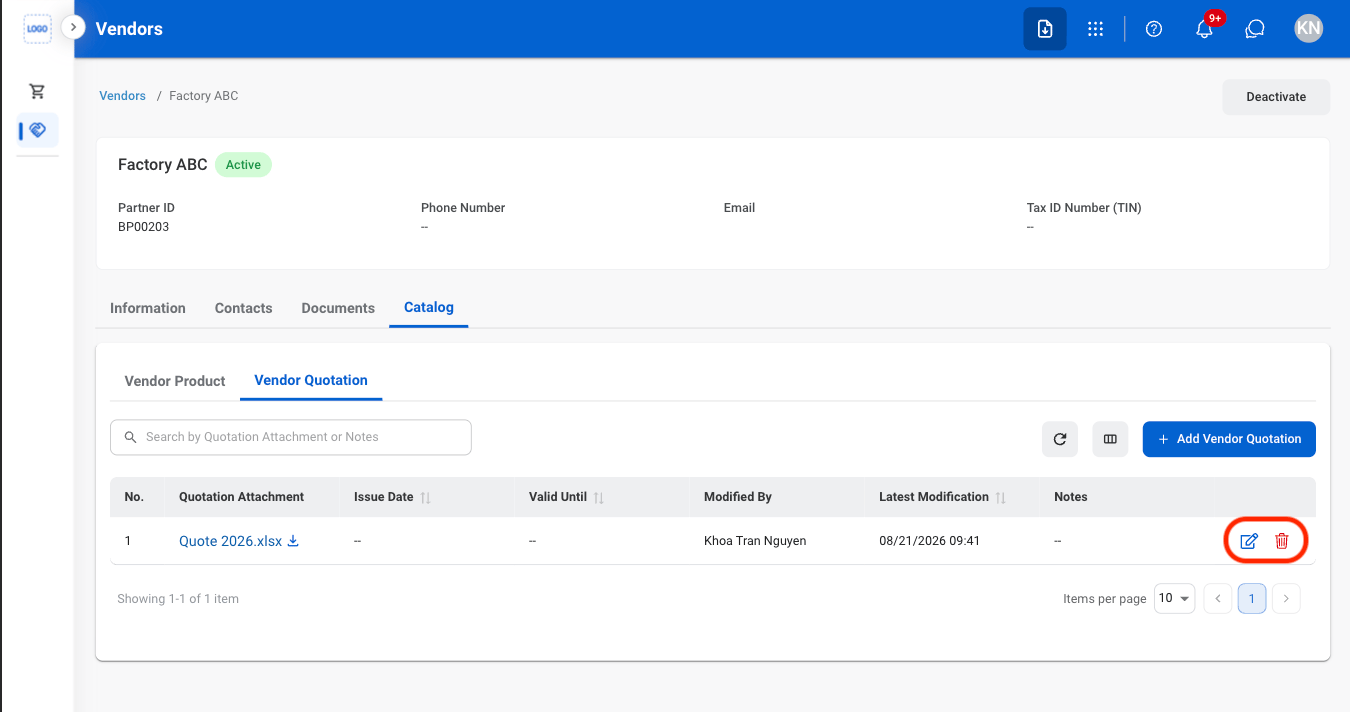
    * **Edit**: Select the **edit icon** to update an existing entry
    * **Delete**: Select the **trash icon** to delete an existing entry.
  </Step>

  <Step title="Confirm the action ">
    * **Edit:** Fill in the required information. Select **Update** to complete or **Cancel** to exit without saving changes. 
    * **Delete:** Select **Delete** to complete or **Cancel** to exit without saving changes. 
  </Step>
</Steps>

## Deactivate a Vendor

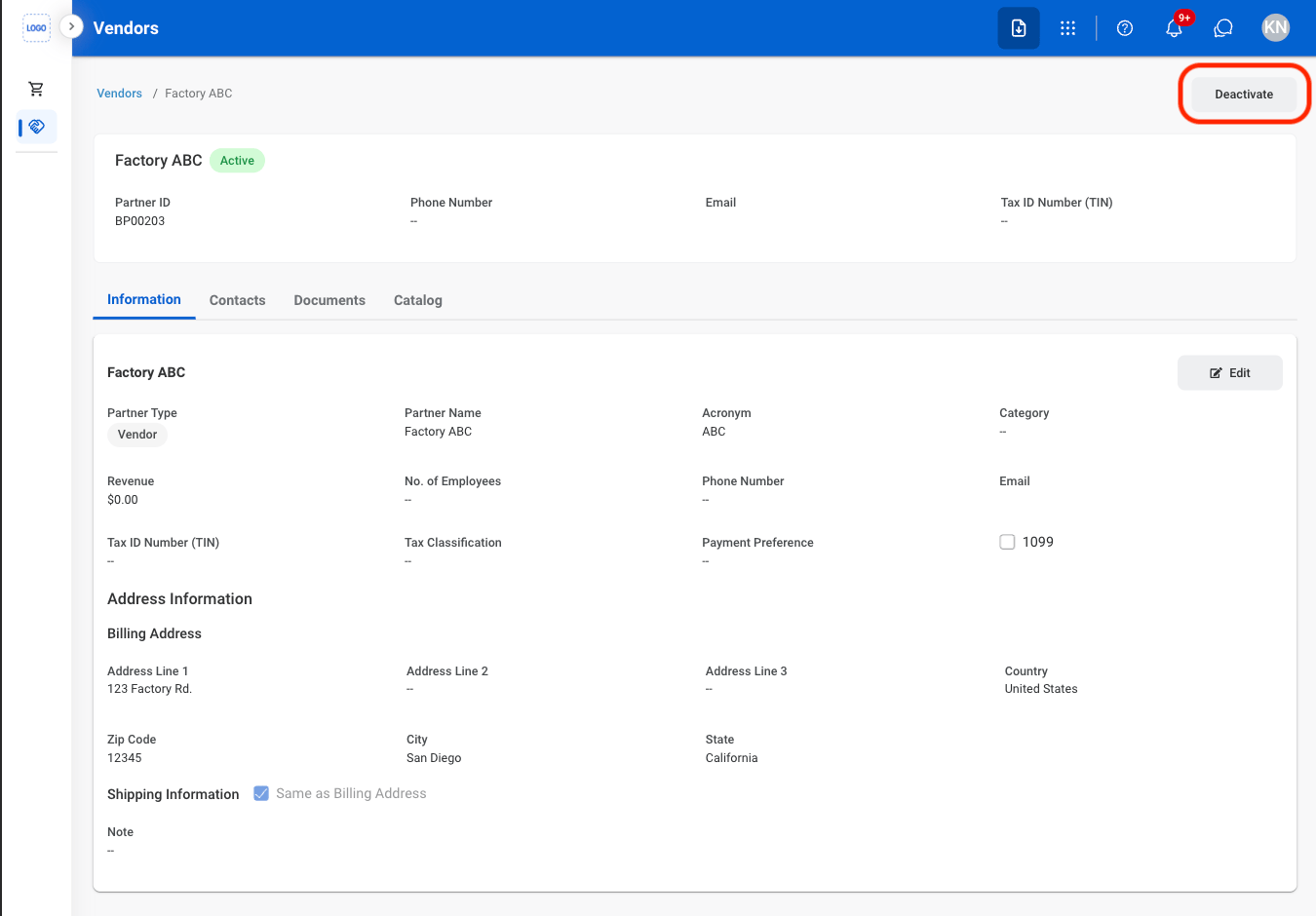
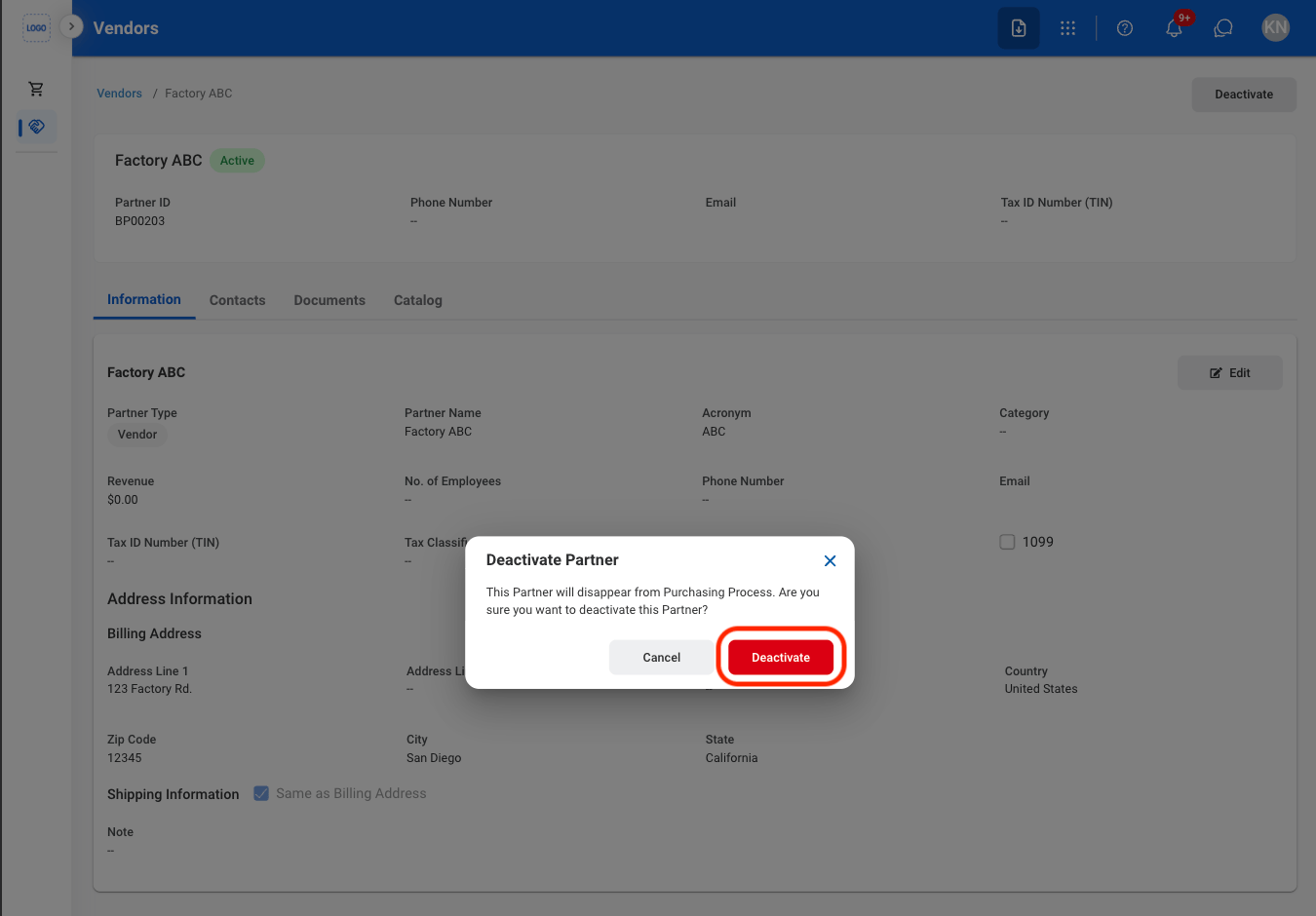
Deactivate the vendor to prevent further use while retaining the vendor record and its existing information.
<Steps>
  <Step title="Select Deactivate">
    <Frame>
      <img src="https://mintcdn.com/bizbone/O54KWBvXAjoTGYsh/images/P-V-Deactivate.png?fit=max&auto=format&n=O54KWBvXAjoTGYsh&q=85&s=c1c82af0fc019c72ba3a5d1f5ed403e8" alt="P V Deactivate" width="1350" height="940" data-path="images/P-V-Deactivate.png" />
    </Frame>
  </Step>

  <Step title="Confirm the action ">
    <Frame>
      <img src="https://mintcdn.com/bizbone/O54KWBvXAjoTGYsh/images/P-V-CDeactivate.png?fit=max&auto=format&n=O54KWBvXAjoTGYsh&q=85&s=b83eaf2eee3d11078a680dde7d8925db" alt="P V C Deactivate" width="1350" height="940" data-path="images/P-V-CDeactivate.png" />
    </Frame>

    Select **Deactivate** to complete or **Cancel** to exit without saving changes.
  </Step>
</Steps>

## Delete a Vendor

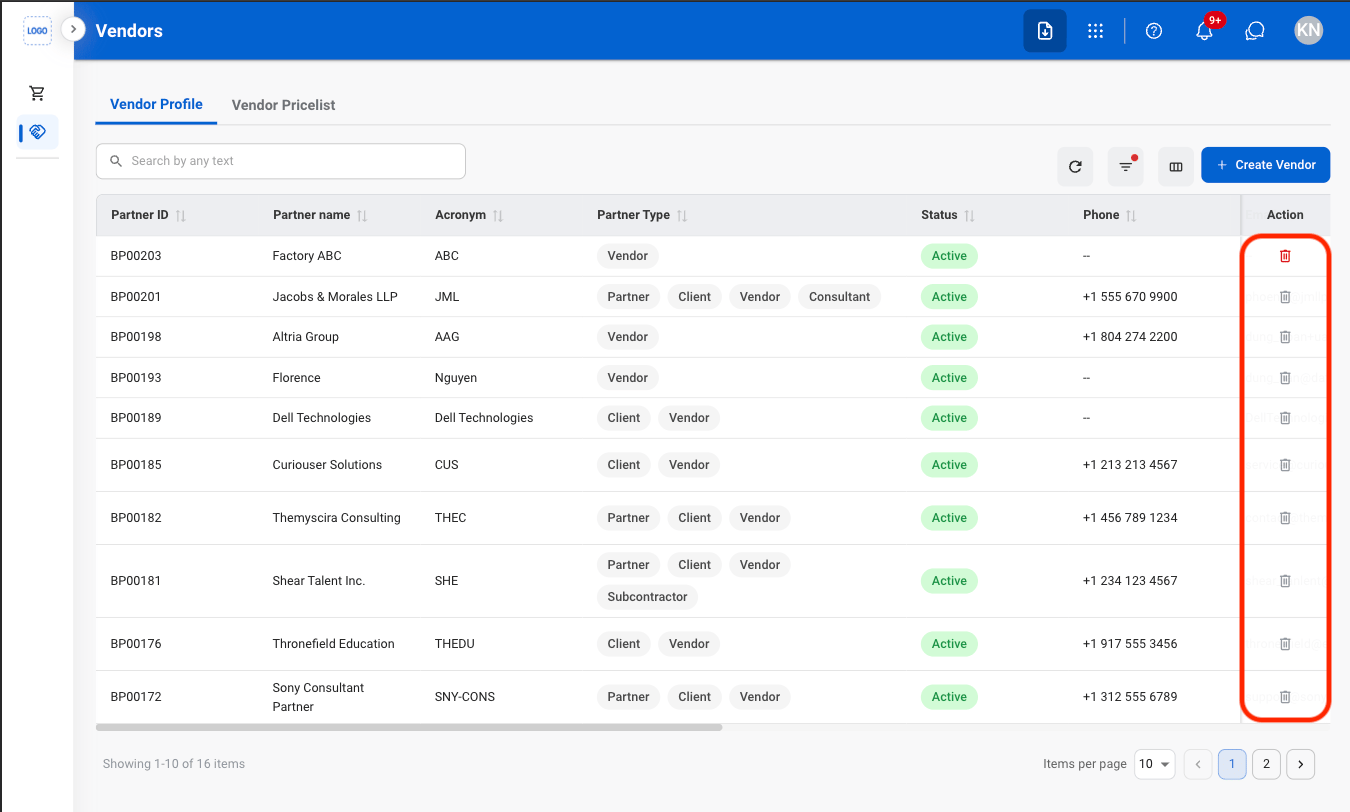
Permanently remove the vendor record and its associated information from the system.

<Info>
  Vendors with documented transactions cannot be deleted from the system.
</Info>

<Steps>
  <Step title="Select the delete icon">
    <Frame>
      <img src="https://mintcdn.com/bizbone/O54KWBvXAjoTGYsh/images/P-V-Delete.png?fit=max&auto=format&n=O54KWBvXAjoTGYsh&q=85&s=4ed275bad841a8fc8cf2454c3c602a41" alt="P V Delete" width="1350" height="812" data-path="images/P-V-Delete.png" />
    </Frame>
  </Step>

  <Step title="Confirm the action ">
    <Frame>
      <img src="https://mintcdn.com/bizbone/O54KWBvXAjoTGYsh/images/P-V-CDelete.png?fit=max&auto=format&n=O54KWBvXAjoTGYsh&q=85&s=f0b3dac7a16382bf592fca2d777c224e" alt="P V C Delete" width="1350" height="812" data-path="images/P-V-CDelete.png" />
    </Frame>

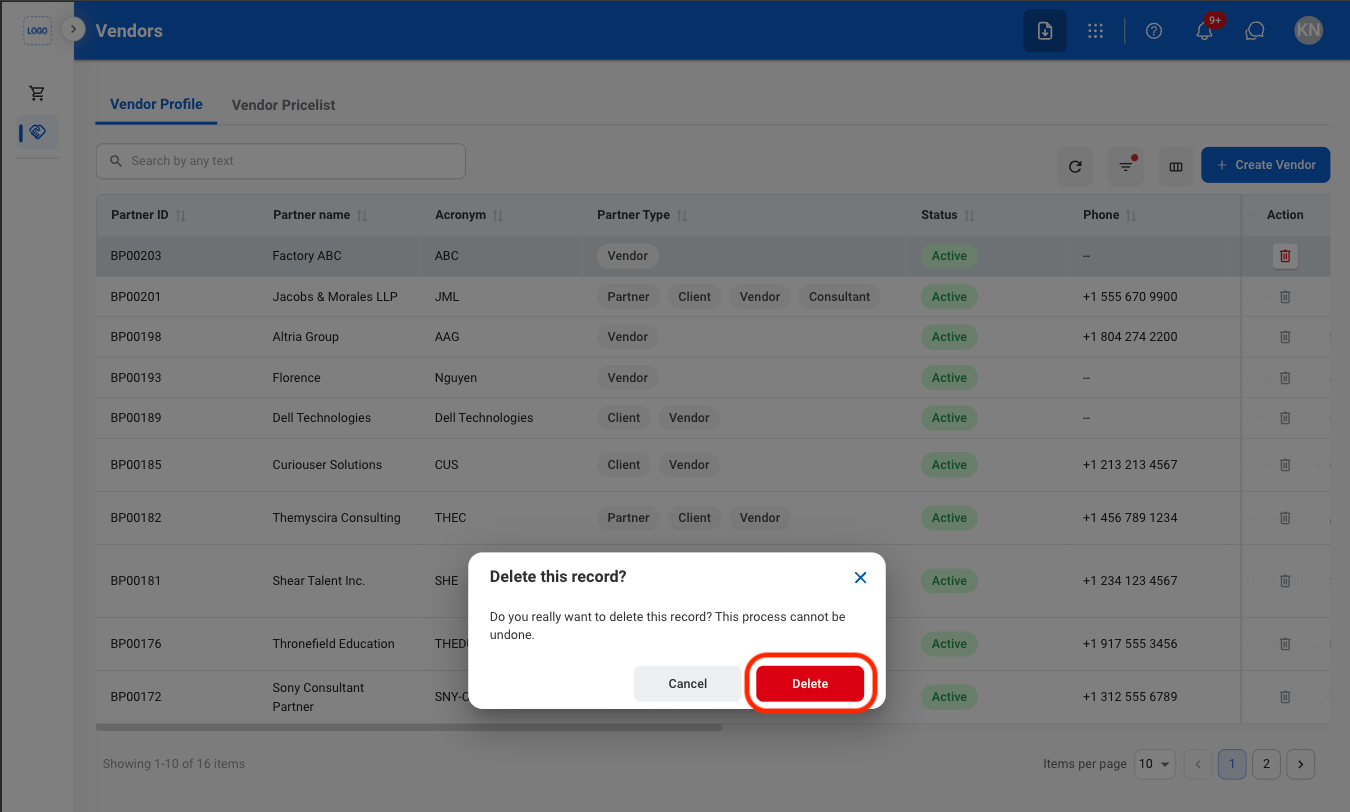
    Select **Delete** to confirm or **Cancel** to exit without saving changes. 
  </Step>
</Steps>

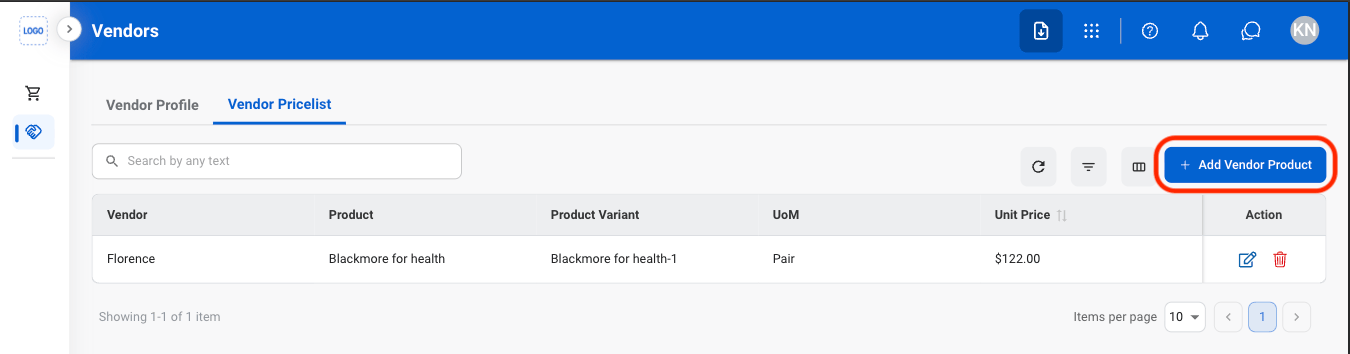
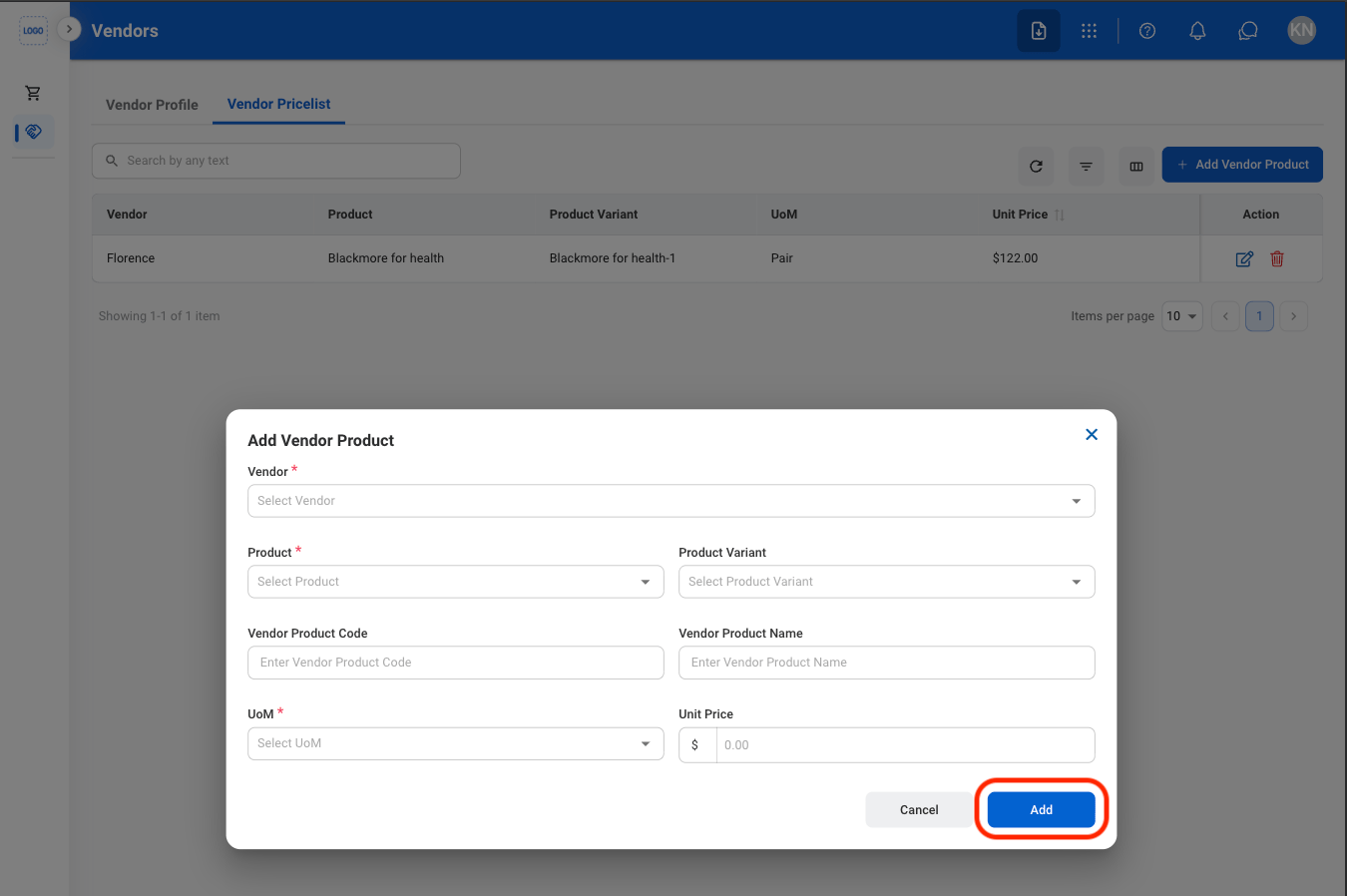
## Add a Vendor Product

<Steps>
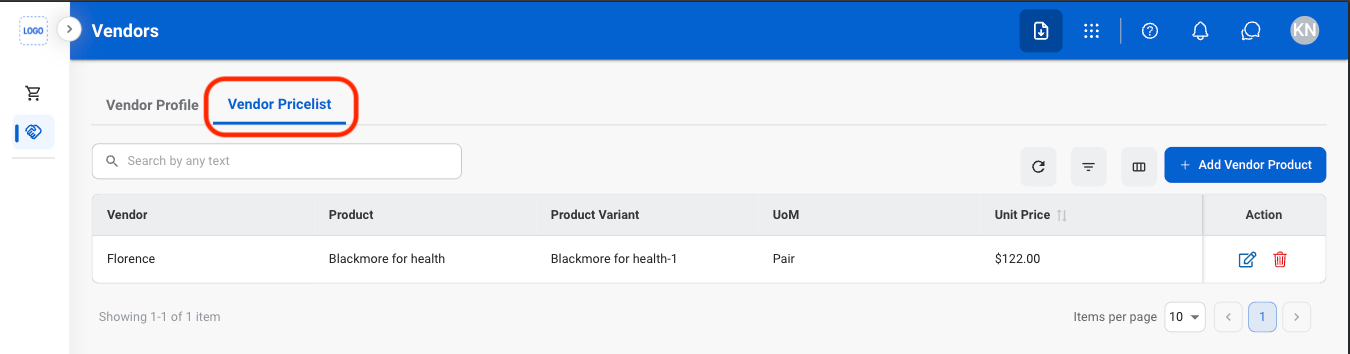
  <Step title="Select Vendor Pricelist ">
    <Frame>
      <img src="https://mintcdn.com/bizbone/pbQvDnPVNhYcuslV/images/P-V-Pricelist.png?fit=max&auto=format&n=pbQvDnPVNhYcuslV&q=85&s=bacf765aa9ac41228b63249d57edd839" alt="P V Pricelist" width="1350" height="354" data-path="images/P-V-Pricelist.png" />
    </Frame>
  </Step>

  <Step title="Select Add Vendor Product">
    <Frame>
      <img src="https://mintcdn.com/bizbone/pbQvDnPVNhYcuslV/images/P-V-Add-P.png?fit=max&auto=format&n=pbQvDnPVNhYcuslV&q=85&s=133e29ea53d60552fcbbd17136150ff2" alt="P V Add P" width="1350" height="354" data-path="images/P-V-Add-P.png" />
    </Frame>
  </Step>

  <Step title="Fill in the required information ">
    <Frame>
      <img src="https://mintcdn.com/bizbone/pbQvDnPVNhYcuslV/images/P-V-Add-P-C.png?fit=max&auto=format&n=pbQvDnPVNhYcuslV&q=85&s=0c4bb75ce6e9624177f04752da5da129" alt="P V Add P C" width="1350" height="898" data-path="images/P-V-Add-P-C.png" />
    </Frame>
  </Step>
</Steps>

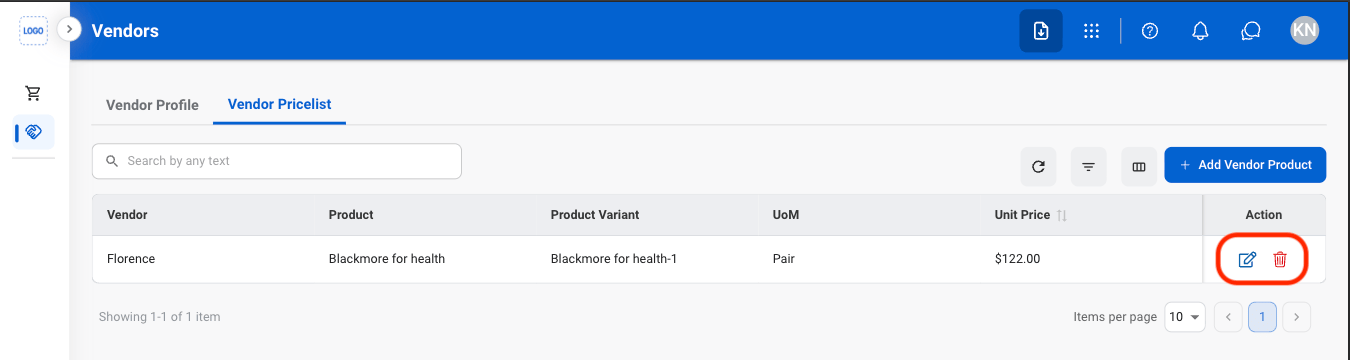
## Modify a Vendor Product

<Steps>
  <Step title="Select an action">
    <Frame>
      <img src="https://mintcdn.com/bizbone/pbQvDnPVNhYcuslV/images/P-V-Modify.png?fit=max&auto=format&n=pbQvDnPVNhYcuslV&q=85&s=44609a76bbb44fa32b13eaec37aaa275" alt="P V Modify" width="1350" height="360" data-path="images/P-V-Modify.png" />
    </Frame>

    * **Edit**: Select the **edit icon** to update an existing entry
    * **Delete**: Select the **trash icon** to delete an existing entry. 
  </Step>

  <Step title="Confirm the action">
    * **Edit:** Fill in the required information. Select **Save** to complete or **Cancel** to exit without saving changes. 
    * **Delete:** Select **Delete** to complete or **Cancel** to exit without saving changes. 
  </Step>
</Steps>