> ## Documentation Index
> Fetch the complete documentation index at: https://docs.bizbone.com/llms.txt
> Use this file to discover all available pages before exploring further.

# Transition Phase

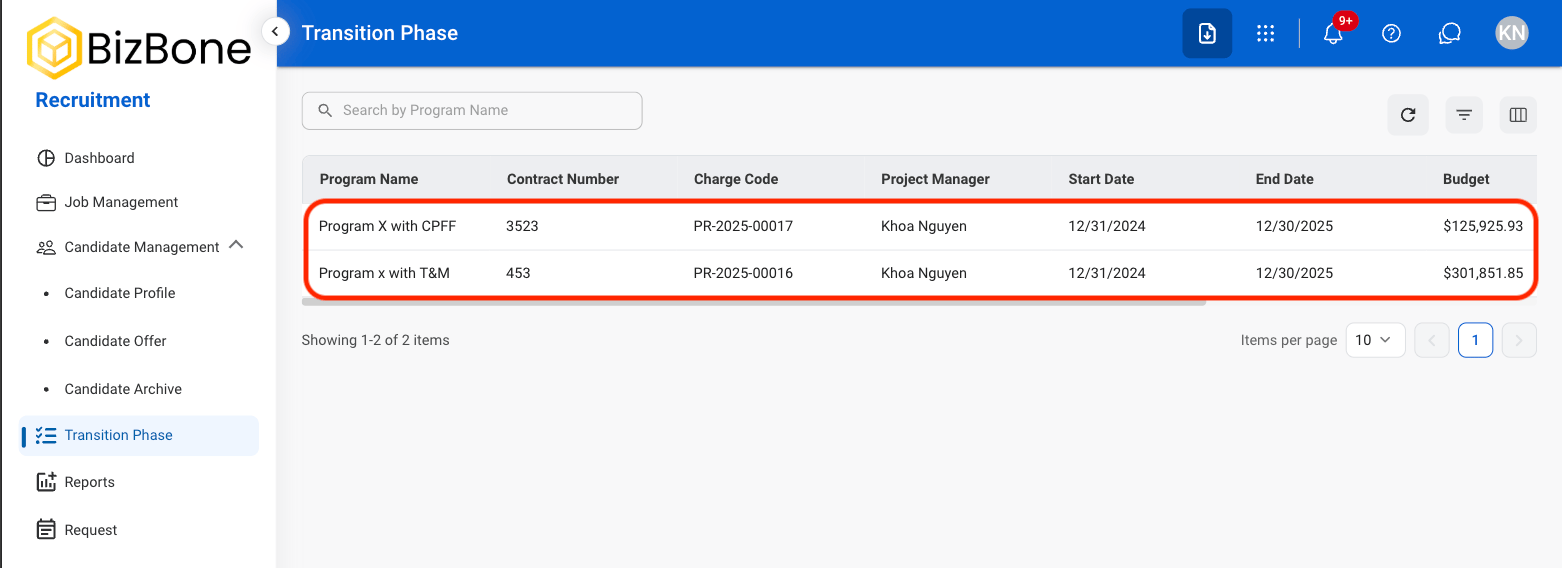
Manage transition activities for programs and contracts, including planning, staffing, communication, equipment coordination, and contract closeout tasks.

## Add a Document
<Steps>
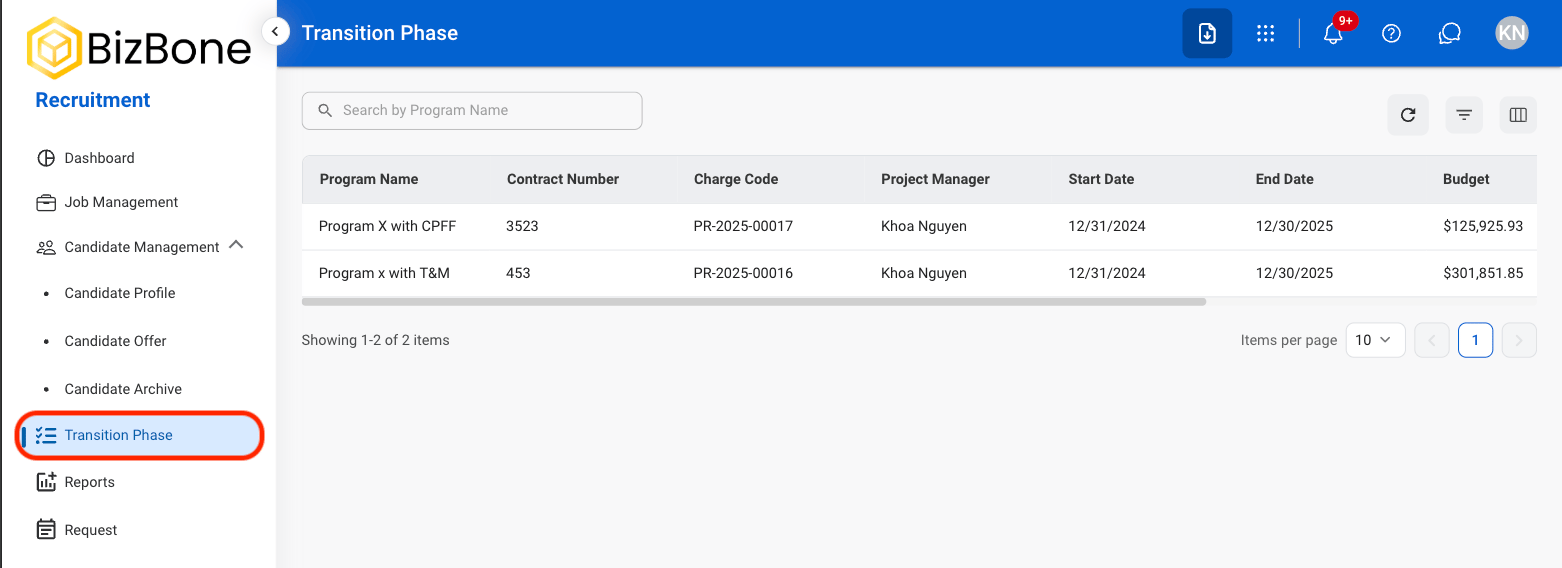
  <Step title="Navigate to Transition Phase">
    <Frame>
      <img src="https://mintcdn.com/bizbone/_k3erF2n8rcHBsQu/images/T-Transition-Phase.png?fit=max&auto=format&n=_k3erF2n8rcHBsQu&q=85&s=24914eb371622b355bcbdb582afcb93e" alt="T Transition Phase" width="1562" height="568" data-path="images/T-Transition-Phase.png" />
    </Frame>
  </Step>

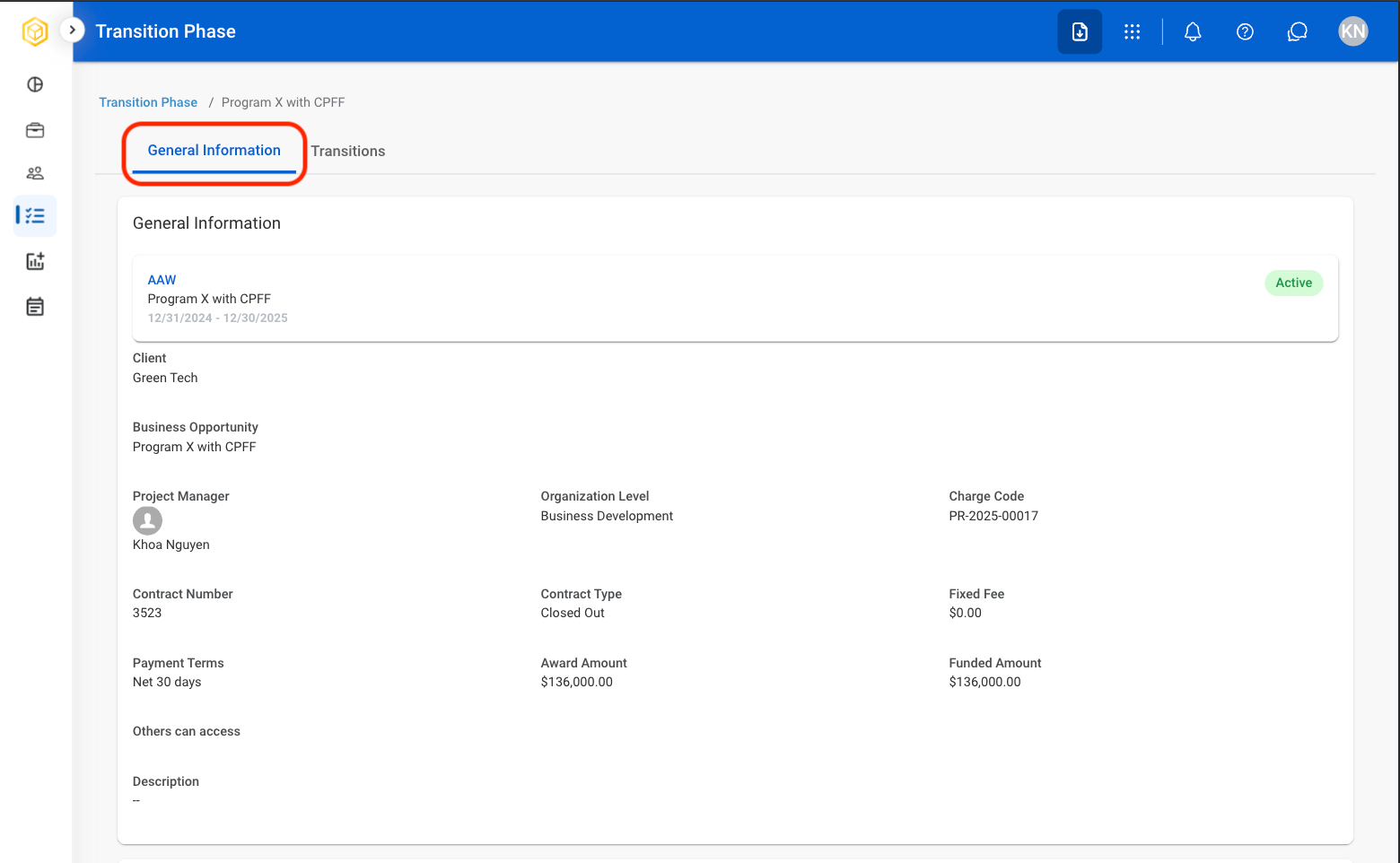
  <Step title="Select a program">
    <Frame>
      <img src="https://mintcdn.com/bizbone/6oPBzRDpo6ZUIAeP/images/R-TP-Select.png?fit=max&auto=format&n=6oPBzRDpo6ZUIAeP&q=85&s=7adef9265184e83a72f80b852a587874" alt="R TP Select" width="1562" height="568" data-path="images/R-TP-Select.png" />
    </Frame>
  </Step>

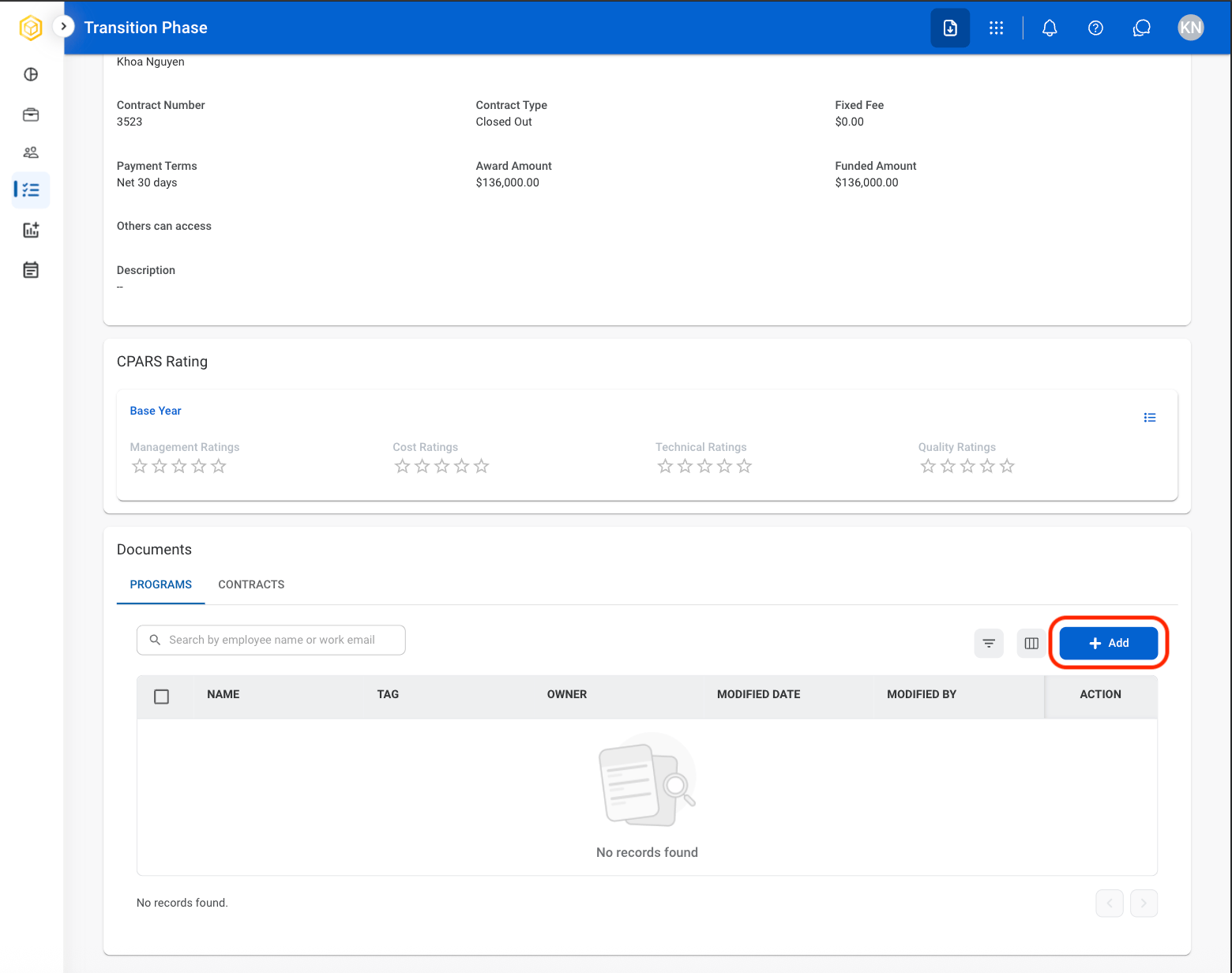
  <Step title="Select General Information ">
    <Frame>
      <img src="https://mintcdn.com/bizbone/6oPBzRDpo6ZUIAeP/images/R-TP-Gen-Info.png?fit=max&auto=format&n=6oPBzRDpo6ZUIAeP&q=85&s=fc7755658f14c91155a169179f07f548" alt="R TP Gen Info" width="1560" height="962" data-path="images/R-TP-Gen-Info.png" />
    </Frame>
  </Step>

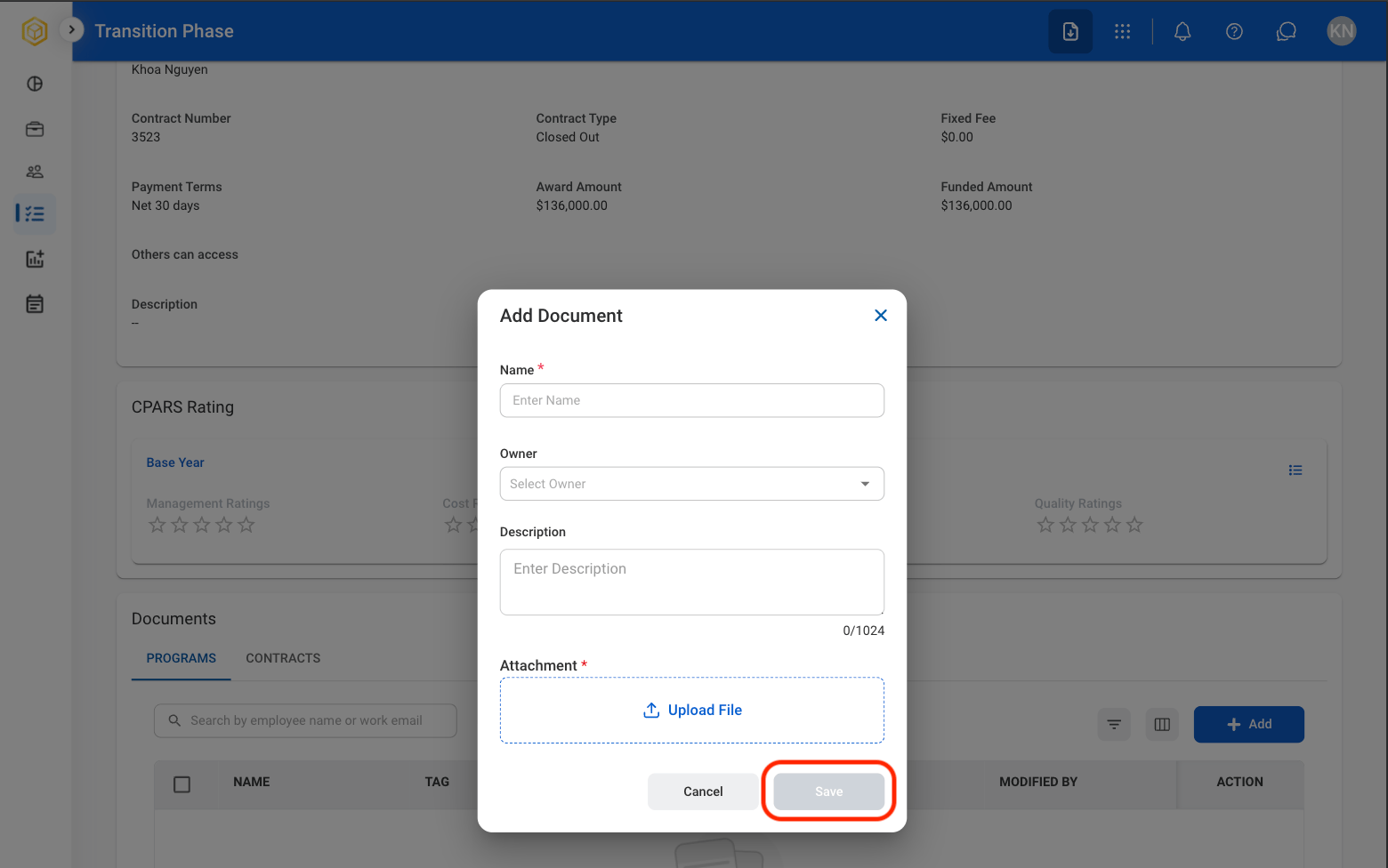
  <Step title="Under Documents, select Add">
    <Frame>
      <img src="https://mintcdn.com/bizbone/6oPBzRDpo6ZUIAeP/images/R-TP-Add-Doc.png?fit=max&auto=format&n=6oPBzRDpo6ZUIAeP&q=85&s=ef52bced7a68c3fde896187d7a48d7ca" alt="R TP Add Doc" width="1560" height="1232" data-path="images/R-TP-Add-Doc.png" />
    </Frame>
  </Step>

  <Step title="Fill in the required information.">
    <Frame>
      <img src="https://mintcdn.com/bizbone/6oPBzRDpo6ZUIAeP/images/R-TP-Save-Add-Doc.png?fit=max&auto=format&n=6oPBzRDpo6ZUIAeP&q=85&s=50ac53df3acff5b24db67b52e6209c78" alt="R TP Save Add Doc" width="1560" height="976" data-path="images/R-TP-Save-Add-Doc.png" />
    </Frame>

    Select **Save** to complete or **Cancel** to exit without saving changes.
  </Step>
</Steps>

## Edit, Download, or Delete a Document
<Steps>
  <Step title="Select a program">
    <Frame>
      <img src="https://mintcdn.com/bizbone/6oPBzRDpo6ZUIAeP/images/R-TP-Select.png?fit=max&auto=format&n=6oPBzRDpo6ZUIAeP&q=85&s=7adef9265184e83a72f80b852a587874" alt="R TP Select" width="1562" height="568" data-path="images/R-TP-Select.png" />
    </Frame>
  </Step>

  <Step title="Select General Information ">
    <Frame>
      <img src="https://mintcdn.com/bizbone/6oPBzRDpo6ZUIAeP/images/R-TP-Gen-Info.png?fit=max&auto=format&n=6oPBzRDpo6ZUIAeP&q=85&s=fc7755658f14c91155a169179f07f548" alt="R TP Gen Info" width="1560" height="962" data-path="images/R-TP-Gen-Info.png" />
    </Frame>
  </Step>

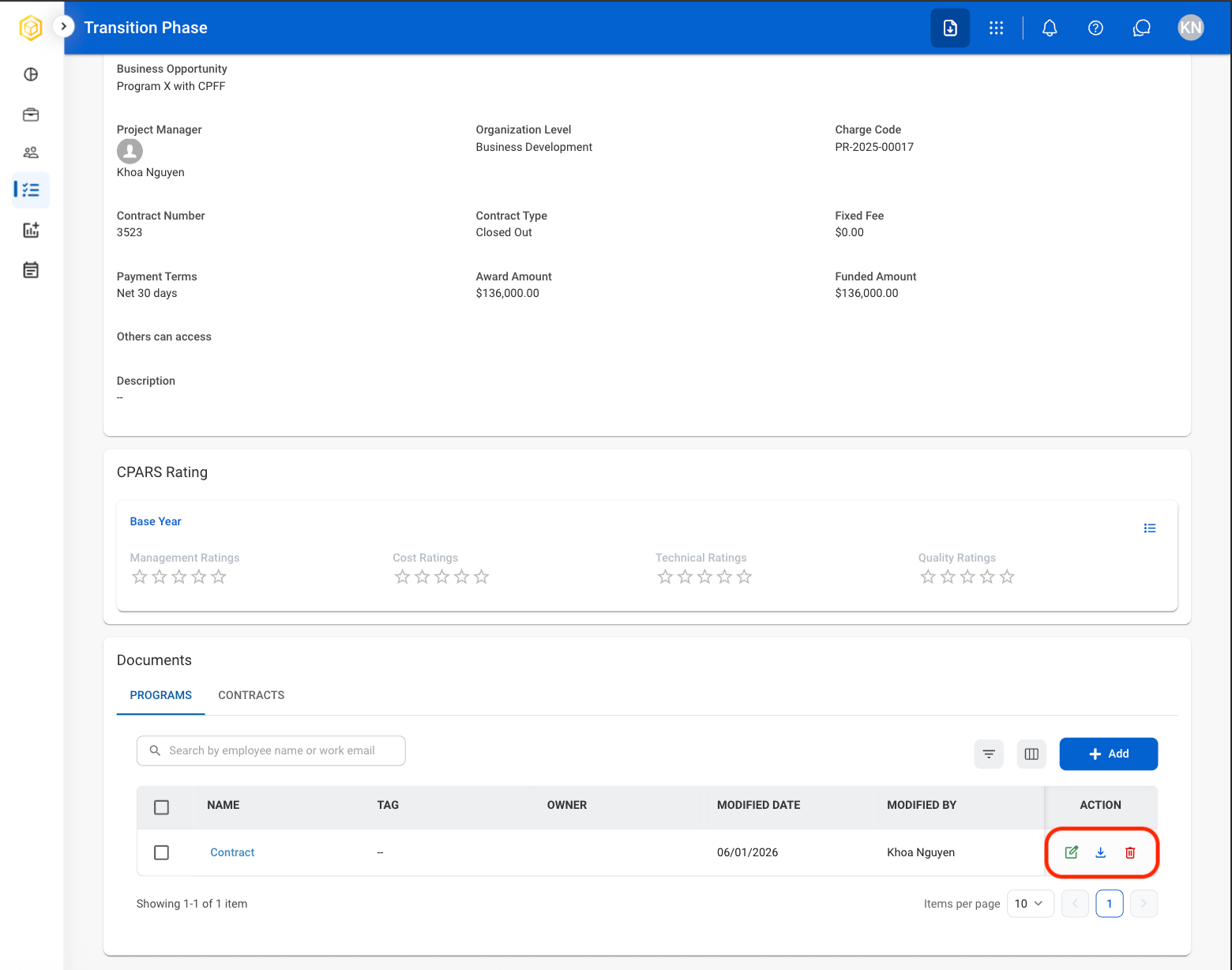
  <Step title="Under Documents, select the desired icon in the Action column">
    <Frame>
      <img src="https://mintcdn.com/bizbone/6oPBzRDpo6ZUIAeP/images/R-TP-Actions.png?fit=max&auto=format&n=6oPBzRDpo6ZUIAeP&q=85&s=039b7c573d3b345970c835f7f1b749e3" alt="R TP Actions" width="1560" height="1228" data-path="images/R-TP-Actions.png" />
    </Frame>

    * **Edit**: Replace or modify the uploaded document.
    * **Download**: Download the uploaded documents to the local device. 
    * **Delete**: Remove the uploaded document.
  </Step>

  <Step title="Complete the action.">
    * **Edit**: Select **Save** to complete or **Cancel** to exit without saving changes.
    * **Download**: Download will start automatically after selection.
    * **Delete**: Select **Delete** to complete or **Cancel** to exit without saving changes.
  </Step>
</Steps>

## Add Transition Activity

<Steps>
  <Step title="Select a program">
    <Frame>
      <img src="https://mintcdn.com/bizbone/6oPBzRDpo6ZUIAeP/images/R-TP-Select.png?fit=max&auto=format&n=6oPBzRDpo6ZUIAeP&q=85&s=7adef9265184e83a72f80b852a587874" alt="R TP Select" width="1562" height="568" data-path="images/R-TP-Select.png" />
    </Frame>
  </Step>

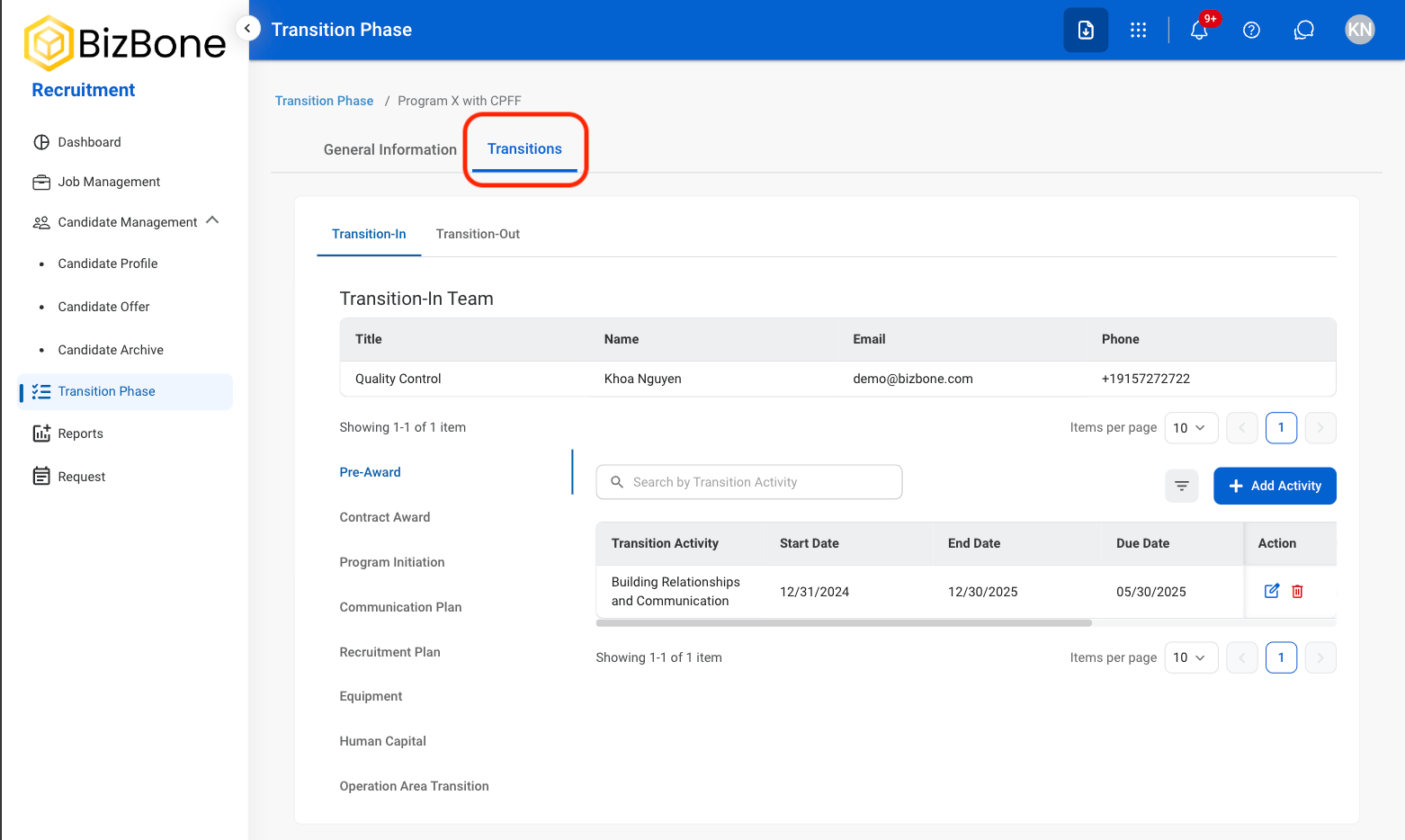
  <Step title="Select Transitions">
    <Frame>
      <img src="https://mintcdn.com/bizbone/6oPBzRDpo6ZUIAeP/images/R-TP-Transitions.png?fit=max&auto=format&n=6oPBzRDpo6ZUIAeP&q=85&s=ff606c94376b42e5481db2bdefb5a2f9" alt="R TP Transitions" width="1562" height="934" data-path="images/R-TP-Transitions.png" />
    </Frame>
  </Step>

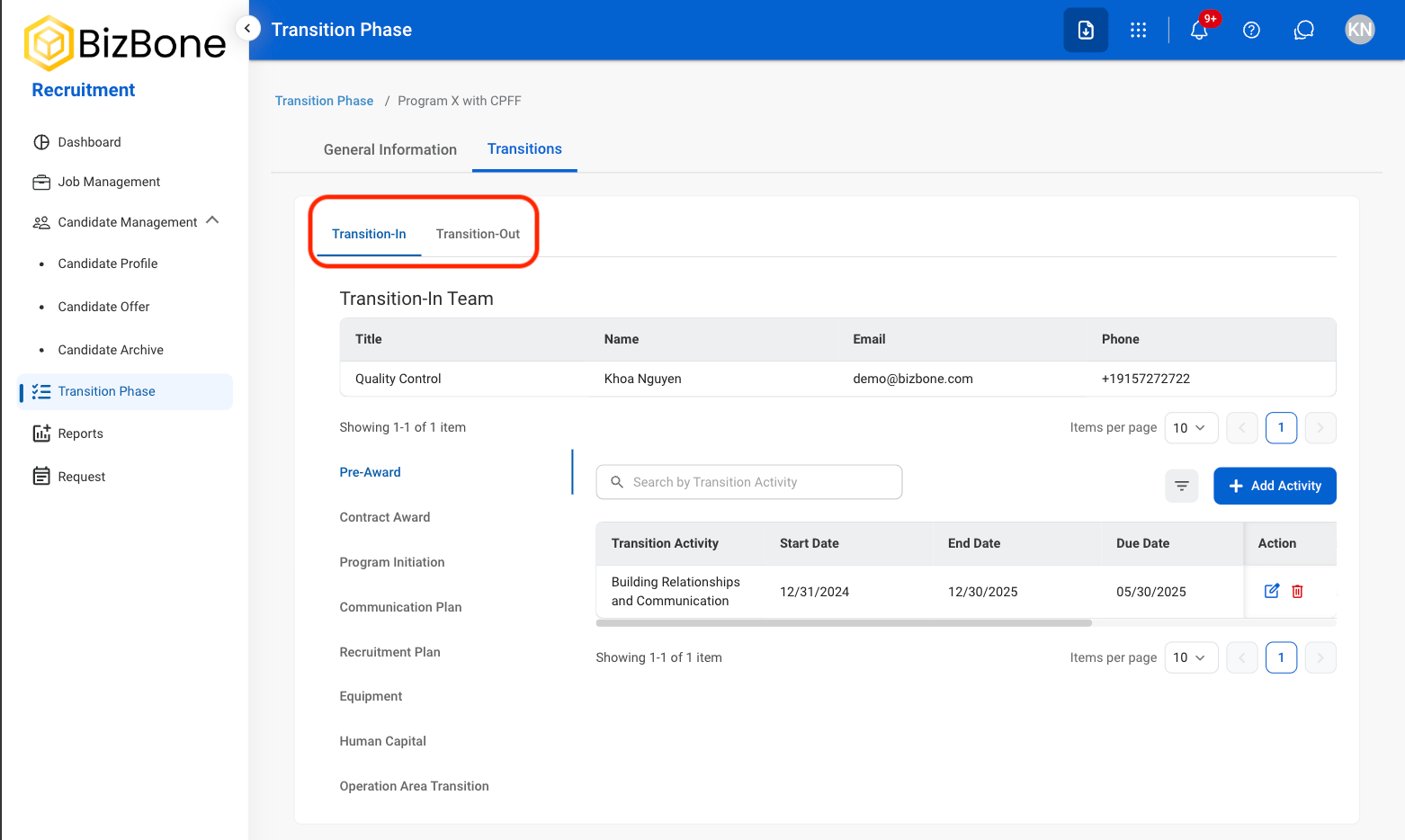
  <Step title="Select a view">
    <Frame>
      <img src="https://mintcdn.com/bizbone/6oPBzRDpo6ZUIAeP/images/R-TP-T-In-Out.png?fit=max&auto=format&n=6oPBzRDpo6ZUIAeP&q=85&s=9ef2aaeec284545b779dc277625c3ab9" alt="R TP T In Out" width="1562" height="934" data-path="images/R-TP-T-In-Out.png" />
    </Frame>

    **Transition-In**: Activities related to transitioning into a newly awarded program or contract.

    **Transition-Out**: Activities related to contract closeout and disengagement.
  </Step>

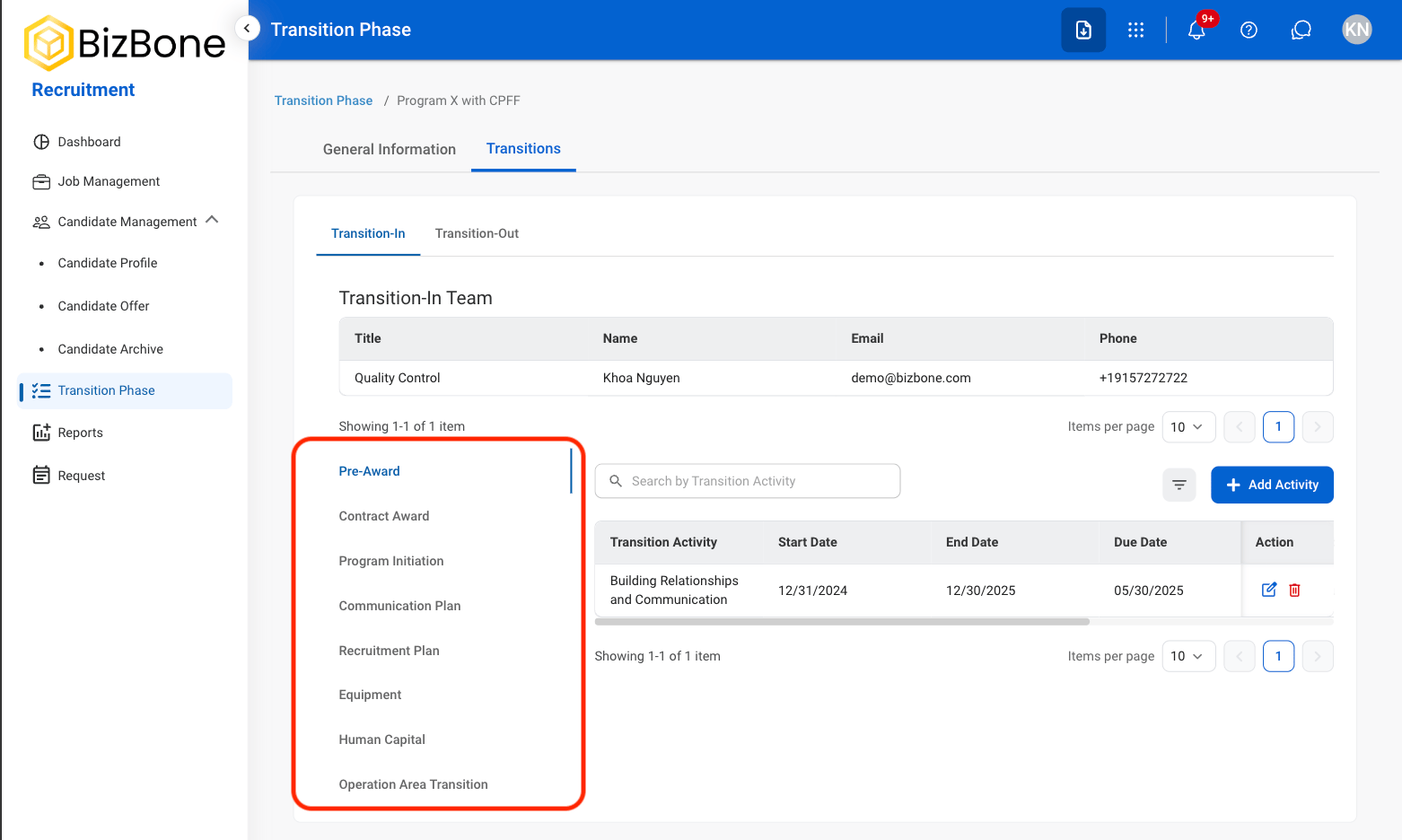
  <Step title="Select a category">
    <Frame>
      <img src="https://mintcdn.com/bizbone/6oPBzRDpo6ZUIAeP/images/R-TP-Category.png?fit=max&auto=format&n=6oPBzRDpo6ZUIAeP&q=85&s=ce344d1f5e96f44bcb5290ad5b1bf913" alt="R TP Category" width="1562" height="936" data-path="images/R-TP-Category.png" />
    </Frame>
  </Step>

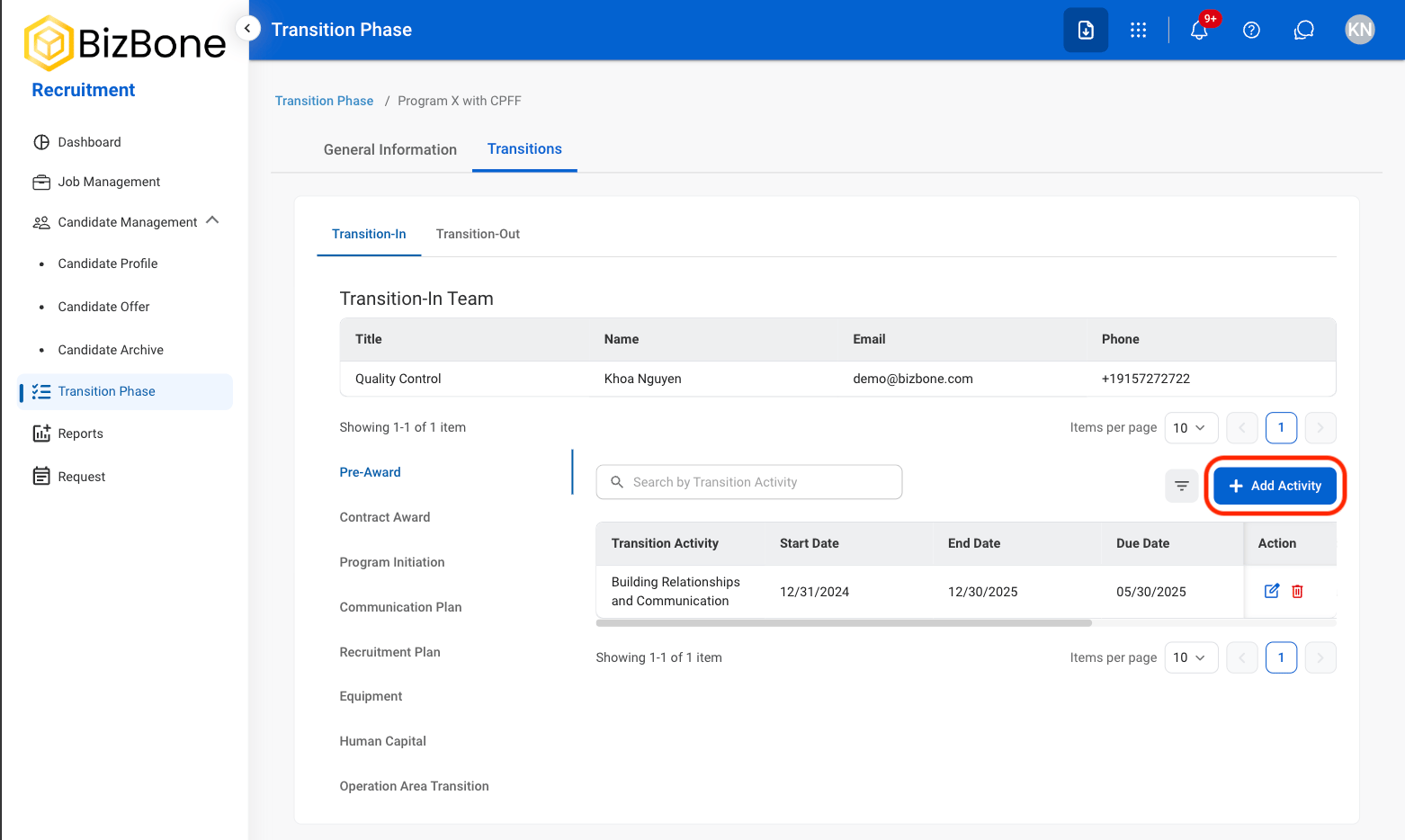
  <Step title="Select Add Activity">
    <Frame>
      <img src="https://mintcdn.com/bizbone/6oPBzRDpo6ZUIAeP/images/R-TP-Add-Activity.png?fit=max&auto=format&n=6oPBzRDpo6ZUIAeP&q=85&s=b16ef42ce1ae010865272b2b42991149" alt="R TP Add Activity" width="1562" height="934" data-path="images/R-TP-Add-Activity.png" />
    </Frame>
  </Step>

  <Step title="Fill in the required information">
    <Frame>
      <img src="https://mintcdn.com/bizbone/6oPBzRDpo6ZUIAeP/images/R-TP-AA-Save.png?fit=max&auto=format&n=6oPBzRDpo6ZUIAeP&q=85&s=7d9160098937acc4ddfd975bfd4fb81a" alt="R TP AA Save" width="1562" height="850" data-path="images/R-TP-AA-Save.png" />
    </Frame>

    Select **Save** to complete or **Cancel** to exit without saving changes. 
  </Step>
</Steps>

## Edit or Delete Transition Activity

<Steps>
  <Step title="Select Transitions">
    <Frame>
      <img src="https://mintcdn.com/bizbone/6oPBzRDpo6ZUIAeP/images/R-TP-Transitions.png?fit=max&auto=format&n=6oPBzRDpo6ZUIAeP&q=85&s=ff606c94376b42e5481db2bdefb5a2f9" alt="R TP Transitions" width="1562" height="934" data-path="images/R-TP-Transitions.png" />
    </Frame>
  </Step>

  <Step title="Select a view">
    <Frame>
      <img src="https://mintcdn.com/bizbone/6oPBzRDpo6ZUIAeP/images/R-TP-T-In-Out.png?fit=max&auto=format&n=6oPBzRDpo6ZUIAeP&q=85&s=9ef2aaeec284545b779dc277625c3ab9" alt="R TP T In Out" width="1562" height="934" data-path="images/R-TP-T-In-Out.png" />
    </Frame>

    **Transition-In**: Activities related to transitioning into a newly awarded program or contract.

    **Transition-Out**: Activities related to contract closeout and disengagement.
  </Step>

  <Step title="Select a category">
    <Frame>
      <img src="https://mintcdn.com/bizbone/6oPBzRDpo6ZUIAeP/images/R-TP-Category.png?fit=max&auto=format&n=6oPBzRDpo6ZUIAeP&q=85&s=ce344d1f5e96f44bcb5290ad5b1bf913" alt="R TP Category" width="1562" height="936" data-path="images/R-TP-Category.png" />
    </Frame>
  </Step>

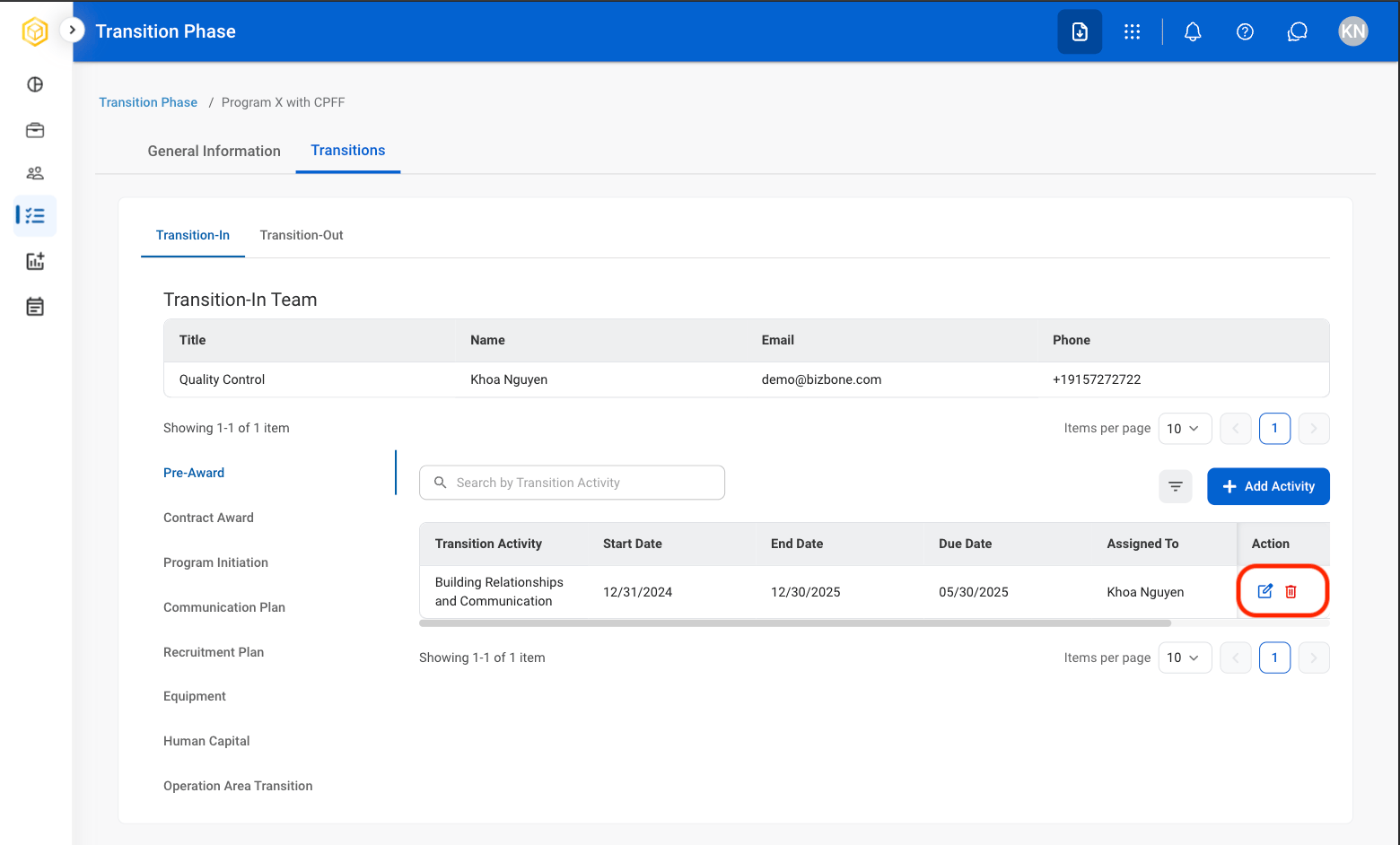
  <Step title="Select the desired icon in the Action column">
    <Frame>
      <img src="https://mintcdn.com/bizbone/6oPBzRDpo6ZUIAeP/images/R-TP-Action.png?fit=max&auto=format&n=6oPBzRDpo6ZUIAeP&q=85&s=d0252f0787eab27010729ed68597b7a5" alt="R TP Action" width="1560" height="942" data-path="images/R-TP-Action.png" />
    </Frame>

    * **Edit**: Replace or modify the activity.
    * **Delete**: Remove the activity.
  </Step>

  <Step title="Complete the action">
    * **Edit**: Select **Save** to complete or **Cancel** to exit without saving changes.
    * **Delete**: Select **Delete** to complete or **Cancel** to exit without saving changes.
  </Step>
</Steps>