> ## Documentation Index
> Fetch the complete documentation index at: https://docs.bizbone.com/llms.txt
> Use this file to discover all available pages before exploring further.

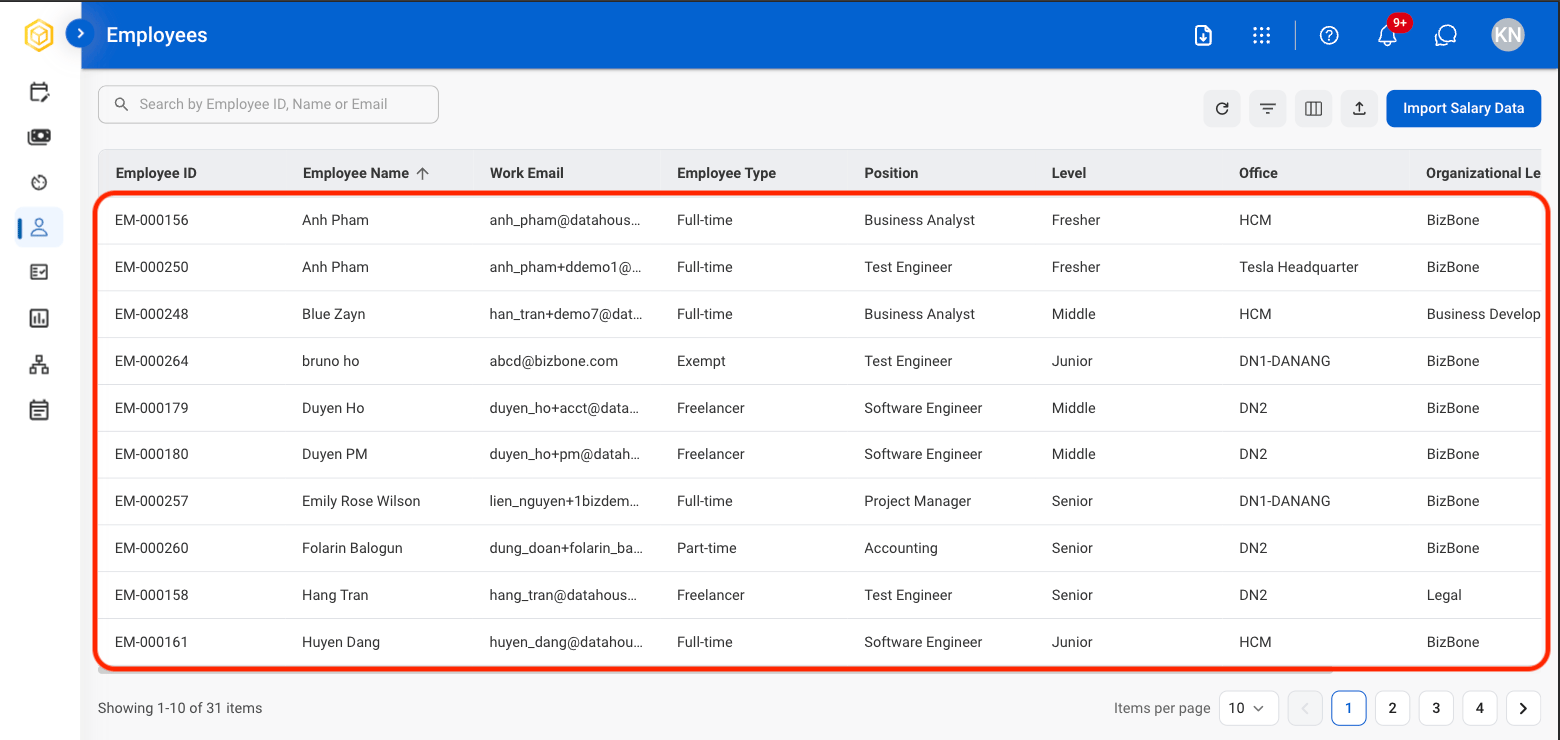
# Employees

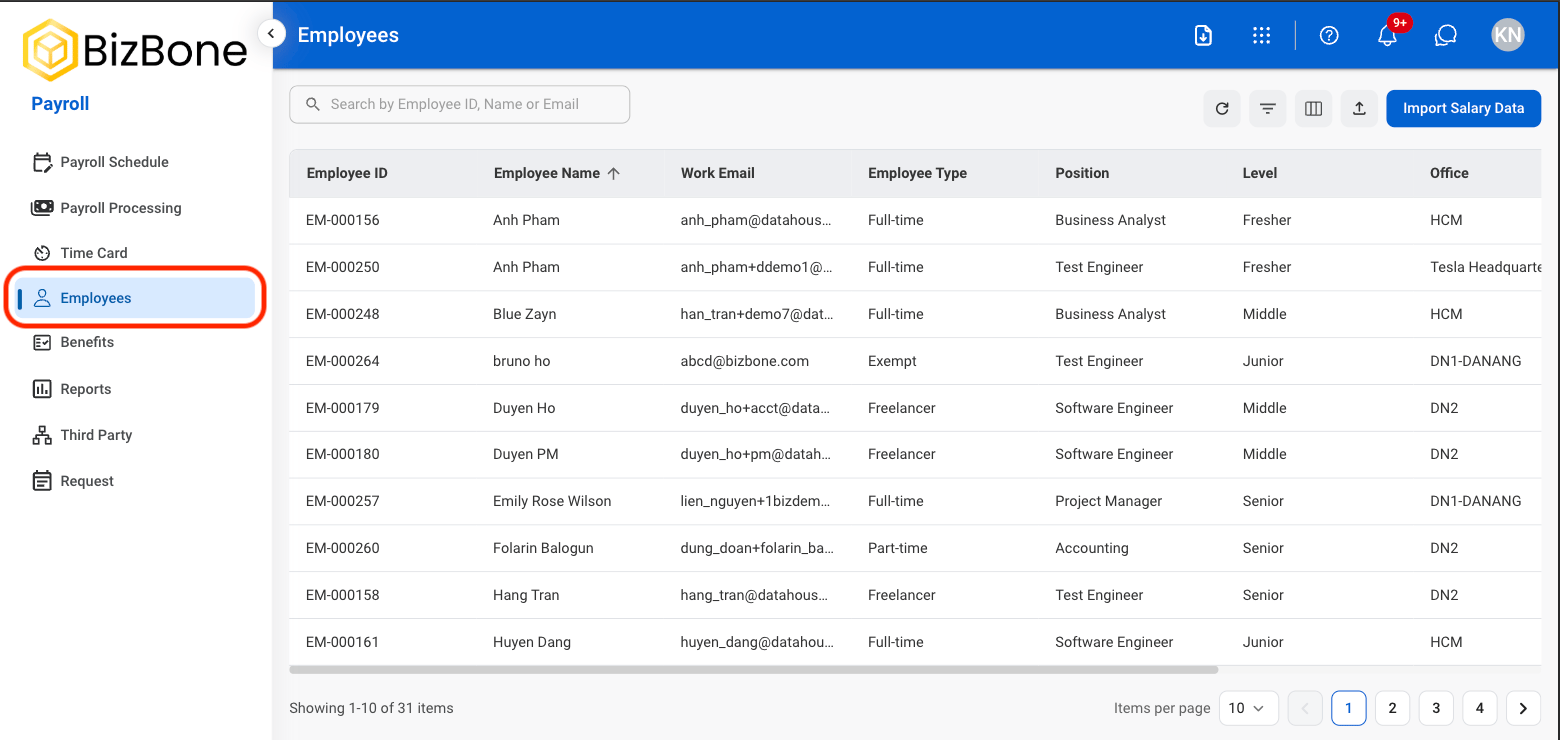
## View Employee Profile
<Steps>
  <Step title="Navigate to Employees">
    <Frame>
      <img src="https://mintcdn.com/bizbone/hVdW0Cdb5EFCxb5_/images/P-E-View.png?fit=max&auto=format&n=hVdW0Cdb5EFCxb5_&q=85&s=93be191fedc9b05ab2ca7c826dc01fb5" alt="P E View" width="1560" height="740" data-path="images/P-E-View.png" />
    </Frame>
  </Step>

  <Step title="Select an employee ">
    <Frame>
      <img src="https://mintcdn.com/bizbone/hVdW0Cdb5EFCxb5_/images/P-E-Select.png?fit=max&auto=format&n=hVdW0Cdb5EFCxb5_&q=85&s=c57ae1177d0b45ae2571c8526e1f4cd0" alt="P E Select" width="1560" height="740" data-path="images/P-E-Select.png" />
    </Frame>
  </Step>
</Steps>

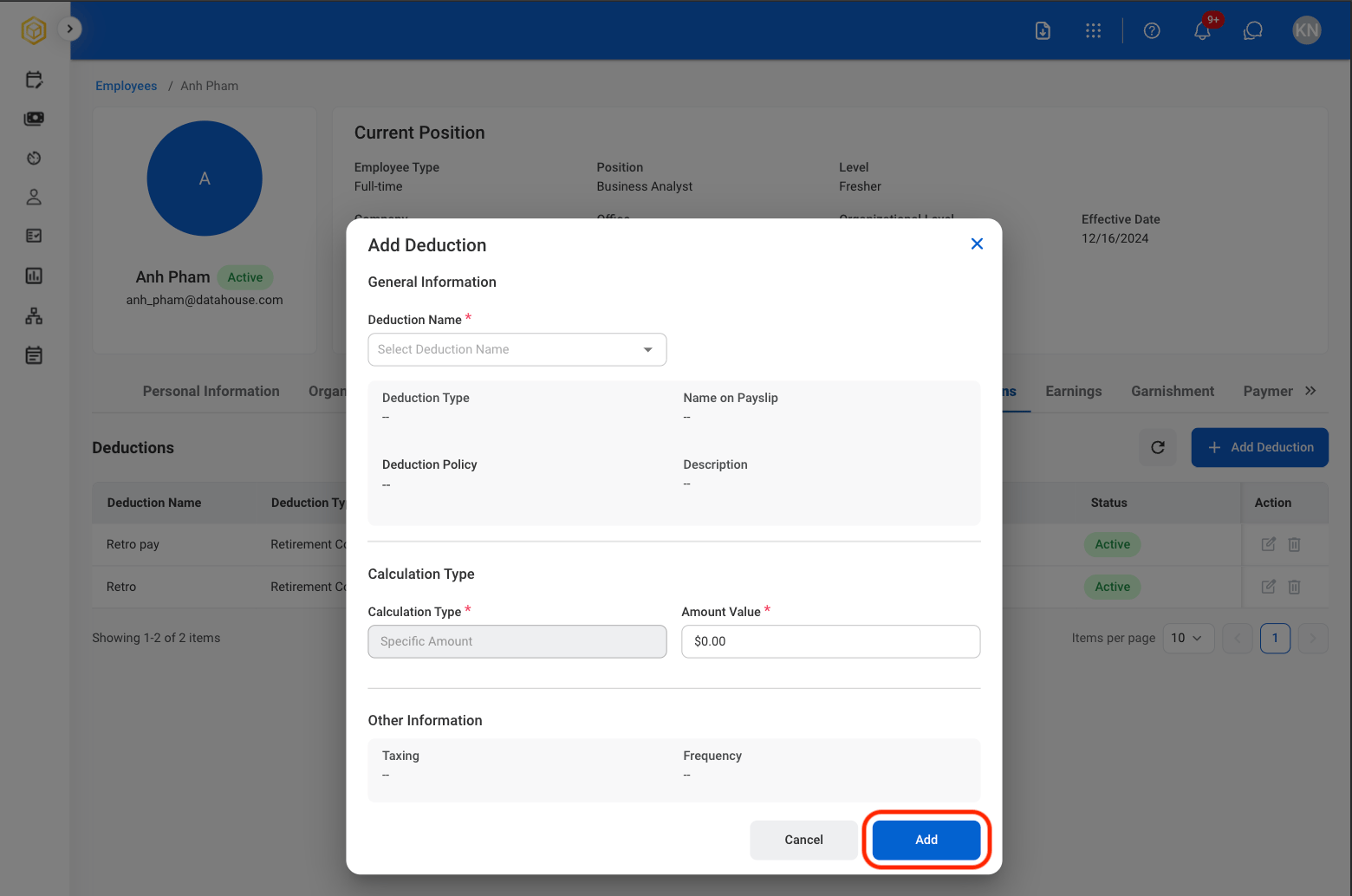
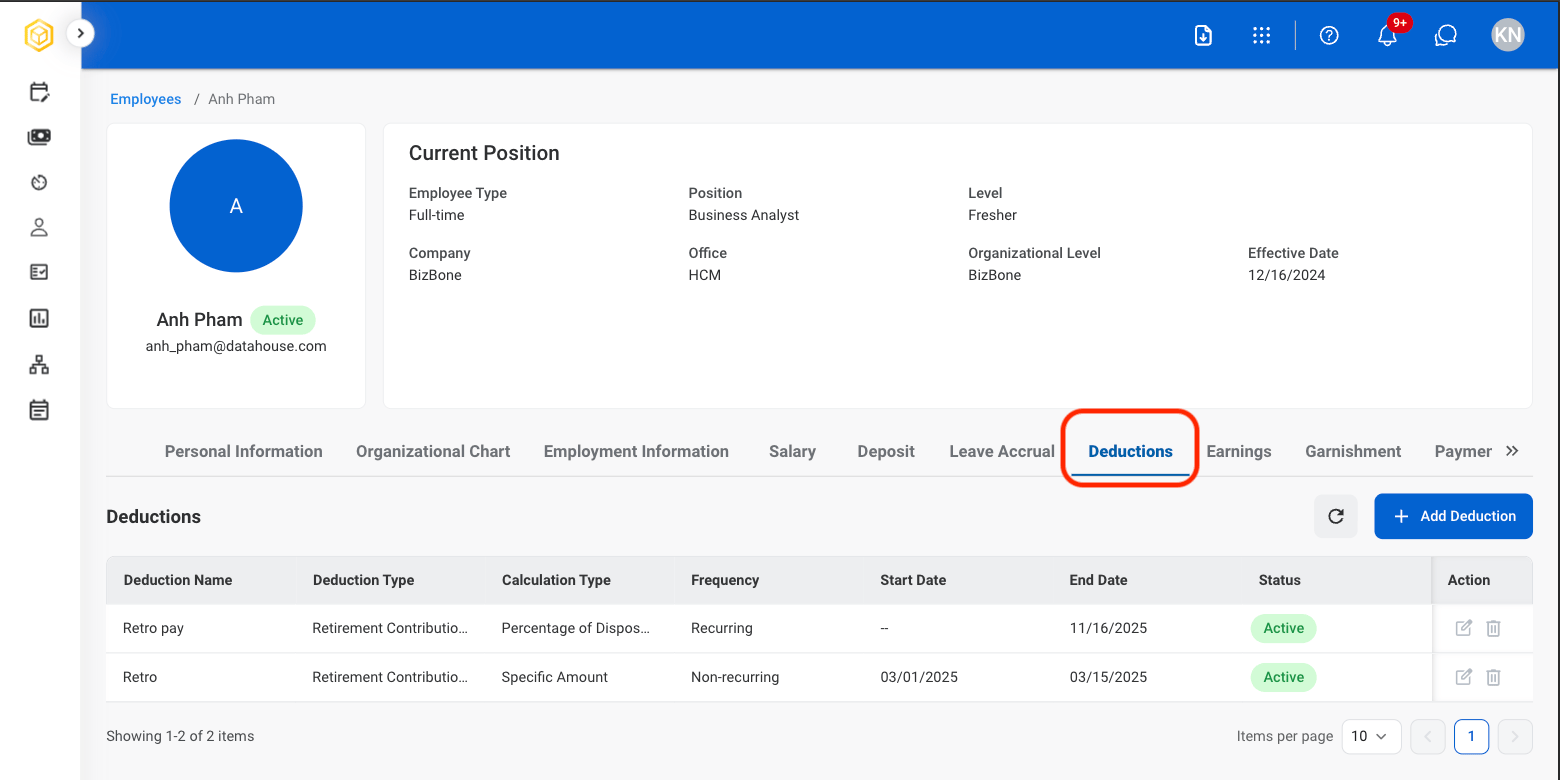
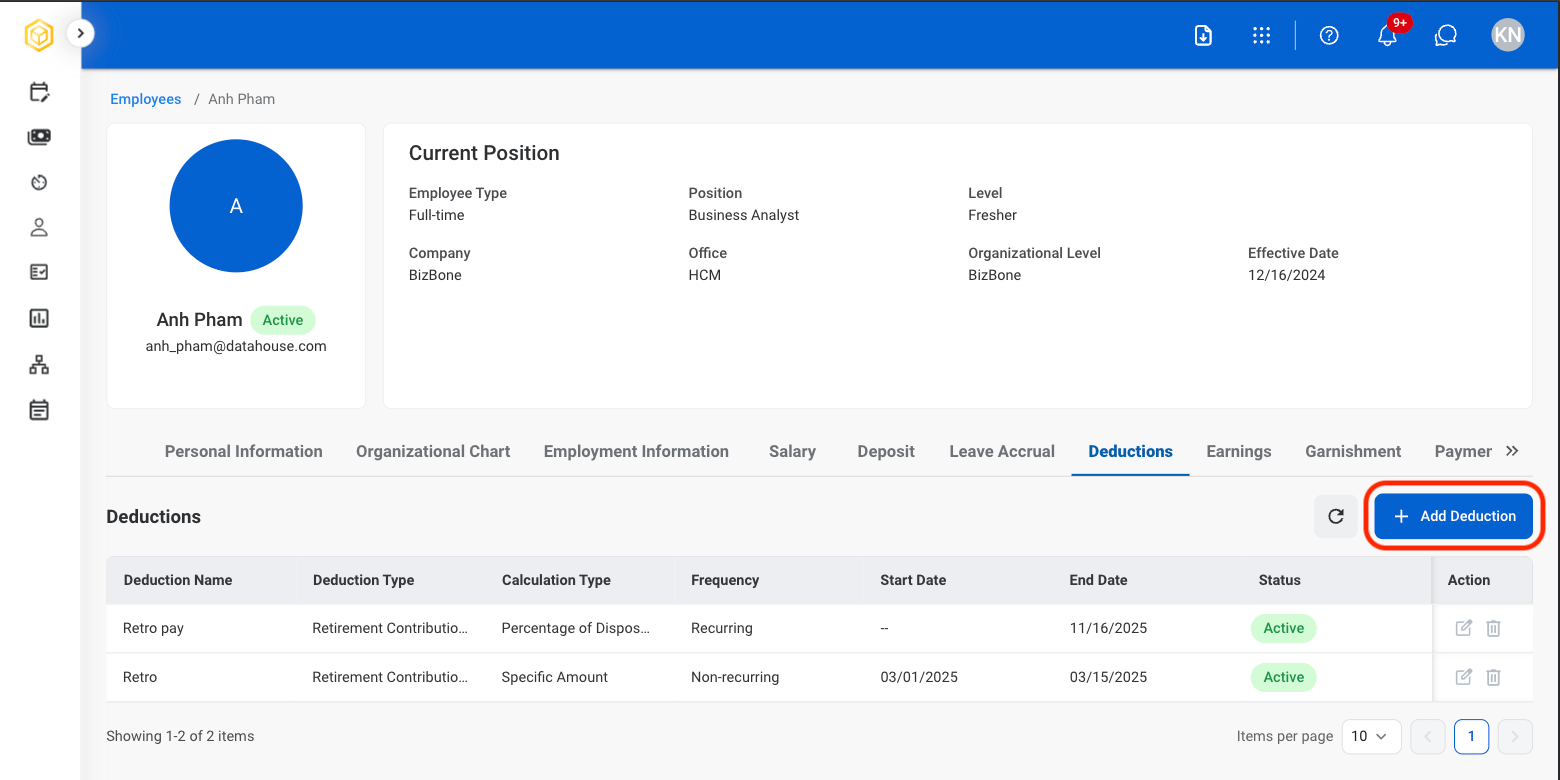
## Add Deductions

Add payroll deductions that reduce an employee's earnings, such as benefit contributions, retirement plans, insurance premiums, or other payroll deductions.
<Steps>
  <Step title="Select the Deductions tab in the profile">
    <Frame>
      <img src="https://mintcdn.com/bizbone/hVdW0Cdb5EFCxb5_/images/P-E-Deductions.png?fit=max&auto=format&n=hVdW0Cdb5EFCxb5_&q=85&s=bc35584db13aab1498b99c86103ed9b2" alt="P E Deductions" width="1560" height="780" data-path="images/P-E-Deductions.png" />
    </Frame>
  </Step>

  <Step title="Select Add Deduction">
    <Frame>
      <img src="https://mintcdn.com/bizbone/hVdW0Cdb5EFCxb5_/images/P-E-Add-Deduction.png?fit=max&auto=format&n=hVdW0Cdb5EFCxb5_&q=85&s=c7c1d84bde7e4ec83427f142289edee6" alt="P E Add Deduction" width="1560" height="780" data-path="images/P-E-Add-Deduction.png" />
    </Frame>
  </Step>

  <Step title="Fill in the required information ">
    <Frame>
      <img src="https://mintcdn.com/bizbone/hVdW0Cdb5EFCxb5_/images/P-E-Info-Add-Deduc.png?fit=max&auto=format&n=hVdW0Cdb5EFCxb5_&q=85&s=c6849053174ce98240861a052c627ad5" alt="P E Info Add Deduc" width="1560" height="1034" data-path="images/P-E-Info-Add-Deduc.png" />
    </Frame>

    Select **Add** to complete or **Cancel** to exit without saving changes.
  </Step>
</Steps>

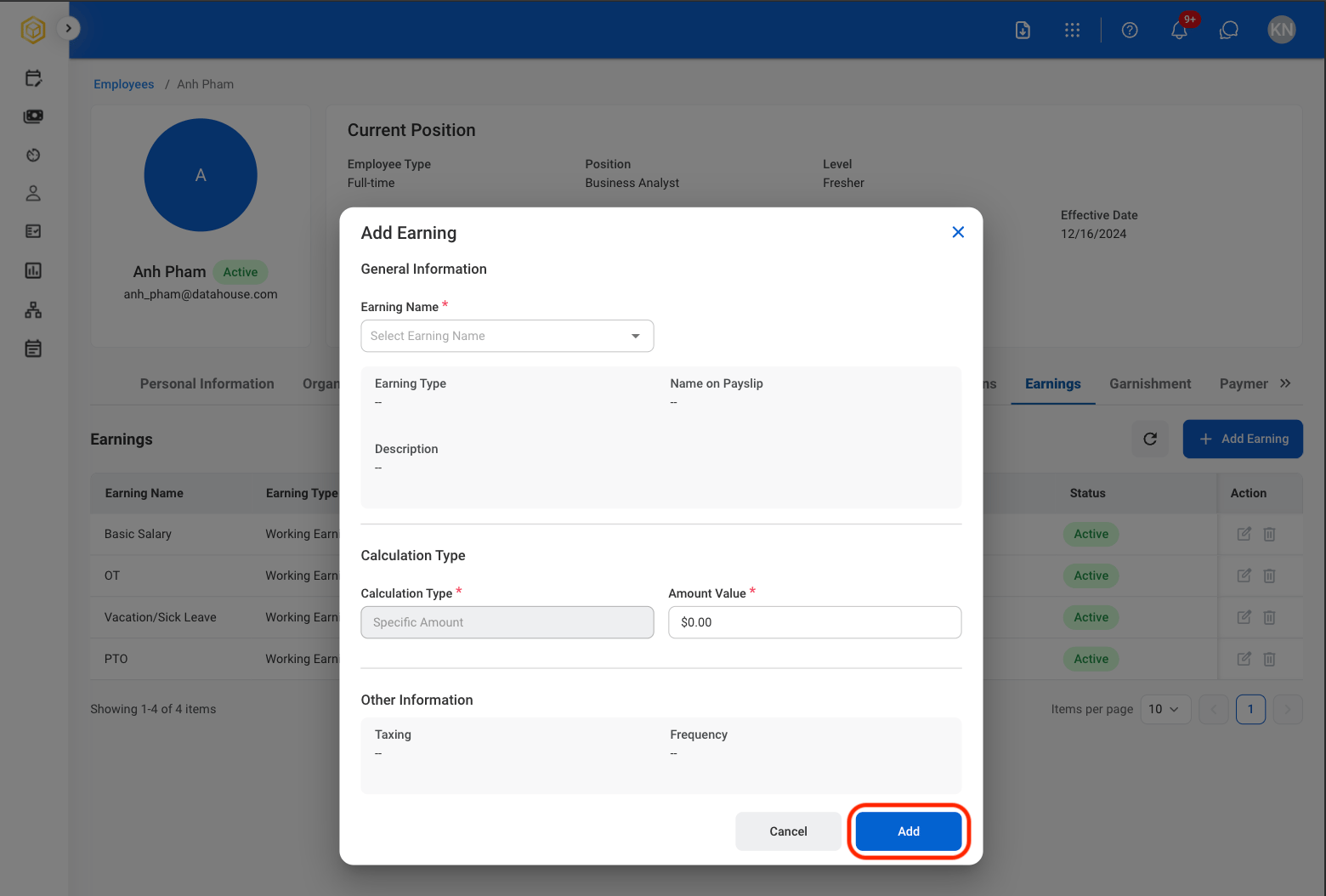
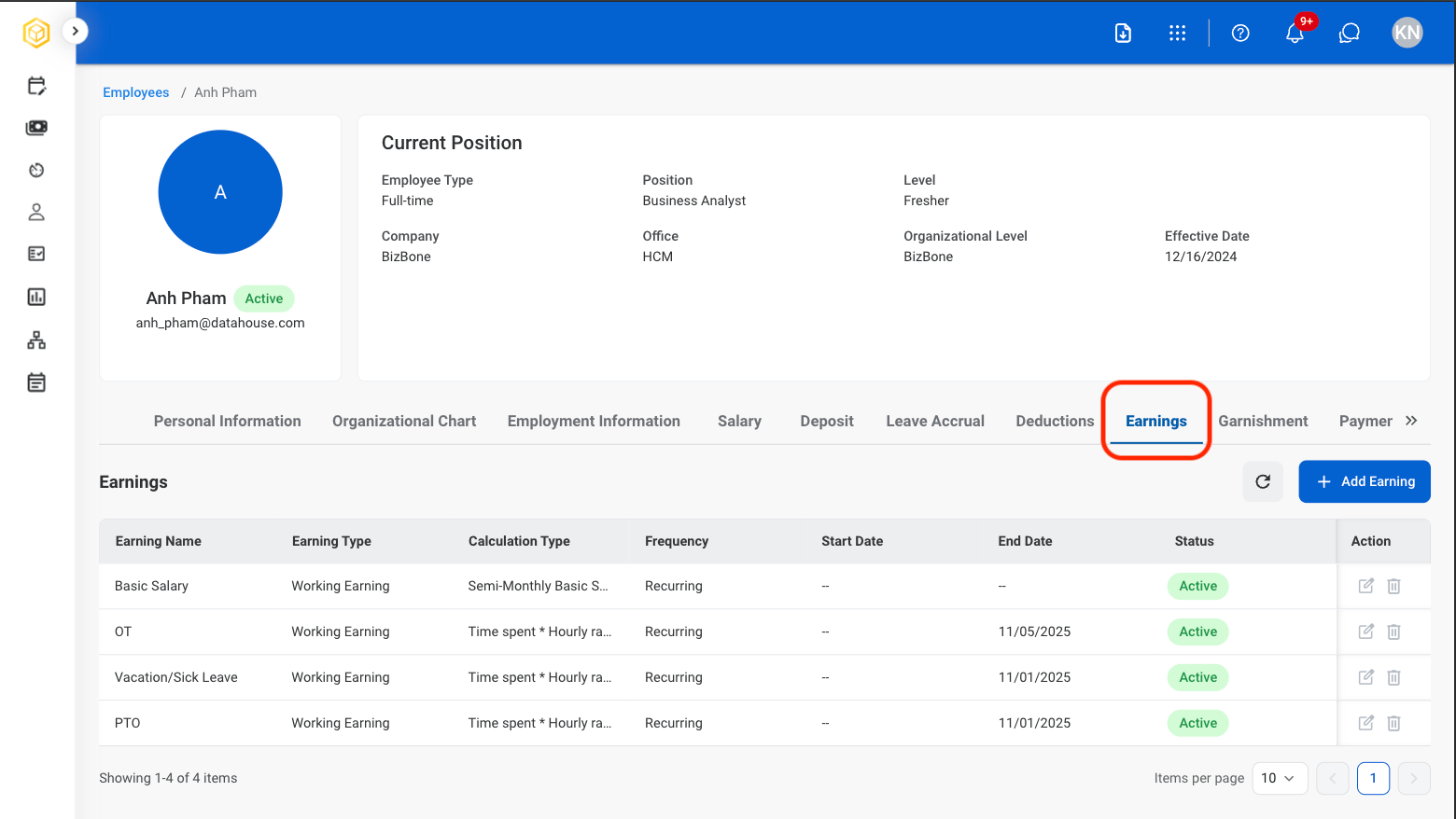
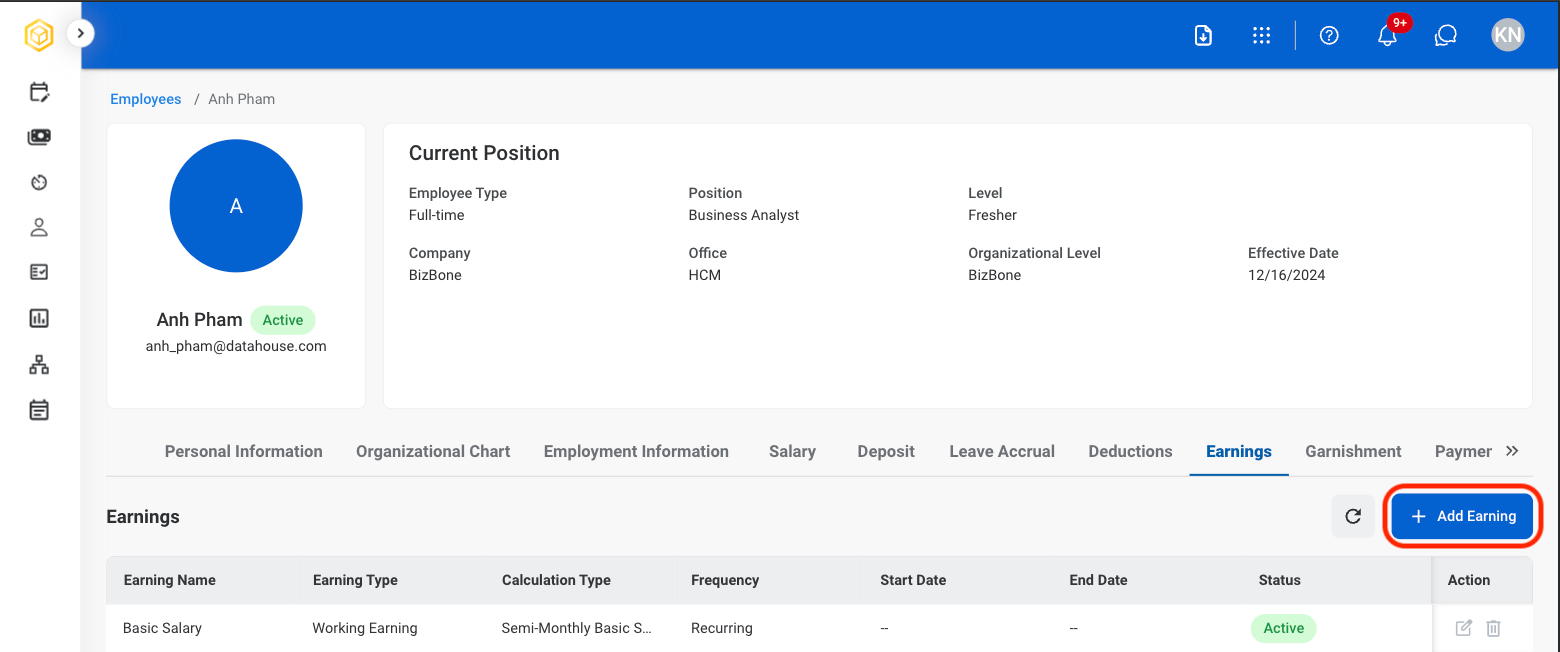
## Add Earnings

Add employee earnings and compensation items used to calculate payroll, including regular pay, overtime, bonuses, and other earnings.
<Steps>
  <Step title="Select the Earnings tab in the profile">
    <Frame>
      <img src="https://mintcdn.com/bizbone/hVdW0Cdb5EFCxb5_/images/P-E-Earnings.png?fit=max&auto=format&n=hVdW0Cdb5EFCxb5_&q=85&s=2b32ca88558fde251716027f0ce012aa" alt="P E Earnings" width="1560" height="878" data-path="images/P-E-Earnings.png" />
    </Frame>
  </Step>

  <Step title="Select Add Earning">
    <Frame>
      <img src="https://mintcdn.com/bizbone/hVdW0Cdb5EFCxb5_/images/P-E-Add-Earning.png?fit=max&auto=format&n=hVdW0Cdb5EFCxb5_&q=85&s=b701e4fcfc157e4c5157e2dabed563b6" alt="P E Add Earning" width="1560" height="652" data-path="images/P-E-Add-Earning.png" />
    </Frame>
  </Step>

  <Step title="Fill in the required information ">
    <Frame>
      <img src="https://mintcdn.com/bizbone/hVdW0Cdb5EFCxb5_/images/P-E-Earning-Info.png?fit=max&auto=format&n=hVdW0Cdb5EFCxb5_&q=85&s=c8e47bfb11d9bf42dcd54f6809efebc0" alt="P E Earning Info" width="1560" height="1054" data-path="images/P-E-Earning-Info.png" />
    </Frame>

    Select **Add** to complete or **Cancel** to exit without saving changes.
  </Step>
</Steps>

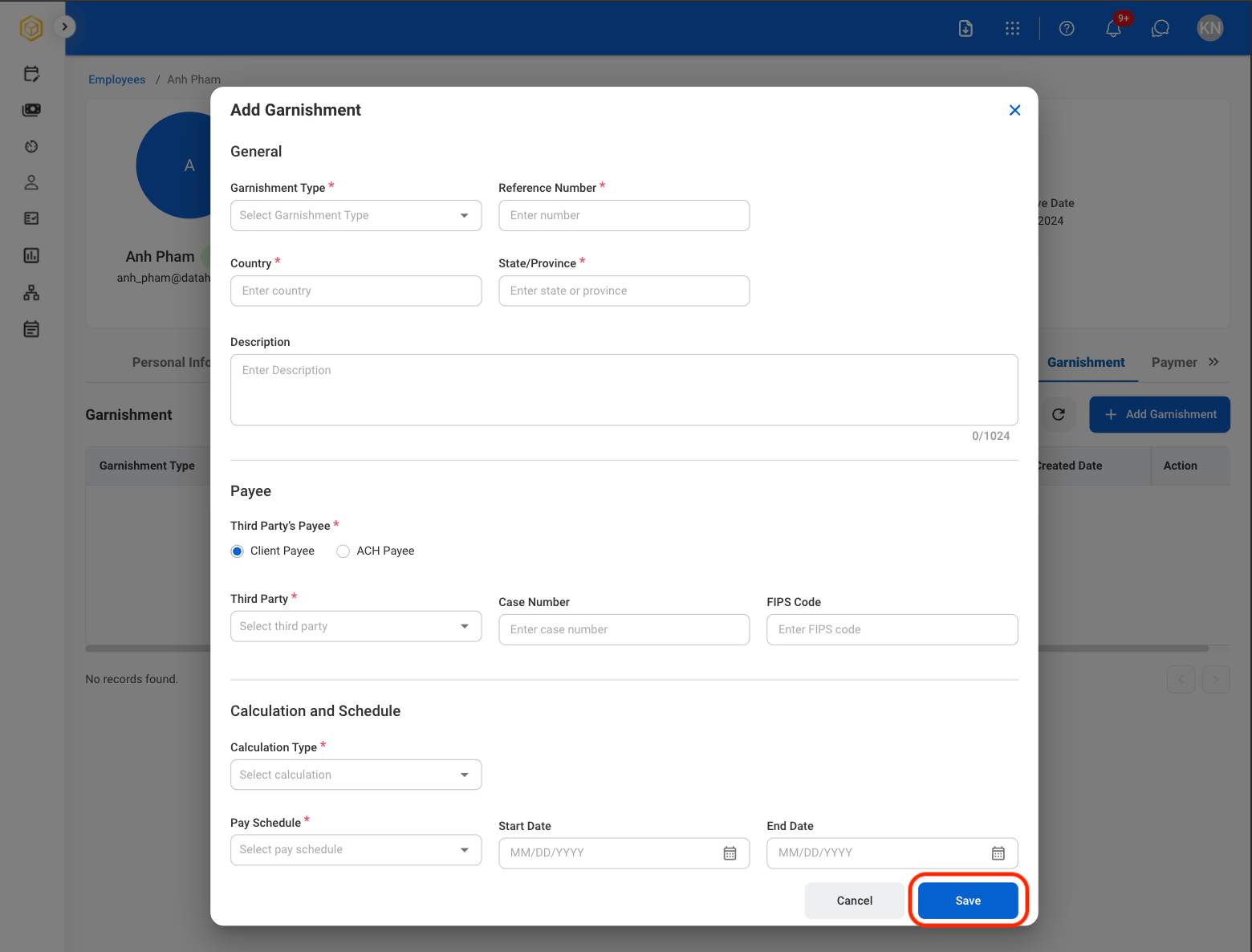
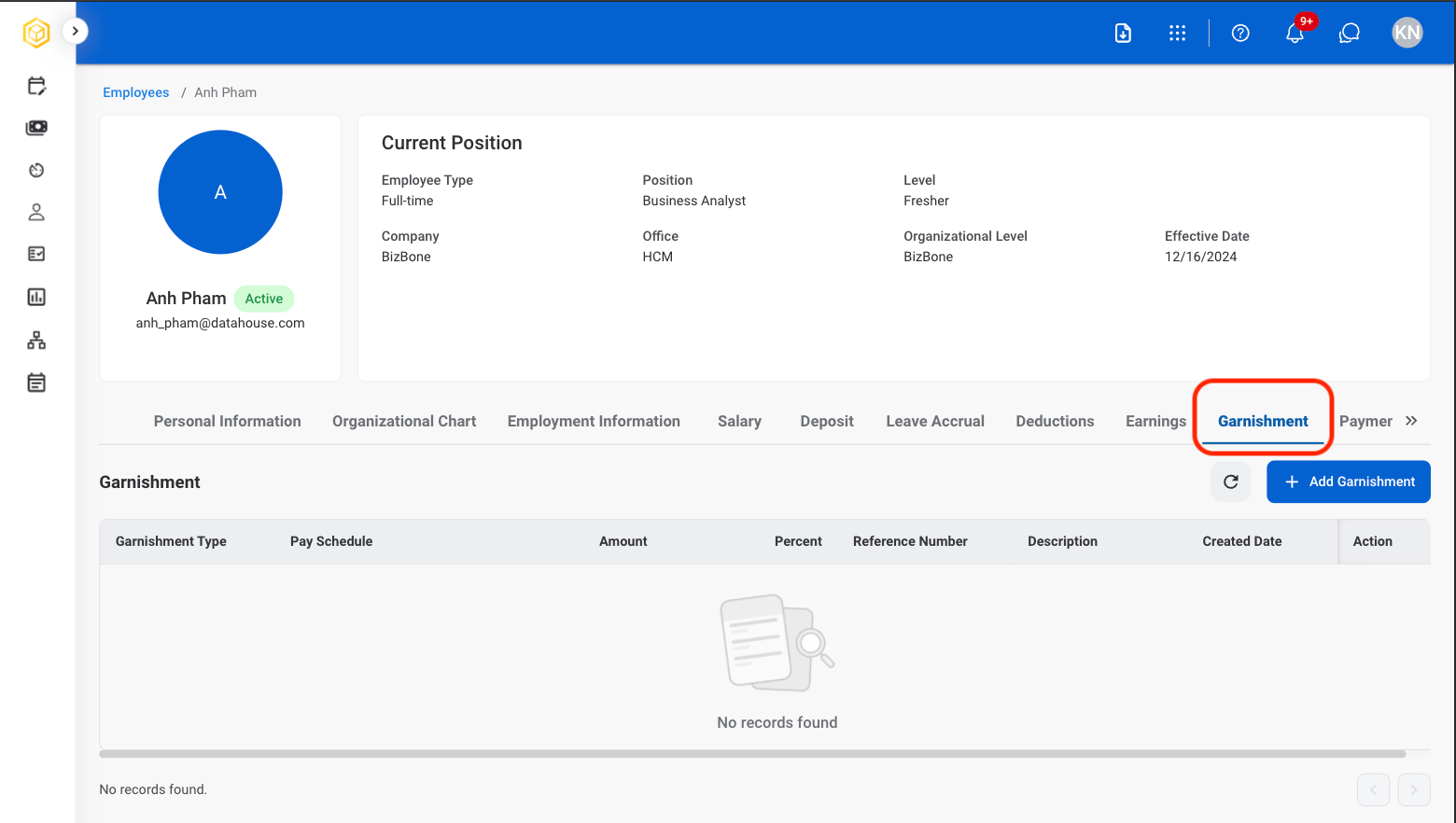
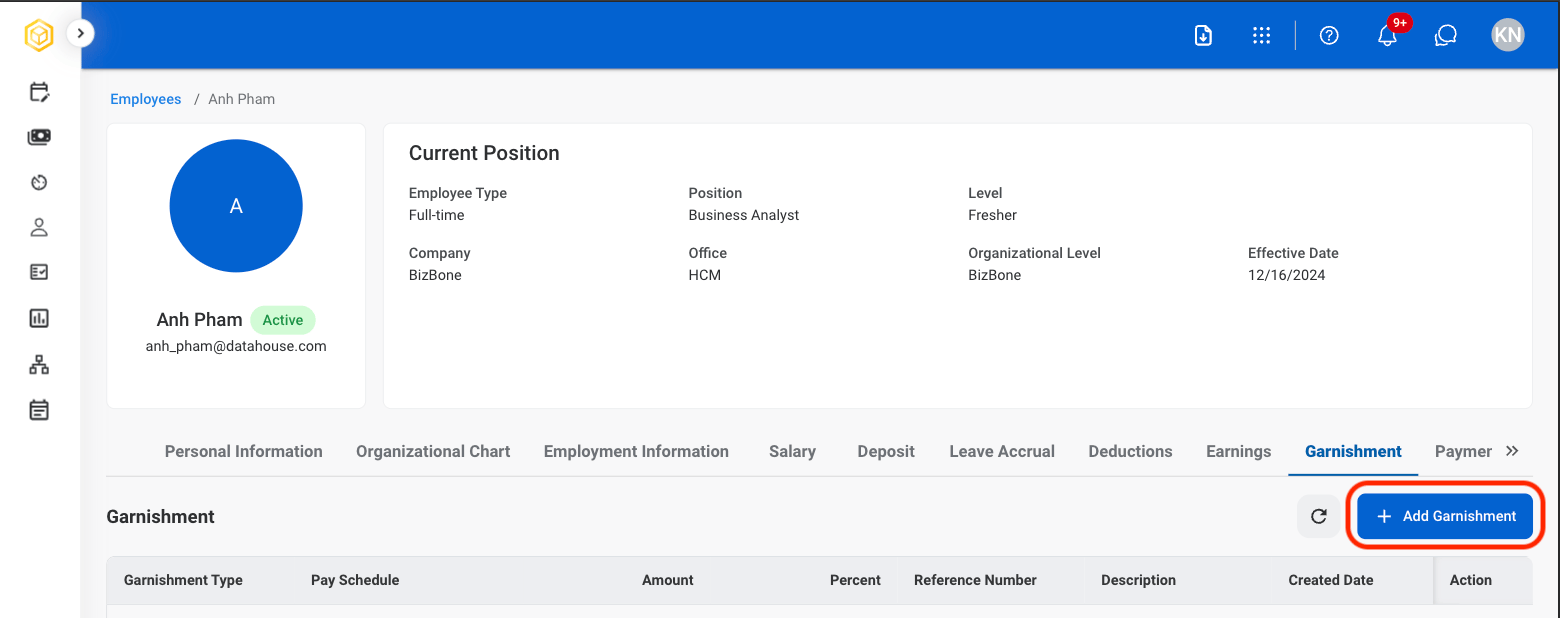
## Add Garnishment

Add court-ordered or legally required payroll deductions, such as child support, tax levies, or other wage garnishments.
<Steps>
  <Step title="Select the Garnishment tab in the profile">
    <Frame>
      <img src="https://mintcdn.com/bizbone/hVdW0Cdb5EFCxb5_/images/P-E-Ganishment.png?fit=max&auto=format&n=hVdW0Cdb5EFCxb5_&q=85&s=8ea5d684a8553dd2314f0633c74f6944" alt="P E Ganishment" width="1560" height="882" data-path="images/P-E-Ganishment.png" />
    </Frame>
  </Step>

  <Step title="Select Add Garnishment">
    <Frame>
      <img src="https://mintcdn.com/bizbone/hVdW0Cdb5EFCxb5_/images/P-E-Add-Garnishment.png?fit=max&auto=format&n=hVdW0Cdb5EFCxb5_&q=85&s=6e558ce7ff01953e26fd71a39ab43e7e" alt="P E Add Garnishment" width="1560" height="618" data-path="images/P-E-Add-Garnishment.png" />
    </Frame>
  </Step>

  <Step title="Fill in the required information ">
    <Frame>
      <img src="https://mintcdn.com/bizbone/hVdW0Cdb5EFCxb5_/images/P-E-Save-Garnishment.png?fit=max&auto=format&n=hVdW0Cdb5EFCxb5_&q=85&s=19d9d70eefec97c13bd3742e1a96c3f1" alt="P E Save Garnishment" width="1560" height="1186" data-path="images/P-E-Save-Garnishment.png" />
    </Frame>

    Select \*\*Save \*\*to complete or **Cancel** to exit without saving changes.
  </Step>
</Steps>

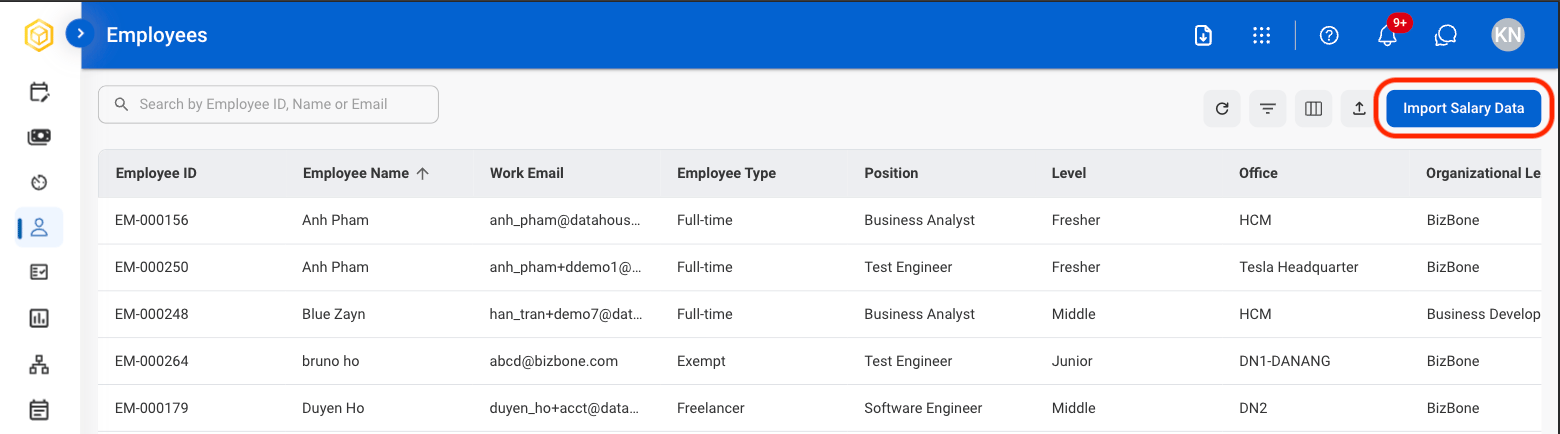
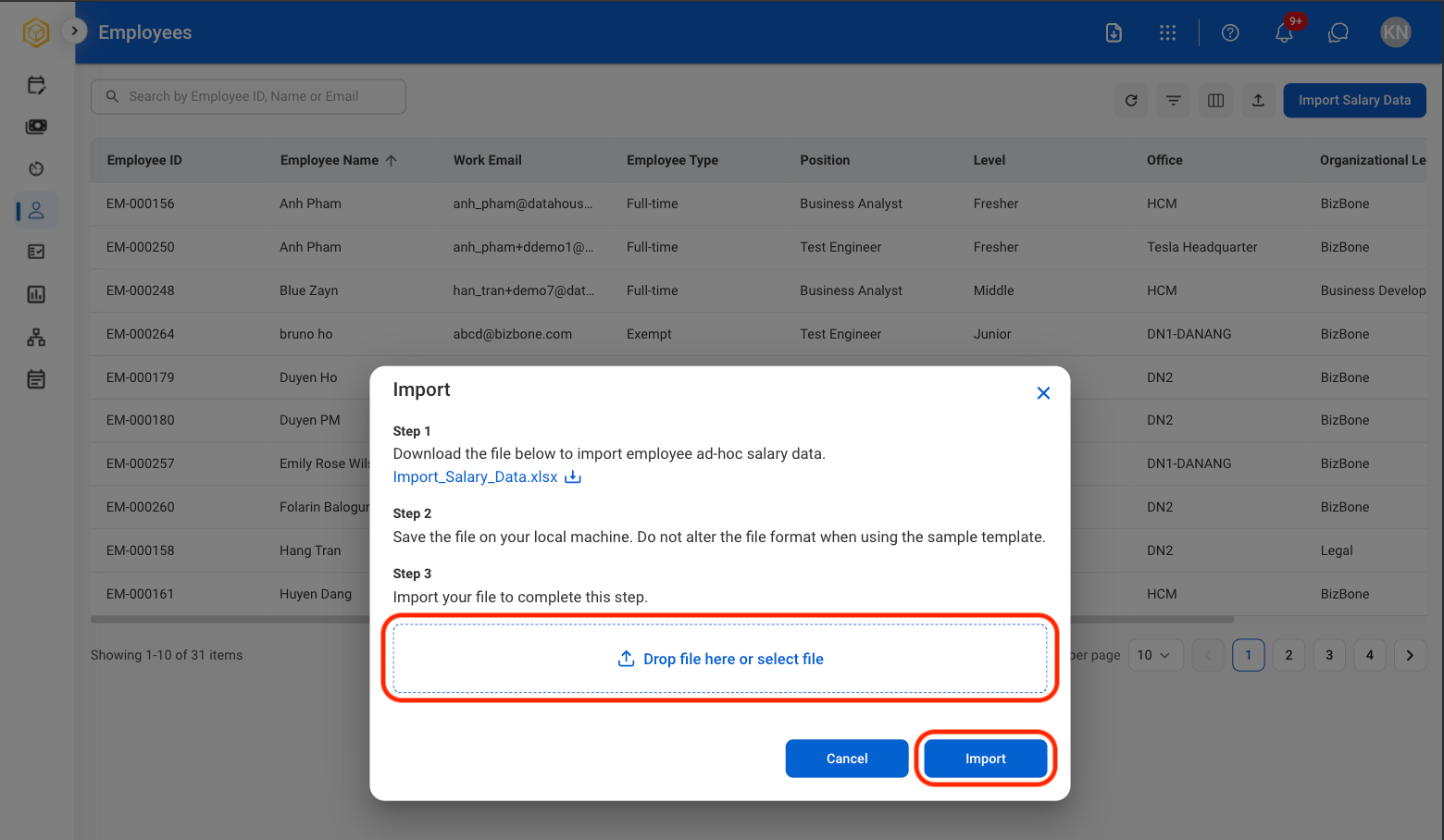
## Import Salary Data

<Steps>
  <Step title="Select Import Salary Data">
    <Frame>
      <img src="https://mintcdn.com/bizbone/hVdW0Cdb5EFCxb5_/images/P-E-Import-Salary.png?fit=max&auto=format&n=hVdW0Cdb5EFCxb5_&q=85&s=872f6ff0130a43ffb6449dc44db27238" alt="P E Import Salary" width="1560" height="434" data-path="images/P-E-Import-Salary.png" />
    </Frame>
  </Step>

  <Step title="Upload the required file">
    <Frame>
      <img src="https://mintcdn.com/bizbone/hVdW0Cdb5EFCxb5_/images/P-E-Upload.png?fit=max&auto=format&n=hVdW0Cdb5EFCxb5_&q=85&s=4afaba4e8fa99a51b1e74093e5093dc2" alt="P E Upload" width="1560" height="908" data-path="images/P-E-Upload.png" />
    </Frame>

    Select **Import** to complete or **Cancel** to exit without saving changes.
  </Step>
</Steps>